5 Movies and shows
Section 5.2 describes movies and shows as they are deployed today. The sections after it are the target, the two views as they are meant to be, and section 5.9 lists every difference between the two as a numbered change. Only a change the owner has approved is built, one change at a time; anything no change names stays as it is deployed.
This chapter specifies movies and shows, the two views that hold the whole library, one kind each. They are built alike, so the chapter draws movies at all three sizes and shows on a phone; what it says about movies holds for shows. The frame around them is specified in chapter 2.
5.1 Purpose
Section titled “5.1 Purpose”Movies and shows let people look through everything the library has of one kind, narrow it down and put it in the order they want. movies and shows in the frame open them, and so does the see all card at the end of a row on home (chapter 4), in that row's order (section 5.7.3). A card opens its title's page (chapter 6).
5.2 As deployed
Section titled “5.2 As deployed”This section says what the four apps' movies and shows do as of 6 November 2026: the web as the public demo showed it that day, on the same build as production, and the apps as their code had them that day. The phone app, Android TV and the Samsung TV are described from their code until screenshots of them are taken. The Samsung TV app isn't released yet.
5.2.1 The web
Section titled “5.2.1 The web”Figures 5.1 to 5.5 are screenshots of the web's movies and shows, signed in as the demo's viewer, whose library holds 26 movies and one show. Figure 5.1 shows movies on a computer.
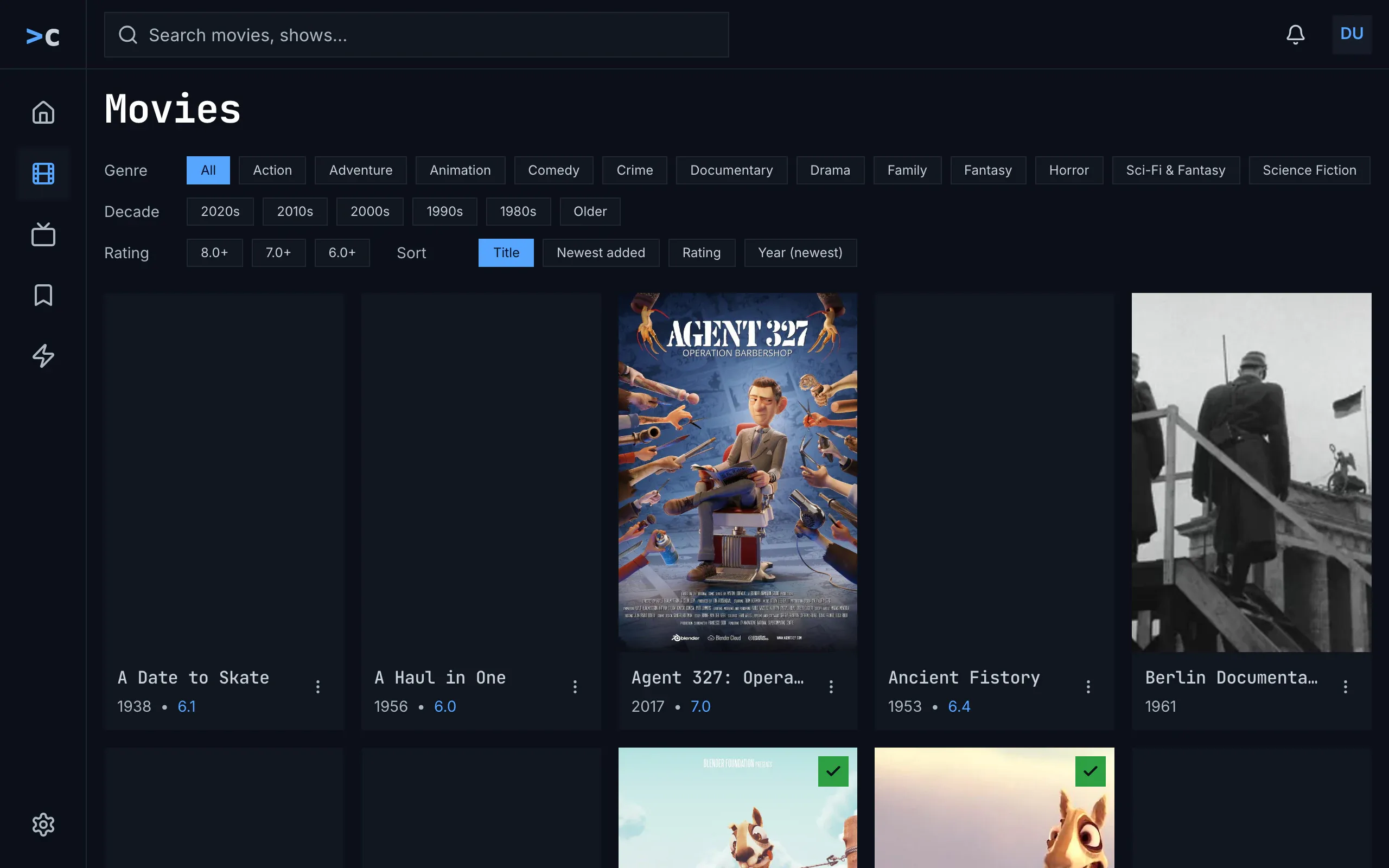
Figure 5.1: The web's movies as deployed on 6 November 2026, on a computer, at 1280 × 800.
- The heading, “Movies”, with a capital, in the monospace face.
- Genre: “All”, blue while no genre is set, then the server's genres with their capitals, on a line that scrolls sideways without a scroll bar: “Action”, “Adventure”, “Animation” … “Sci-Fi & Fantasy”, “Science Fiction”, and past the window's edge “Short” and “War & Politics”. The list is the same for movies and shows, so science fiction is there twice, under the movies' name and the shows' one, and “Sci-Fi & Fantasy” and “War & Politics” match no movie.
- Decade and Rating: “2020s” to “1980s” and “Older”, then “8.0+”, “7.0+” and “6.0+”. Neither has a chip for all: a second press on the chip that is on takes it off.
- Sort, at the end of the rating's line: “Title”, blue, then “Newest added”, “Rating” and “Year (newest)”.
- A card: the poster, then the name in the monospace face, cut with “…”, the year with the rating in blue, “2017 • 7.0”, and ⋮ for the card's menu. A poster that hasn't come yet is a grey box; the check on green marks a watched title.
The chips are 26 px high, in the body face. The grid takes as many posters as fit at 190 px or more, five at 1280 px, and two on a phone. Figure 5.2 shows movies on a phone held upright.
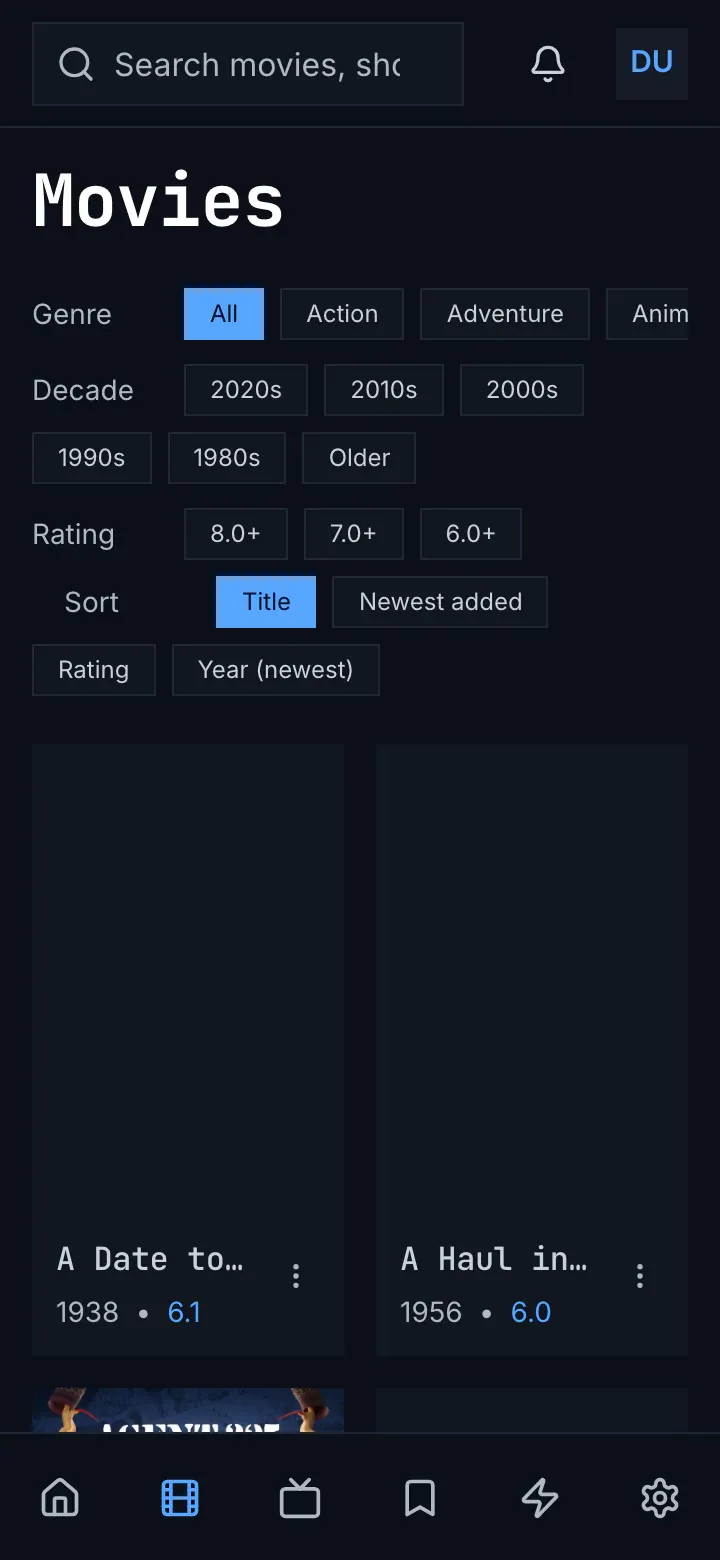
Figure 5.2: The web's movies as deployed on 6 November 2026, on a phone held upright, at 360 × 780.
- Genre keeps to one line and scrolls; “Anim” is cut at the screen's edge.
- Decade, Rating and Sort wrap onto more lines, Sort starting a line of its own, indented, so the chips take the screen down to 372 px.
- Two posters to a line, their names cut, “A Date to…”, each with ⋮.
Figure 5.3 shows movies on a phone held sideways.
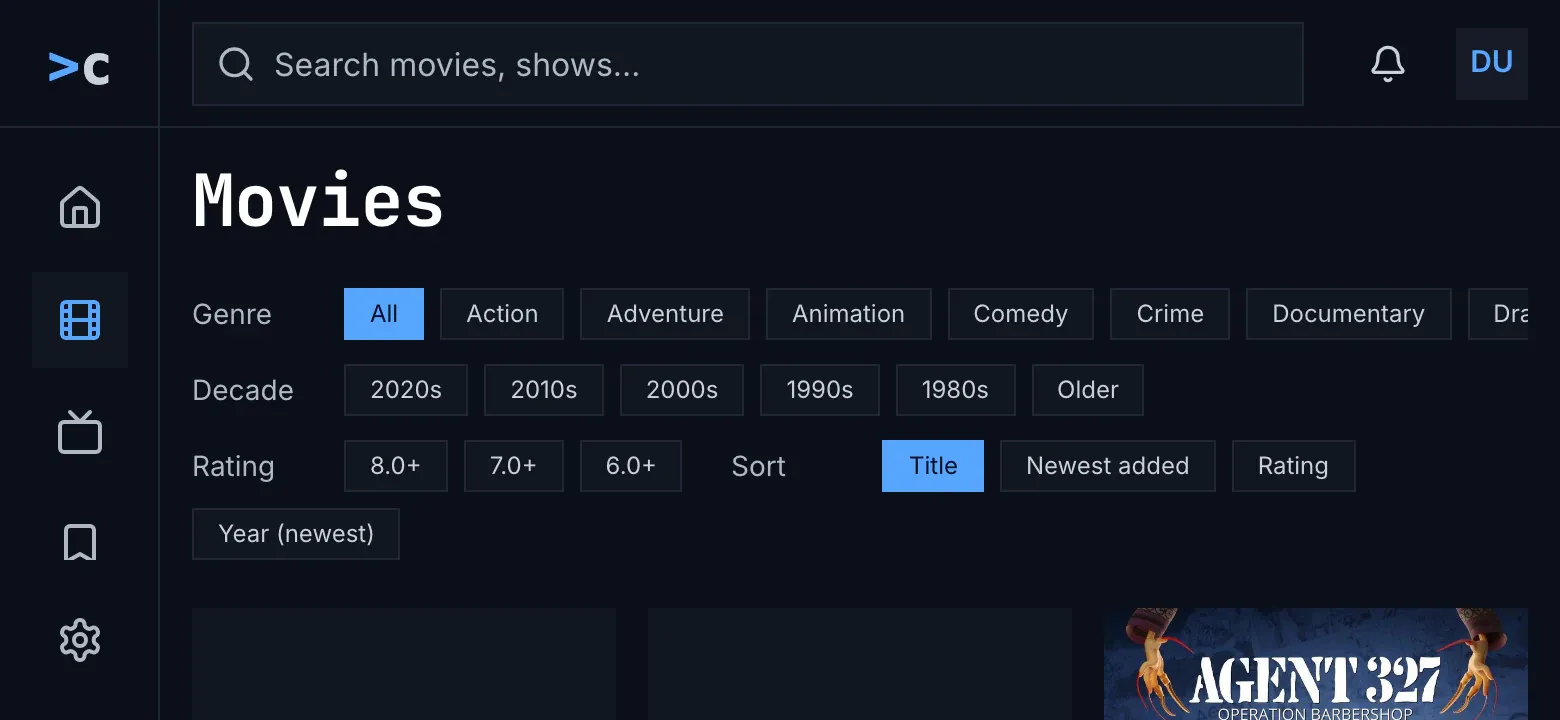
Figure 5.3: The web's movies as deployed on 6 November 2026, on a phone held sideways, at 780 × 360.
- The computer's layout, with the side navigation, from 768 px wide (chapter 2).
- The chips fill the screen, “Year (newest)” on a line of its own, and the first posters start at its foot.
Figure 5.4 shows shows, with the same chips.
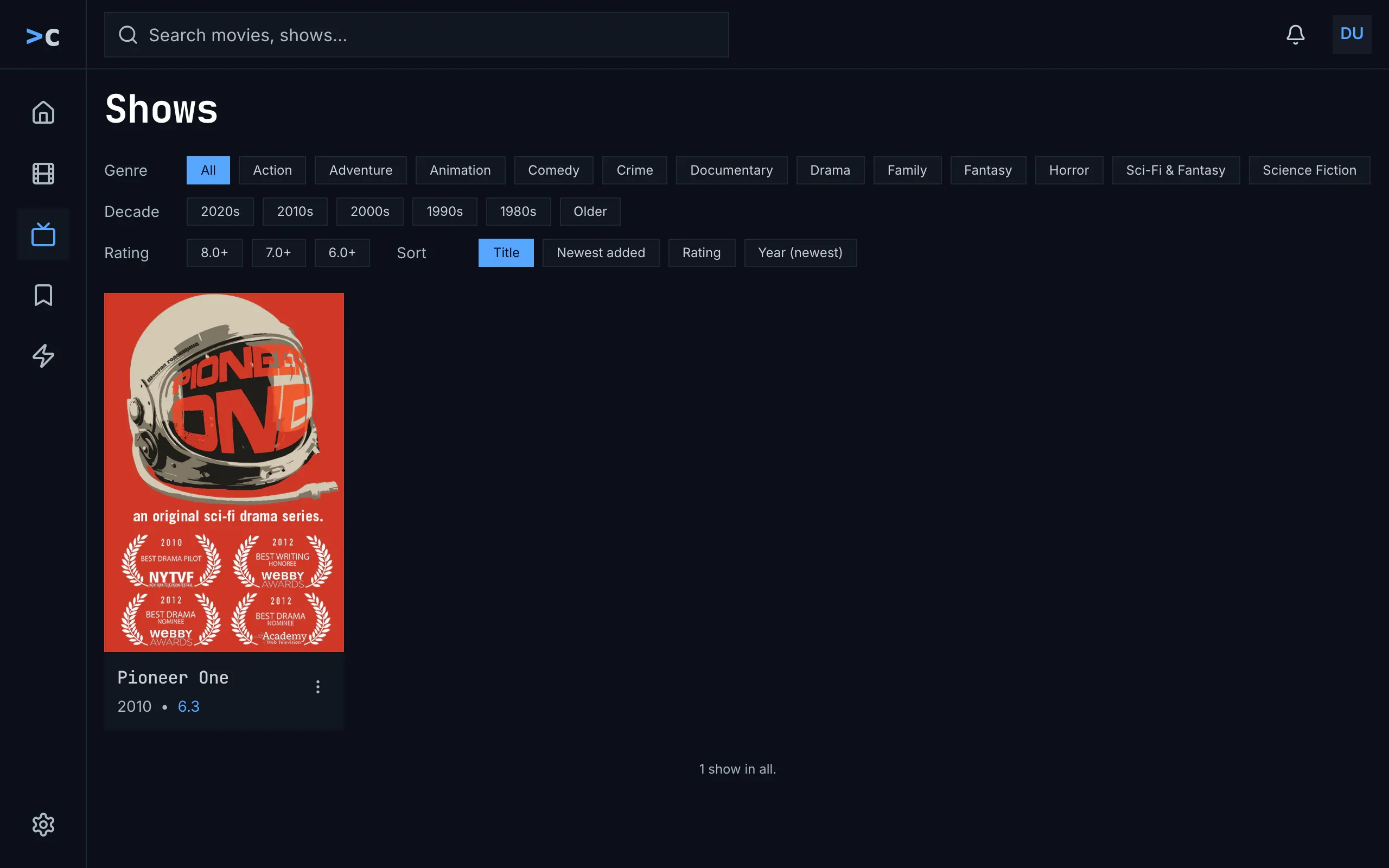
Figure 5.4: The web's shows as deployed on 6 November 2026, on a computer, at 1280 × 800.
- The same genres as in movies: “Science Fiction” is offered, which no show has; the demo's show is under “Sci-Fi & Fantasy”.
- The one show, Pioneer One, “2010 • 6.3”.
- The count, “1 show in all.”, under the grid once all of it is in.
Figure 5.5 shows three filters that match nothing.
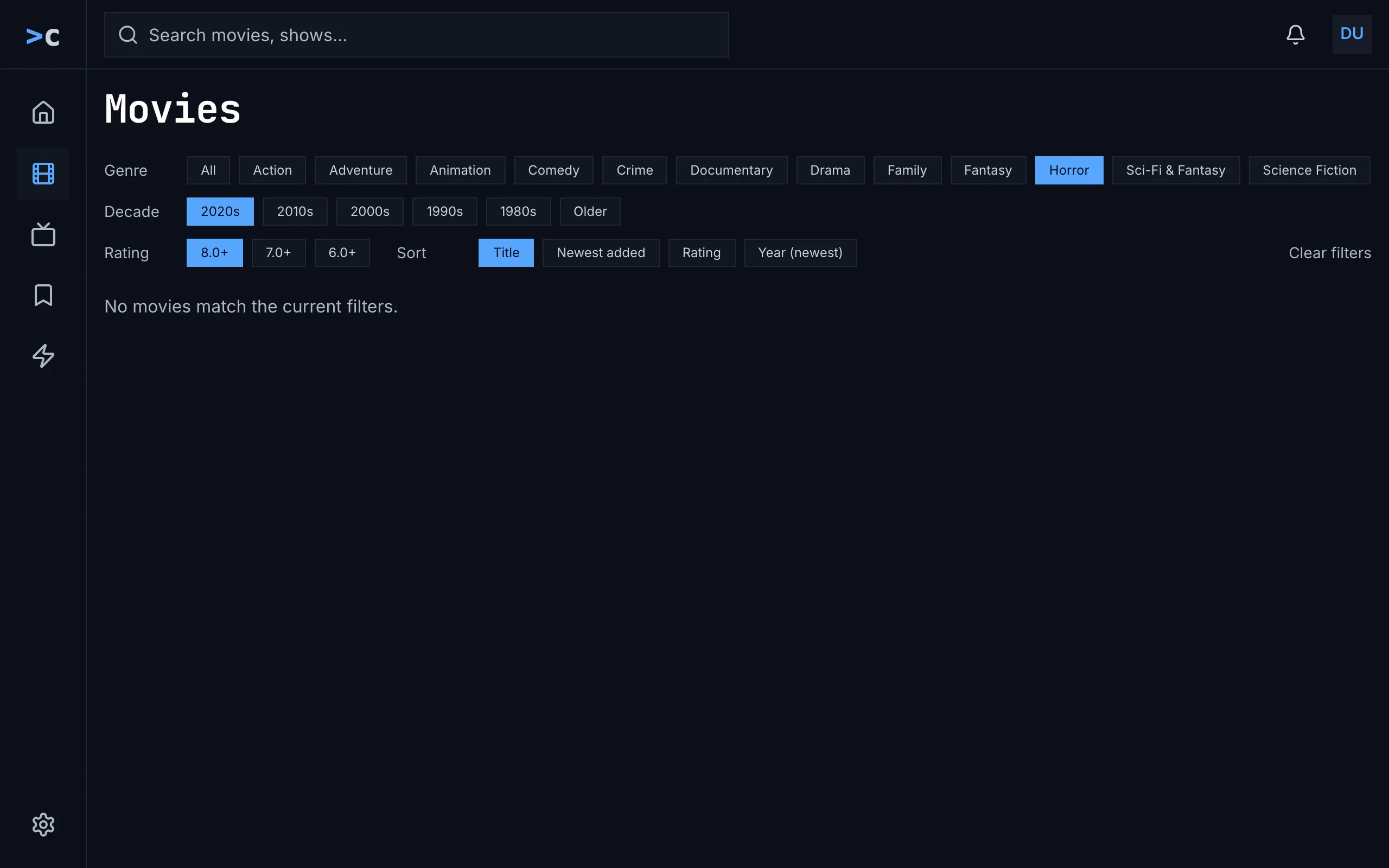
Figure 5.5: The web's movies as deployed on 6 November 2026, with filters that match nothing, on a computer, at 1280 × 800.
- Three chips on, in blue: “Horror”, “2020s” and “8.0+”.
- Clear filters, a quiet text button at the end of the rating's line. It is there while a filter is set or the sort isn't Title, and it sets the sort back to Title too.
- “No movies match the current filters.”, a line on its own with nothing to press: the way out is the chips.
The grid loads 48 titles at a time as the person nears its end, with a spinner under it, and a page that couldn't load says “couldn't load more movies” under the cards, with the reason and try again. While the grid loads, the spinner turns alone; a filter or a sort that changes empties the grid, and the spinner turns again. Couldn't load says “couldn't load the movies” with the reason, try again and details. A card's menu has play, even for a title the person is in, and mark as watched or watched. The grid's cards have no bar.
The filters and the sort start over whenever the view is left: for another view, and for a title's page, which is a page of its own. Movies and shows have no address of their own, so back from a title's page goes to home. see all on home opens movies or shows in the order by title.
5.2.2 The phone app
Section titled “5.2.2 The phone app”The phone app's views are “movies” and “shows”, lowercase in the monospace face, with the web's chips and words: “Genre” with “All” and the server's genres, “Decade”, “Rating” and “Sort”. “Clear filters” is a grey chip at the end of the sort's line, there while a filter is set or the sort isn't Title, and it sets the sort back too. The grid has three posters to a line, four from 600 dp, with the name and the year with the rating in blue, and no bar. A long press opens a card's menu, with play, never resume, and the watched toggle. While the grid loads, a spinner turns alone; no match says “No items match the current filters.”, also with no filter set; a later page that couldn't load says “Couldn't load more movies.” with try again. The filters, the sort and the place in the grid stay, for each view, while the app runs. Without the server, the banner of chapter 13 stands over the last grid the phone had for those filters.
5.2.3 Android TV
Section titled “5.2.3 Android TV”Android TV has three lines of chips that scroll sideways: “all genres” and the server's genres; the decades, down to “older”, and the ratings; and the sorts, “title”, “newest added”, “rating” and “year (newest)”, with “clear filters” at the end while anything differs. The grid has six posters to a line, without a bar, and the focused card says “Hold OK for options”. While the grid loads, “Loading Movies…” stands in the middle, and after a chip “Loading movies…” in the grid's place. The end of the grid says “You've reached the end — 10 movies.”, also “1 movies” for one, and no match “No movies match the current filters.” over “You've reached the end — 0 movies.” Back from a title's page, the focus is on the card that opened it.
5.2.4 Samsung TV
Section titled “5.2.4 Samsung TV”The Samsung TV's views are “Movies” and “Series”. They have two lines of chips: “Genre” with “All” and the server's genres, six of its own while those haven't come, and “Sort” with “Recommended”, the order by rating it starts with, “Newest” and “A–Z”. There is no decade or rating, and no way to clear. It loads 60 titles at a time, with a Load more button after the grid as well. The cards have no menu. Back from a title's page the view starts over, the focus on the first card.
5.2.5 Feature by feature
Section titled “5.2.5 Feature by feature”The table compares the four apps feature by feature. “—” is a feature the app doesn't have.
| Feature | Web | Phone app | Android TV | Samsung TV |
|---|---|---|---|---|
| The views' names | “Movies”, “Shows” | “movies”, “shows” | “movies”, “shows” | “Movies”, “Series” |
| The filters | lines of chips, 26 px high, in the body face | lines of chips | three lines of chips that scroll sideways | two lines of chips |
| Genre | “All”, then the server's genres, one list for movies and shows, with their capitals, on one line that scrolls | the same | “all genres”, then the same list | “All”, then the same list; six of its own while it comes |
| Decade | “2020s” … “1980s”, “Older” for 1900 to 1979; no all | the same | “2020s” … “older”; no all | — |
| Rating | “8.0+”, “7.0+”, “6.0+”; no all | the same | the same | — |
| Sort | chips: “Title”, “Newest added”, “Rating”, “Year (newest)”; Title first | the same | “title”, “newest added”, “rating”, “year (newest)”; title first | “Recommended” (by rating), “Newest”, “A–Z”; Recommended first |
| Clearing | “Clear filters”, a text button, while a filter or a sort is set; the sort too | “Clear filters”, a chip; the same | “clear filters”, a chip; the same | — |
| The grid | as many as fit at 190 px: five at 1280 px; two on a phone | three, four from 600 dp | six | as many as fit at 242 px |
| Under the poster | the name in the monospace face, “2017 • 7.0”, the rating in blue | the same | the same | the same |
| The bar | — | — | — | — |
| Status marks | the Watchlist's bookmark, the watched check | the same | the same | the watched check alone |
| The card's menu | ⋮ beside the name: play · mark as watched or watched | a long press: play · the watched toggle | holding OK, “Hold OK for options”: play on a movie · the watched toggle | — |
| More titles | 48 at a time, as the end nears, a spinner under the grid | 48 at a time | 48 at a time, “Loading more…” | 60 at a time, and a “Load more” button |
| The end of the grid | “26 movies in all.”, “1 show in all.” | the same | “You've reached the end — 10 movies.”, for one “1 movies” | “You’ve reached the end — 10 movies.” |
| Loading | a spinner alone | a spinner alone | “Loading Movies…” | a spinner, “Loading movies…” |
| A filter changed | the grid empties, the spinner | the grid empties, the spinner | “Loading movies…” in the grid's place | the grid loads again from the top, the focus on the first card |
| Couldn't load | “couldn't load the movies”, the reason, try again, details | the same | the same, over the whole page, the chips too | “Couldn’t load the library” in red and the error's text, “chino-api 500”; no try again |
| More couldn't load | “couldn't load more movies”, the reason, try again | “Couldn't load more movies.”, try again | the grid ends | the grid gives way to couldn't load |
| No match | “No movies match the current filters.” | “No items match the current filters.” | “No movies match the current filters.”, “You've reached the end — 0 movies.” | “No movies to show”, “Nothing tagged “Drama”. Pick “All” to clear the filter.” |
| No movies at all | the no-match line | the no-match line | the no-match line | “No movies to show”, “This library is empty.” |
| Back from a title's page | home: the view has no address | the view as it was | the view as it was, the focus on the card | the view from the start, the focus on the first card |
| Another view, and back | filters and sort from the start | kept, for each view | from the start | kept between movies and shows from the rail |
| see all on home | the view in the order by title | the same | the same | — |
| A phone held sideways | the computer's layout: the chips fill the screen, three posters a line | the rail; four posters a line | — | — |
| Without the server | — | the banner over the last grid for those filters | — | — |
5.3 Movies on a computer
Section titled “5.3 Movies on a computer”Figure 5.6 shows movies on a computer. The view's name heads the page with the sort at the end of its line, the filters follow on one line, and the grid of posters fills the rest.
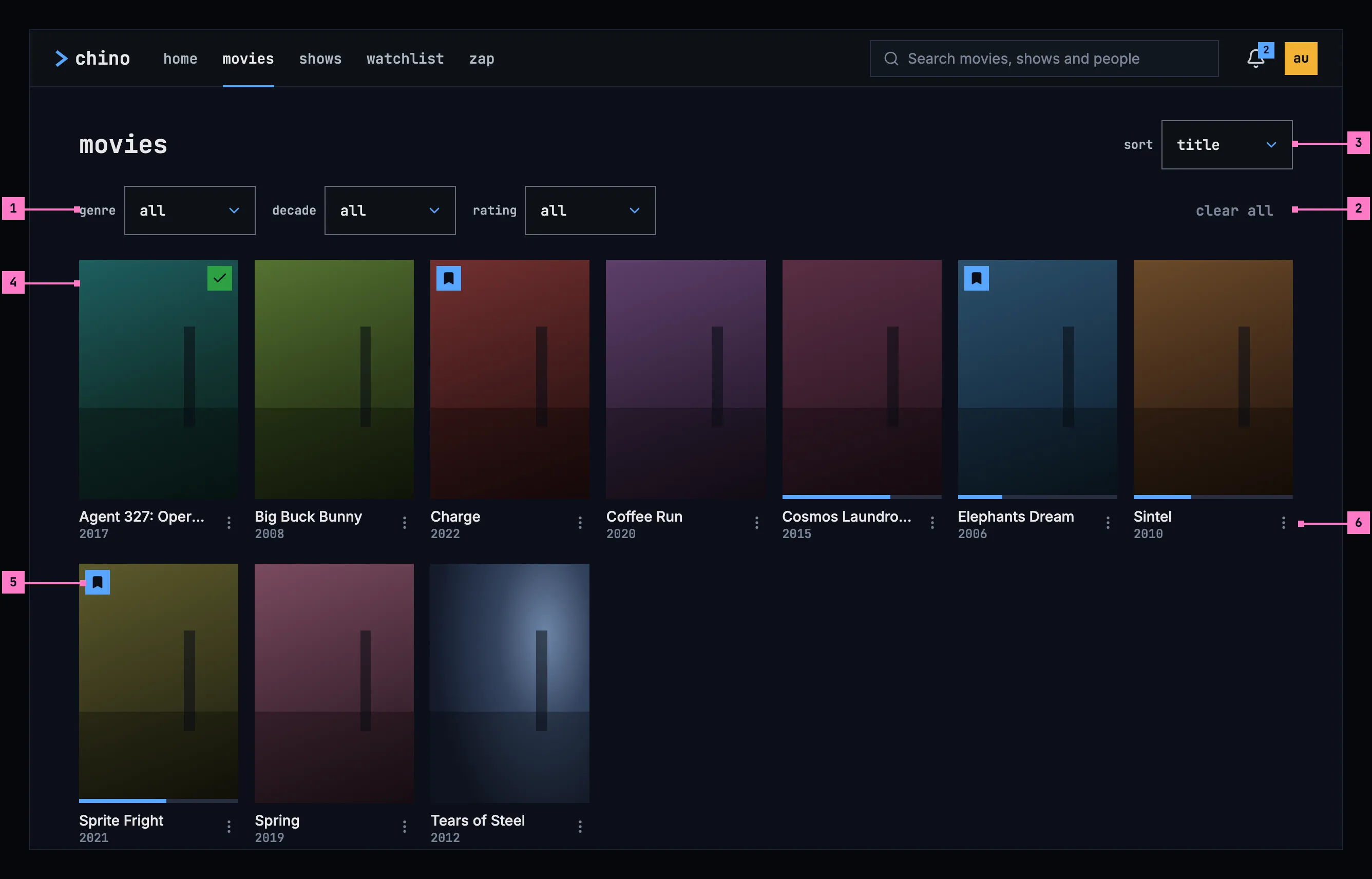
Figure 5.6: Movies on a computer, at 1280 × 800.
- The filters: genre, decade and rating. Each is its name and a box that shows its choice, here all; choosing the box opens the list of choices. A filter that narrows the grid shows its choice in blue. Section 5.7.1 lists the choices.
- clear all sets every filter back to all. With nothing to clear, it is dimmed, as here.
- sort puts the grid in order: title, the order the view starts with, newest added, rating or year (newest) (section 5.7.2).
- A card: the poster, then the title's name on one line, cut with “…” where it's too long, and its year. Choosing the card opens the title's page.
- The status marks on the poster, as chapter 6 draws them: the bookmark on blue for a title in the Watchlist, the check on green for a watched one, and the bar along the foot for how far the person got. Nothing else is drawn on a poster.
- ⋮, at the right of the card's lines, opens the card's menu (section 5.8).
The grid takes as many posters to a line as fit, seven at 1280 wide.
5.4 Movies on a phone
Section titled “5.4 Movies on a phone”The phone shows movies upright and sideways. Figure 5.7 shows them upright and figure 5.8 sideways. The parts are those of figure 5.6; the numbers mark where the phone differs, and section 5.4.3 says what happens when the phone is turned.
5.4.1 Held upright
Section titled “5.4.1 Held upright”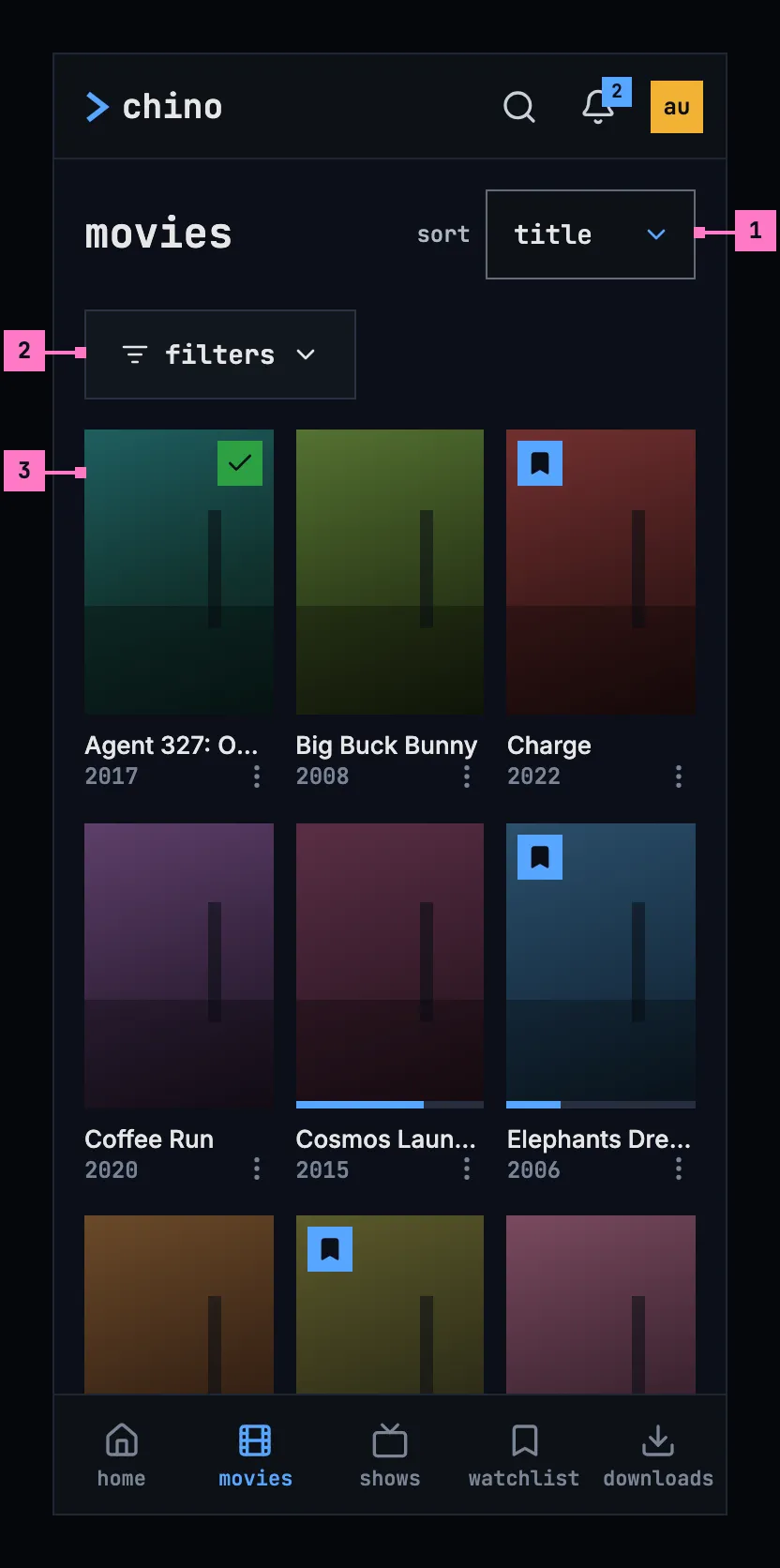
Figure 5.7: Movies on a phone held upright, at 360 × 780 dp.
- sort stays at the end of the name's line, as on a computer.
- filters folds the three filters away behind one button, which opens them in a column under it, as figure 5.10 shows. While filters are set, the button counts them: filters · 1.
- The grid has three posters to a line, each with its name, its year and ⋮, which stands beside the year so the name has the card's whole width.
The web on a phone held upright has the layout of figure 5.7, with its own tabs (chapter 2).
5.4.2 Held sideways
Section titled “5.4.2 Held sideways”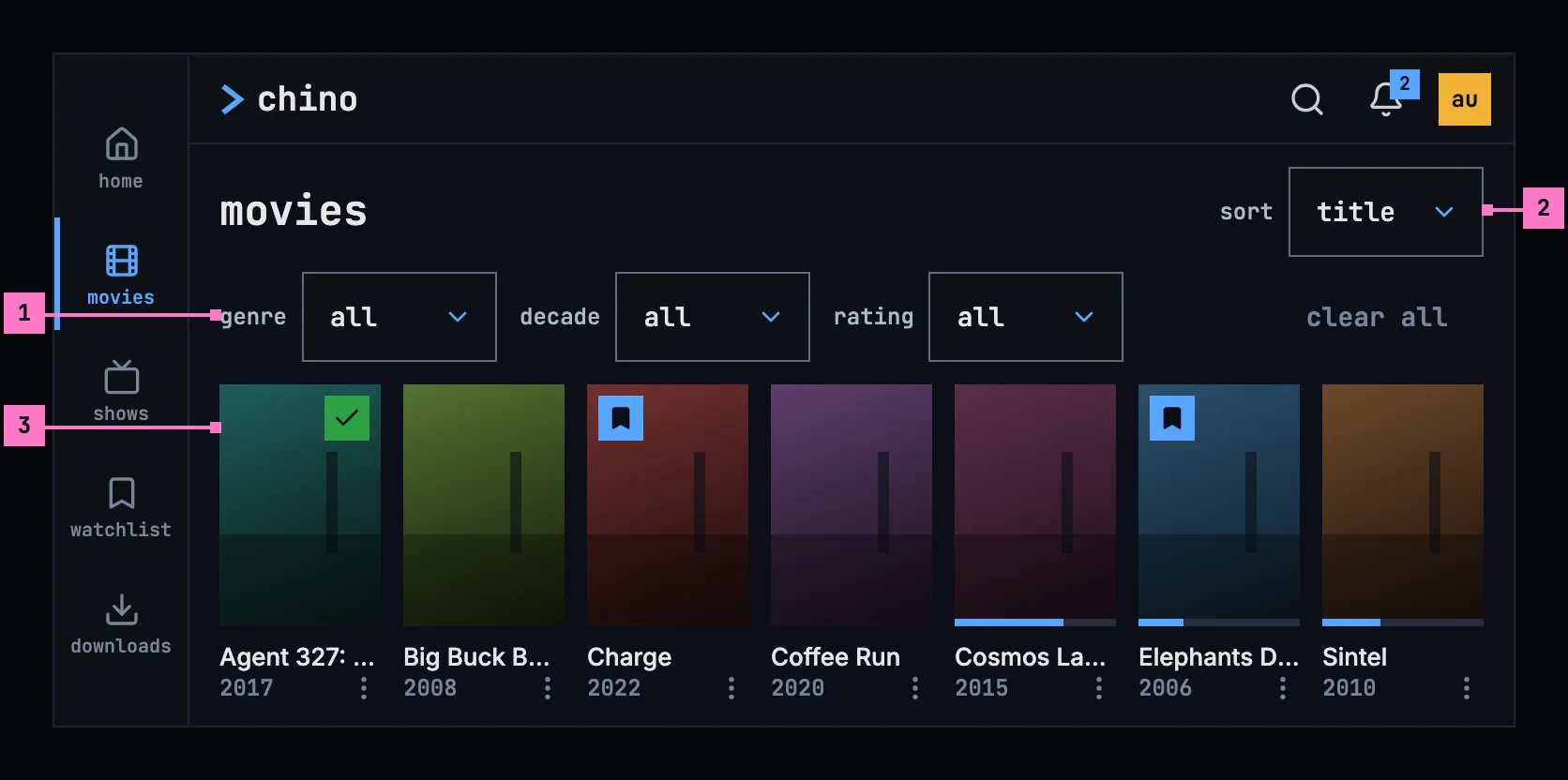
Figure 5.8: Movies on a phone held sideways, at 780 × 360 dp.
- The filters stand in one line, as on a computer, with clear all at its end: the bar is wide enough for them, so it doesn't fold them away.
- sort at the end of the name's line, as upright.
- The grid has seven smaller posters to a line, so a whole line of cards, their names and years too, shows under the filters.
The tabs run down the left edge as a rail while the phone is sideways (chapter 2). The web on a phone held sideways has the layout of figure 5.8.
5.4.3 Turning the phone
Section titled “5.4.3 Turning the phone”Turning the phone keeps the filters, the sort and the place in the grid: the card at the top of the screen stays in view. The filter bar goes by its own width, as the design system's filter bar does: narrower than 640 dp, it folds the filters behind filters, and from 640 dp it shows them in a line. So turned sideways, the filters stand in their line, and turned back upright they fold again, behind filters open or closed as it was. Upright the grid has three posters to a line and sideways seven smaller ones.
5.5 Movies on a TV
Section titled “5.5 Movies on a TV”Figure 5.9 shows movies on a TV. The page keeps to the safe area at its sides, and the grid scrolls past its foot.
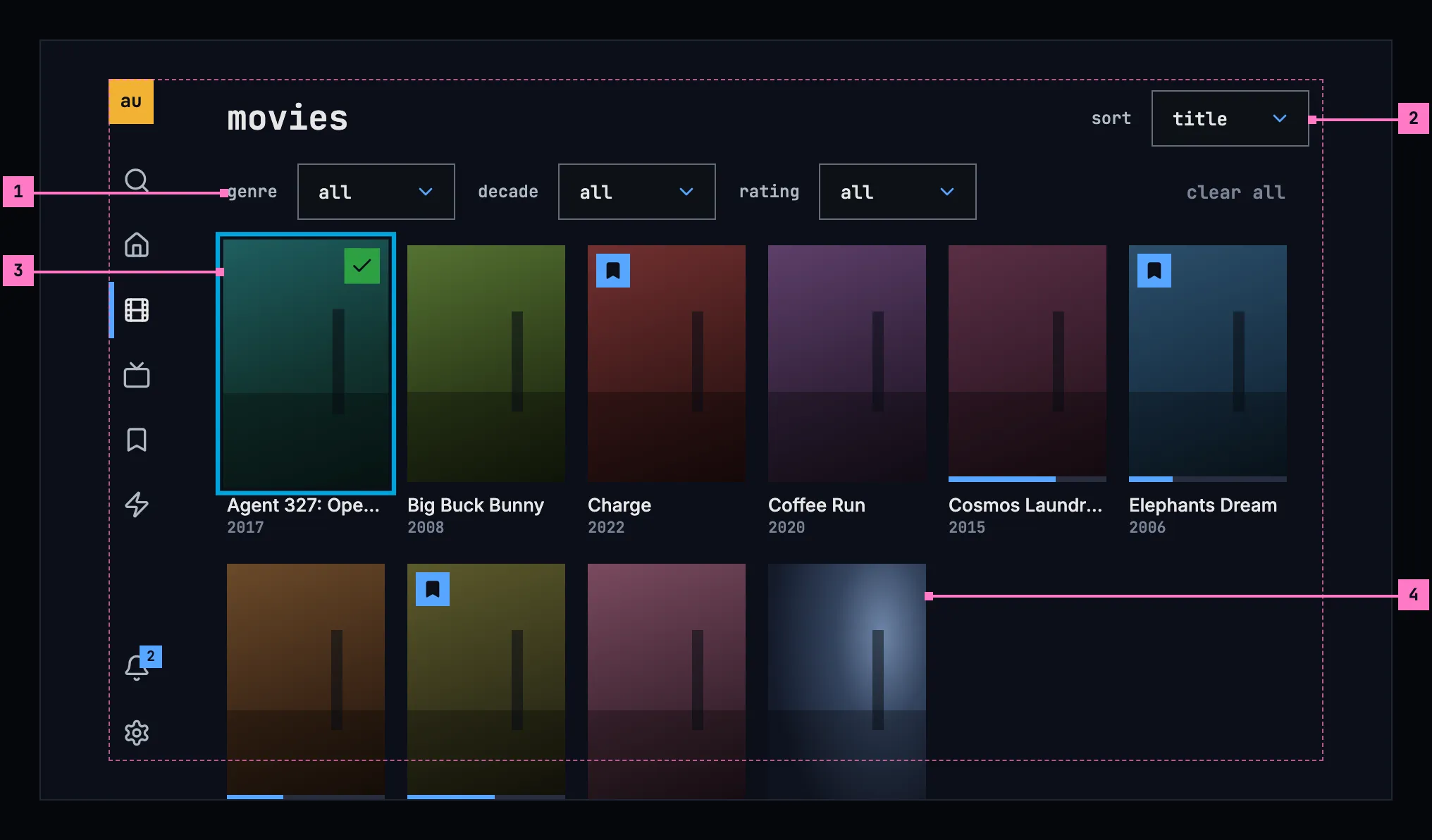
Figure 5.9: Movies on a TV, at 960 × 540 dp.
- The filters are buttons the focus can take, 40 dp high, as every TV control is. OK opens a menu of one choice, like the player's menus in chapter 11: the chosen row in blue with a small square before it. Up and down move in the menu, OK picks a row and closes it, and back closes it without a change.
- sort works the same way, at the end of the name's line.
- The focus on a card: the ring sits 2 dp outside the poster, and the card grows by 5 %, as the design system's TV focus sets out. Right from the rail lands on the first card. The arrows move from card to card, up from the first line reaches the filters, and left from the first column opens the rail.
- The grid keeps six posters to a line inside the safe area. The next line shows under the outline, and the grid scrolls when the focus reaches it, so the focus never leaves the safe area.
A TV card has no ⋮: holding OK on it opens its menu (section 5.8).
5.6 Shows
Section titled “5.6 Shows”Figures 5.10 and 5.11 show shows on a phone, with one filter set. Shows look and work as movies do, at every size, with the shows' own words.
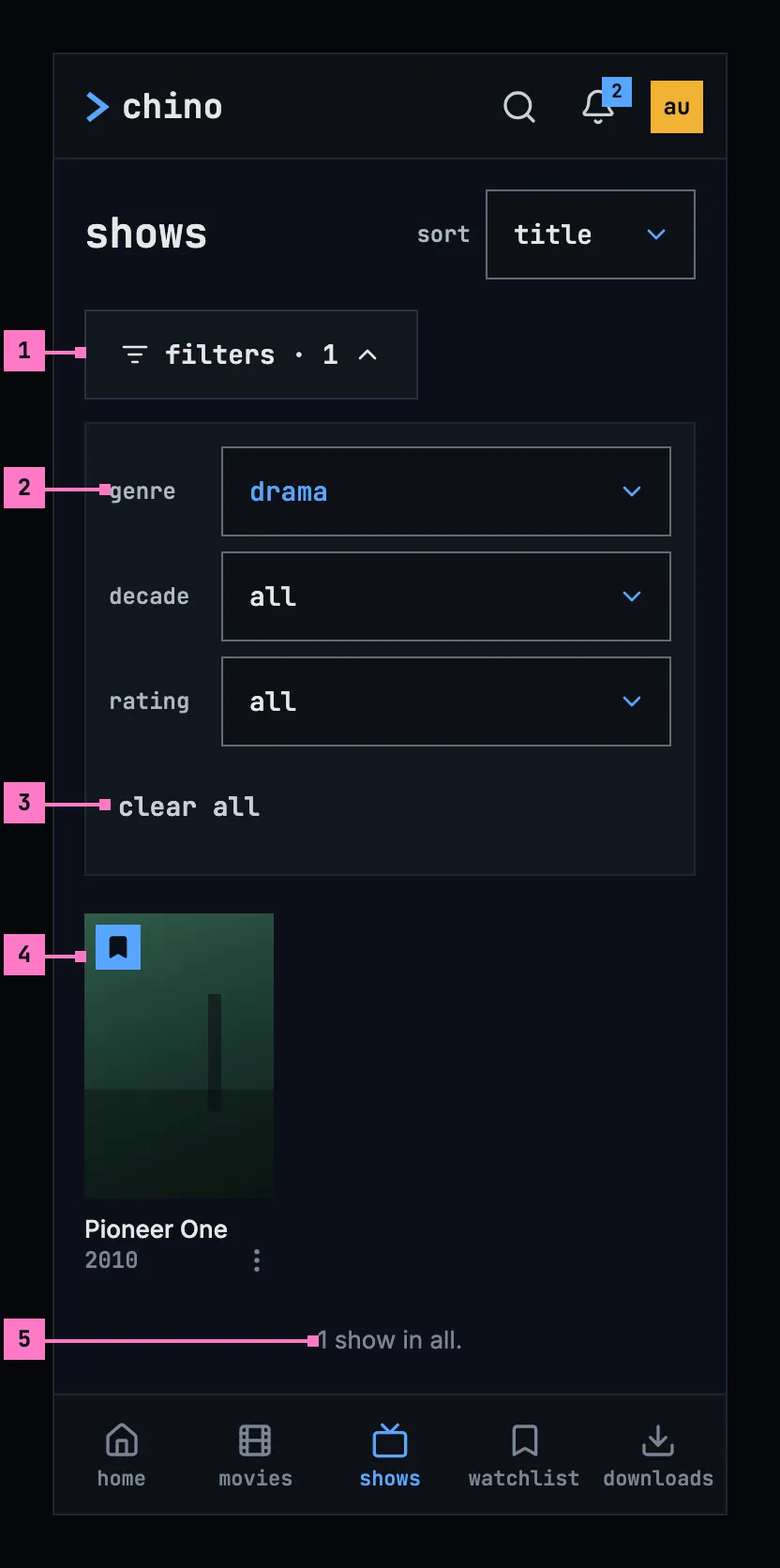
Figure 5.10: Shows on a phone held upright, filtered by genre, at 360 × 780 dp.
- filters · 1 counts the filters that are set. Pressed again, it folds them away.
- A filter that is set shows its choice in blue: drama.
- clear all, at the end of the column, sets them all back to all.
- The grid holds only what fits the filters: here the one drama in the library, Pioneer One. A show's year is the year it started.
- The count under the last card says how many the grid holds, once all of them are in: “1 show in all.”
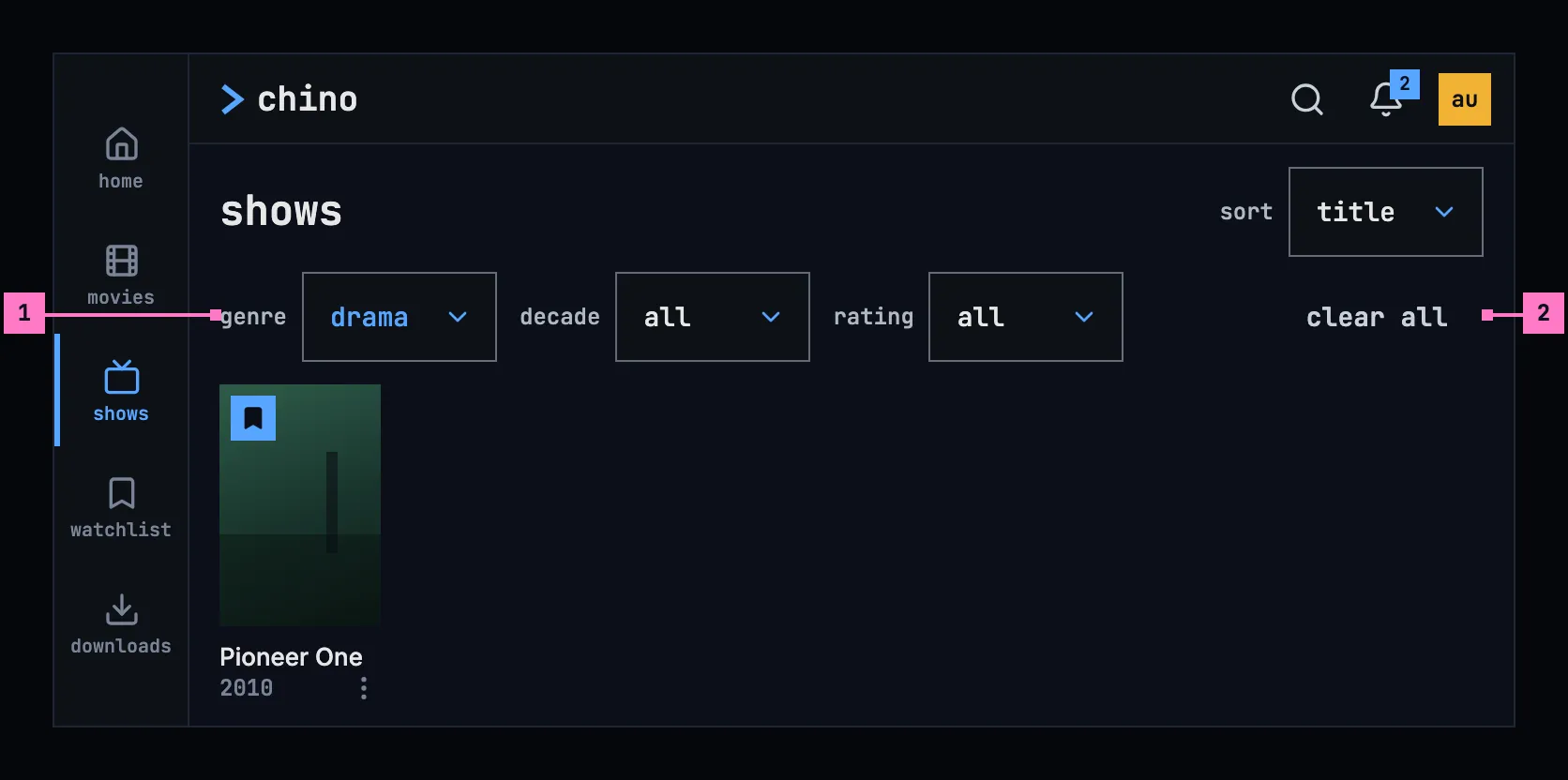
Figure 5.11: Shows on a phone held sideways, filtered by genre, at 780 × 360 dp.
- A filter that is set, in the line of filters, shows its choice in blue: drama.
- clear all at the line's end is bright, because there is something to clear. The count, “1 show in all.”, follows under the grid, past the screen's foot.
5.7 The filters and the sort
Section titled “5.7 The filters and the sort”5.7.1 The filters
Section titled “5.7.1 The filters”| Filter | Choices | Keeps |
|---|---|---|
| genre | all, then the genres of the view's own titles, lowercase: drama, science fiction | Titles of that genre |
| decade | all · 2020s · 2010s · 2000s · 1990s · 1980s · before 1980 | Titles from those years; before 1980 is every year before 1980 |
| rating | all · 8.0+ · 7.0+ · 6.0+ | Titles the catalog rates that high or higher |
- A filter holds one choice at a time, and the grid changes as soon as it's made, with nothing to confirm. The filters add up: a title shows when it fits all of them. all comes first in every filter, as the design system's filter bar has it, so each filter has its way back.
- clear all in the filter bar and clear filters in an empty grid (figure 5.13) both set every filter back to all. Neither changes the sort.
- Each view lists the genres its own titles have, each once, so a genre on its own never leads to an empty grid: movies the genres of the movies, shows those of the shows. The two can name a genre differently, as the catalog does: the demo's science fiction is science fiction in movies and sci-fi & fantasy in shows. A genre with a title of this kind leads to the no-match state of section 5.10 only together with another filter.
5.7.2 The sort
Section titled “5.7.2 The sort”| Sort | Order |
|---|---|
| title | A to Z by the title's name; the order the view starts with |
| newest added | The titles added to the library last come first |
| rating | The highest rated first |
| year (newest) | The latest year first |
5.7.3 Where the view starts
Section titled “5.7.3 Where the view starts”- Opened from the frame, the view has the filters and the sort the person left it with while the app runs. When the app starts, the filters are at all and the sort is title.
- Back from a title's page, the grid is where it was, and on a TV the focus is on the card that opened the page. On the web, movies and shows have addresses of their own that hold the filters and the sort, so back from a title's page, a reload and a shared link open the view as it was.
- see all at the end of a row on home opens the view in the row's order, with every filter at all:
| Row on home | Opens | Sort |
|---|---|---|
| recently added movies | movies | newest added |
| recently added shows | shows | newest added |
| top rated | movies | rating |
The row leaves out what the person has watched; the view doesn't, so watched titles show among the row's.
5.8 The grid
Section titled “5.8 The grid”- The grid holds the titles in the sort's order and loads more as the person nears its end, with grey cards in the places still loading (section 5.10). Once all of them are in, a line under the last card counts them: “10 movies in all.”, “1 movie in all.”
- A card shows the poster with its status marks, the name, the year and ⋮. On a TV the focused card's name turns to the brightest text colour.
- A card's menu, as in chapter 6, offers play, or resume for a title the person is in, and the watched mark: mark as watched, or watched while it's on, which takes the mark off. A show's play plays the episode its page's first button names. ⋮ opens the menu on a computer and a phone, and in the phone app a long press on the card opens it too. On a TV, holding OK opens it.
5.9 Changes
Section titled “5.9 Changes”Every difference between section 5.2 and the target is one change in the table. A change names the apps it is built in, what they do today and the target, with the figure or the section that sets it out; it is built as its row says, and nothing else changes with it. Each change starts as proposed; once the owner approves it, it is built, one change at a time. A target that starts with “Recommended” was an open decision, or takes away something an app has today. What a card shows and how its menu opens hold for every card, on home (chapter 4) and in the watchlist (chapter 8) too. The order see all opens in is chapter 4's change 4.C14, and the side navigation and the tabs are chapter 2's.
| No. | Change | Apps | Today | Target | Status |
|---|---|---|---|---|---|
| 5.C1 | The filter bar | Web, Phone app, Android TV, Samsung TV | lines of chips: “Genre”, “Decade”, “Rating” and “Sort”, the genres on a line that scrolls sideways; on Android TV three lines that scroll; on Samsung TV “Genre” and “Sort” | Recommended: the design system's filter bar, a box per filter that opens a menu of one choice, folded behind filters on a bar narrower than 640 dp; sort a box at the end of the name's line (figures 5.6 to 5.9) | proposed |
| 5.C2 | all in every filter; before 1980 | Web, Phone app, Android TV | decade and rating have no all: a second press on the chip that is on takes it off; the oldest decade is “Older” (“older”), 1900 to 1979 | all first in every filter; before 1980, every year before 1980 (section 5.7.1) | proposed |
| 5.C3 | The genres of the view's own titles | Web, Phone app, Android TV, Samsung TV, the server | one list for movies and shows, with its capitals: movies offers “Sci-Fi & Fantasy” and “War & Politics”, which no movie has, and science fiction twice; shows offers “Science Fiction”, which no show has; Samsung TV shows six of its own while the list comes | the server gives each kind its own list, and each view offers the genres its titles have, once each, lowercase (section 5.7.1) | proposed |
| 5.C4 | clear all leaves the sort | Web, Phone app, Android TV | “Clear filters” (“clear filters”), there while a filter is set or the sort isn't title, and it sets the sort back too; a text button on the web, a chip in the apps | clear all at the end of the filters, dimmed with nothing to clear; it sets the filters back to all and leaves the sort (figure 5.6, part 2) | proposed |
| 5.C5 | Samsung TV: decade, rating and the sorts | Samsung TV | no decade or rating, no way to clear; the sorts “Recommended” (by rating, the one it starts with), “Newest”, “A–Z” | the three filters, clear all, and the four sorts of section 5.7.2, starting with title | proposed |
| 5.C6 | The views' names | Web, Samsung TV | Web: “Movies”, “Shows”. Samsung TV: “Movies”, “Series” | movies · shows (section 5.11) | proposed |
| 5.C7 | The card: the name and the year | Web, Phone app, Android TV, Samsung TV | the name in the monospace face, then the year with the rating in blue, “2017 • 7.0” | Recommended: the name in the body face and the year, without the rating (figure 5.6, part 4) | proposed |
| 5.C8 | The bar on the grid's cards | Web, Phone app, Android TV, Samsung TV | the grid's cards have no bar | the bar along the poster's foot for how far the person got (figure 5.6, part 5) | proposed |
| 5.C9 | The card's menu: its button and resume | Web, Phone app, Android TV, Samsung TV | Web: play, never resume, in the grid. Phone app: a long press only; play, never resume. Android TV: play on a movie's card alone. Samsung TV: no menu | ⋮ at the right of the card's lines, the phone app's long press too; holding OK on a TV; play or resume, a show's play its episode, and the watched mark (section 5.8) | proposed |
| 5.C10 | The grid's posters | Web, Phone app | Web: five to a line at 1280 px, two on a phone. Phone app: four from 600 dp | seven at 1280 px; on a phone three upright and seven smaller ones sideways (figures 5.6 to 5.8) | proposed |
| 5.C11 | A phone held sideways | Web | the computer's layout: the chips fill the screen (figure 5.3) | figure 5.8: the filters in one line, the grid under them | proposed |
| 5.C12 | Back from a title's page | Web, Samsung TV | Web: movies and shows have no address of their own, so back goes to home, the filters and the sort gone. Samsung TV: the view starts over, the focus on the first card | the view as it was, and on a TV the focus on the card that opened the page; on the web, addresses that hold the filters and the sort (section 5.7.3) | proposed |
| 5.C13 | The filters kept while the app runs | Web, Android TV, Samsung TV | Web: they start over with another view. Android TV: kept for a title's page, not for another view. Samsung TV: kept only between movies and shows from the rail | kept for each view while the app runs (section 5.7.3) | proposed |
| 5.C14 | Loading: grey blocks | Web, Phone app, Android TV, Samsung TV | Web, Phone app: a spinner alone, and a filter that changes empties the grid. Android TV: “Loading Movies…”, and after a chip “Loading movies…” in the grid's place. Samsung TV: a spinner, “Loading movies…”, and a chip loads the grid again from the top | figure 5.12, with the name, the sort and the filters there at once; a change keeps the cards under a thin blue line (section 5.10) | proposed |
| 5.C15 | Samsung TV: no load more button | Samsung TV | 60 at a time, and a “Load more” button after the grid | Recommended: more as the focus nears the end, with grey cards, and no button (section 5.8) | proposed |
| 5.C16 | No match | Web, Phone app, Android TV, Samsung TV | Web, Android TV: “No movies match the current filters.”, with nothing to press; Android TV adds “You've reached the end — 0 movies.” Phone app: “No items match the current filters.” Samsung TV: “No movies to show”, “Nothing tagged “Drama”. Pick “All” to clear the filter.” | figure 5.13: no matches, “Nothing fits these filters.” and clear filters | proposed |
| 5.C17 | No movies in the library | Web, Phone app, Android TV, Samsung TV | the no-match line, with the filters; Samsung TV: “No movies to show”, “This library is empty.” | “no movies yet” without the filters, with nothing to press (section 5.10) | proposed |
| 5.C18 | Couldn't load, under the view's name | Android TV, Samsung TV | Android TV: over the whole page, the chips too. Samsung TV: “Couldn’t load the library” in red and the error's text, no try again | figure 5.14: in the grid's place, the name, the sort and the filters staying; the reason by cause and try again | proposed |
| 5.C19 | More couldn't load | Phone app, Android TV, Samsung TV | Phone app: “Couldn't load more movies.” with try again. Android TV: the grid ends there. Samsung TV: couldn't load takes the grid's place | “couldn't load more movies”, the reason and try again under the cards loaded (section 5.10) | proposed |
| 5.C20 | The end of the grid | Android TV, Samsung TV | “You've reached the end — 10 movies.”, on Android TV “1 movies” for one | “10 movies in all.”, “1 movie in all.” (section 5.8) | proposed |
5.10 States
Section titled “5.10 States”The views are drawn in figures 5.6 to 5.11 with everything loaded. Figures 5.12 to 5.14 show the states in between.
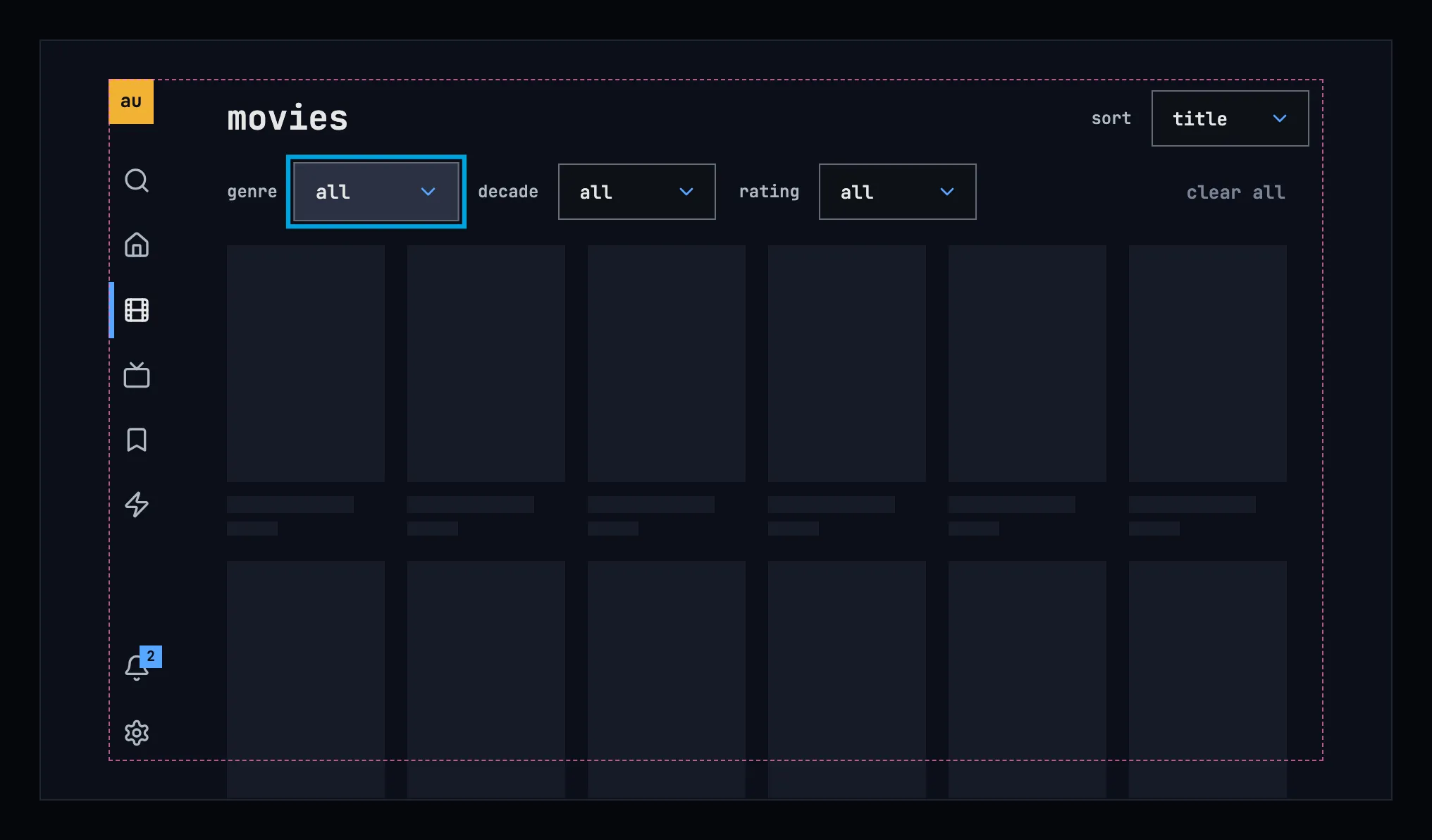
Figure 5.12: Movies loading, on a TV.
While the grid loads, it shows nothing for the first 0.4 seconds, and after that grey blocks in the shape of the posters and their lines, as the design system's loading and progress describes. The name, the sort and the filters are there at once, so the focus can already rest on them, here on genre. A computer and a phone show the same blocks in their own grid.
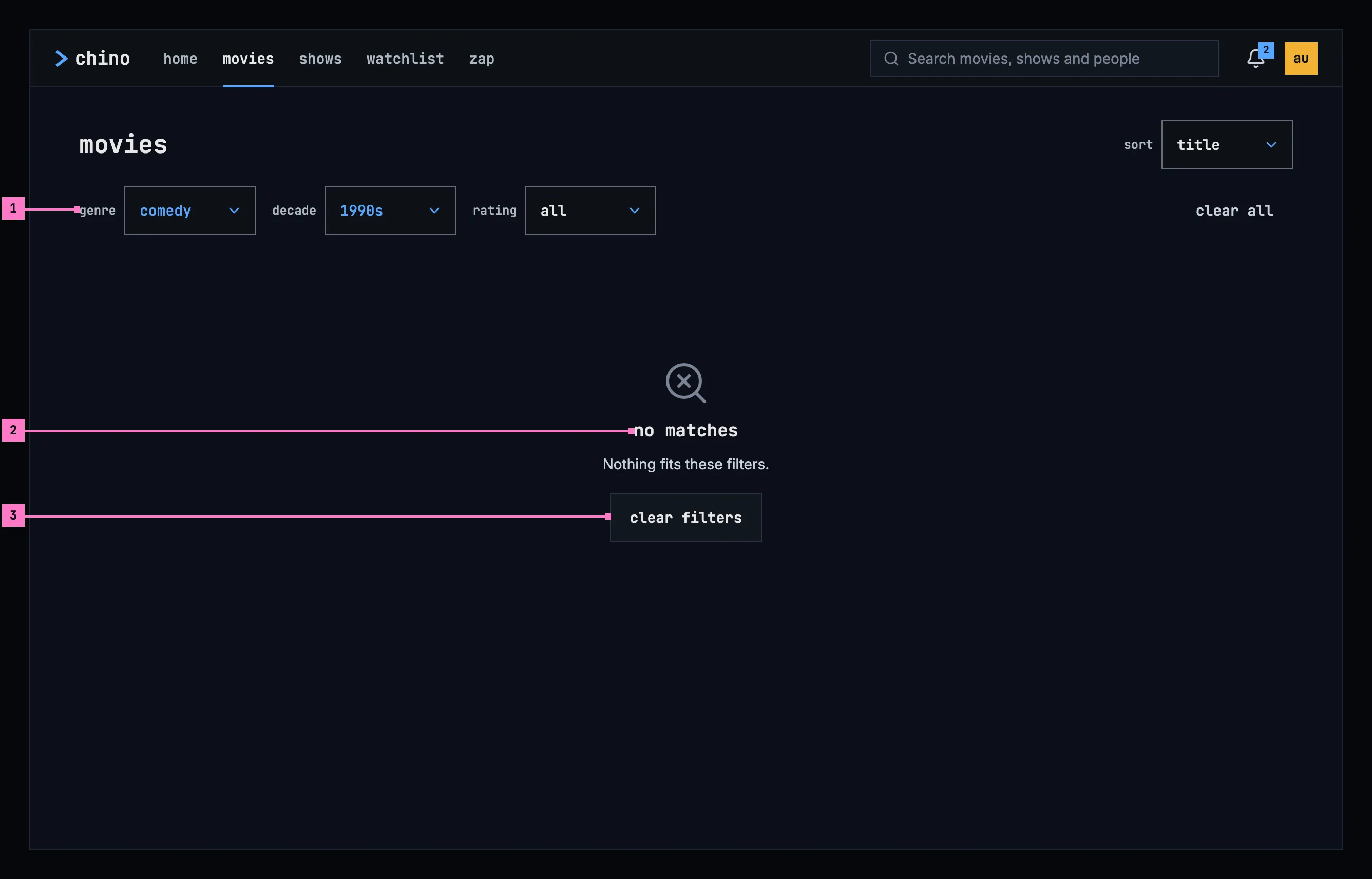
Figure 5.13: Filters that match nothing, on a computer.
- The filters that are set stay as they are, in blue, so the person can change one of them instead of starting over.
- no matches: the design system's no-match state, with “Nothing fits these filters.” under it, in the grid's place.
- clear filters sets the filters back to all, and the grid comes back. It is the state's one way out.
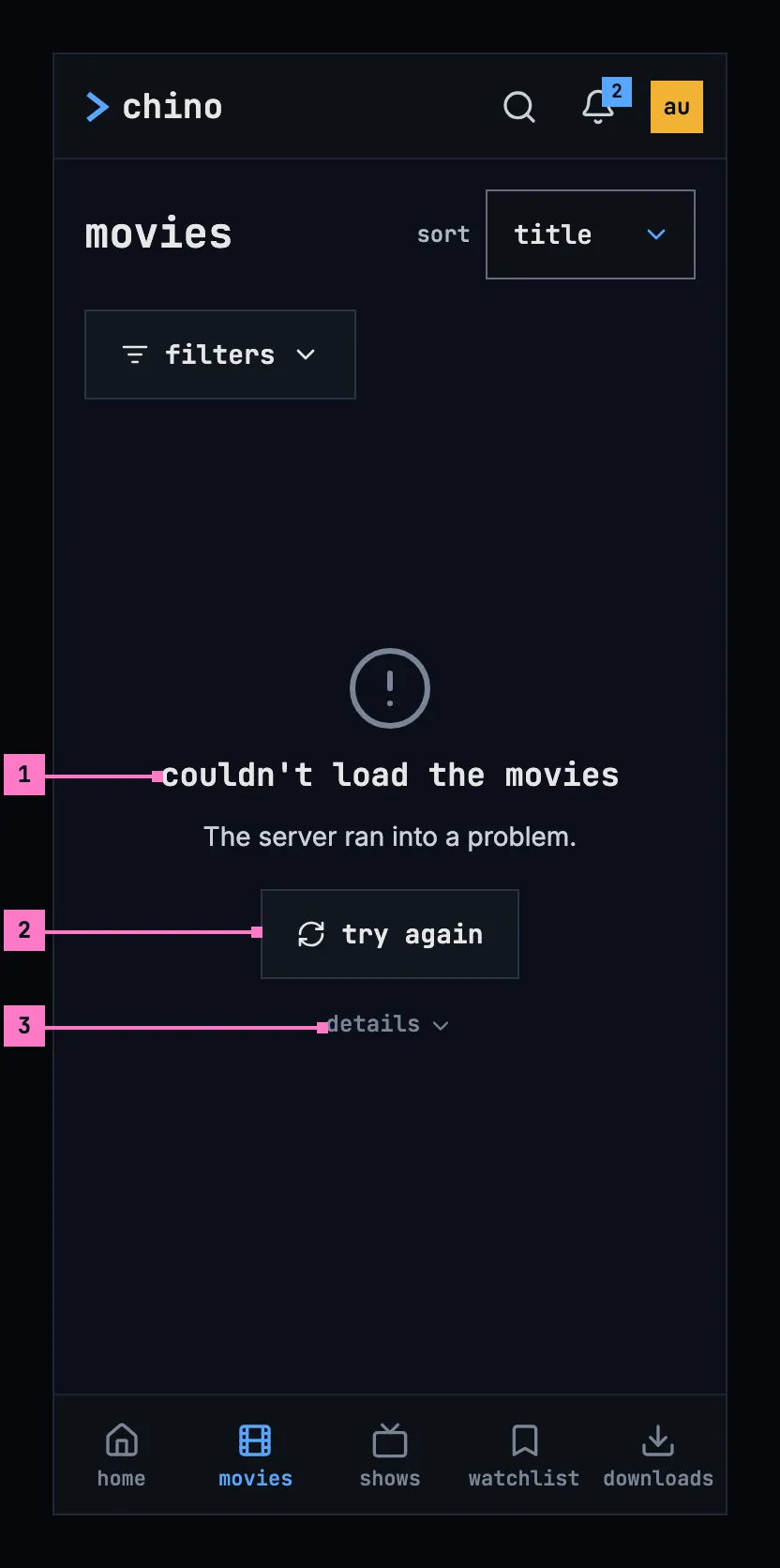
Figure 5.14: Movies when they couldn't load, on a phone.
- What couldn't load, and why. “couldn't load the movies”, or “couldn't load the shows”, and under it the reason as far as the app can tell. Figure 5.14 shows the case where the server ran into a problem; chapter 17 lists every cause and its sentence.
- try again loads the grid again, with the filters and the sort as they were.
- details holds the status the server answered with, for the people who fix things, and stays closed until it is tapped, as chapter 17 sets out.
| State | What the view shows |
|---|---|
| Loading | Figure 5.12 |
| A filter or the sort changed | The cards stay until the new ones are in, with a thin blue line running along the top of the grid |
| More loading | Grey cards in the places still loading, at the end of the grid |
| No match | Figure 5.13 |
| Couldn't load | Figure 5.14, with the sentence for the cause |
| More couldn't load | The cards loaded stay; under them “couldn't load more movies”, the reason and try again |
| No movies in the library | “no movies yet” in the grid's place, without the filters and with nothing to press, as on home (chapter 4) |
| Asking again failed | The grid stays as it was, under the warning banner of chapter 17: “Couldn't refresh the movies; it shows what was loaded 4 minutes ago.”, with try again |
| The phone app can't reach the server | The banner of chapter 13, with the titles the phone loaded under it as they were; with none, figure 5.14 without the sentence, which the banner already says |
5.11 Words
Section titled “5.11 Words”| Where | Text |
|---|---|
| The views' names | movies · shows |
| The sort | sort · title · newest added · rating · year (newest) |
| The filters | genre · decade · rating · all · clear all |
| The genres | the view's own, lowercase: drama · science fiction · sci-fi & fantasy |
| The decades | 2020s · 2010s · 2000s · 1990s · 1980s · before 1980 |
| The ratings | 8.0+ · 7.0+ · 6.0+ |
| The filters on a phone held upright | filters · filters · 1 |
| A card | the name, the year: 2012, and ⋮ |
| The end of the grid | 10 movies in all. · 1 movie in all. · 2 shows in all. · 1 show in all. |
| A card's menu | play · resume · mark as watched · watched |
| No match | no matches · Nothing fits these filters. · clear filters |
| Couldn't load | couldn't load the movies · couldn't load the shows · The server ran into a problem. · try again · details |
| More couldn't load | couldn't load more movies · couldn't load more shows |
| Asking again failed | Couldn't refresh the movies; it shows what was loaded 4 minutes ago. · Couldn't refresh the shows; it shows what was loaded 4 minutes ago. · try again |
| No titles of the kind | no movies yet · no shows yet |