2 The frame
Section 2.2 describes the frame as it is deployed today. The sections after it are the target, the frame as it is meant to be, and section 2.6 lists every difference between the two as a numbered change. Only a change the owner has approved is built, one change at a time; anything no change names stays as it is deployed.
The chapter covers the frame around every chino screen: the top bar on a computer and a phone, the phone's tabs, the TV's rail, and the avatar's menu. The screens in the chapters after this one are drawn inside it. A few screens leave it out to give the picture the whole screen: the player (chapter 11), and zap in the phone app and on a TV (chapter 10); zap on a computer keeps the top bar, so the way out is never covered.
2.1 Purpose
Section titled “2.1 Purpose”The frame answers the same questions on every screen: which product this is, where the person is, how to get to the other views, how to search, what's new for them, and who is signed in. It looks and works the same everywhere, so people learn it once. It follows the design system's top bar, which lets a product for people watching keep its own views in the bar.
2.2 As deployed
Section titled “2.2 As deployed”This section says what the four apps' frames do as of 6 November 2026: the web as the public demo showed it that day, on the same build as production, and the apps as their code had them that day. The phone app, Android TV and the Samsung TV are described from their code until screenshots of them are taken. The Samsung TV app isn't released yet.
All four have the same frame today, the one the web has on a computer: the views as icons alone in a rail down the left edge, with settings at its foot, and a top bar with a search field, the bell and the avatar. Only a narrow phone puts the views in tabs at the bottom instead.
2.2.1 The web
Section titled “2.2.1 The web”Figures 2.1 to 2.3 are screenshots of the web's home, which shows the frame around the page. Figure 2.1 shows it on a computer.
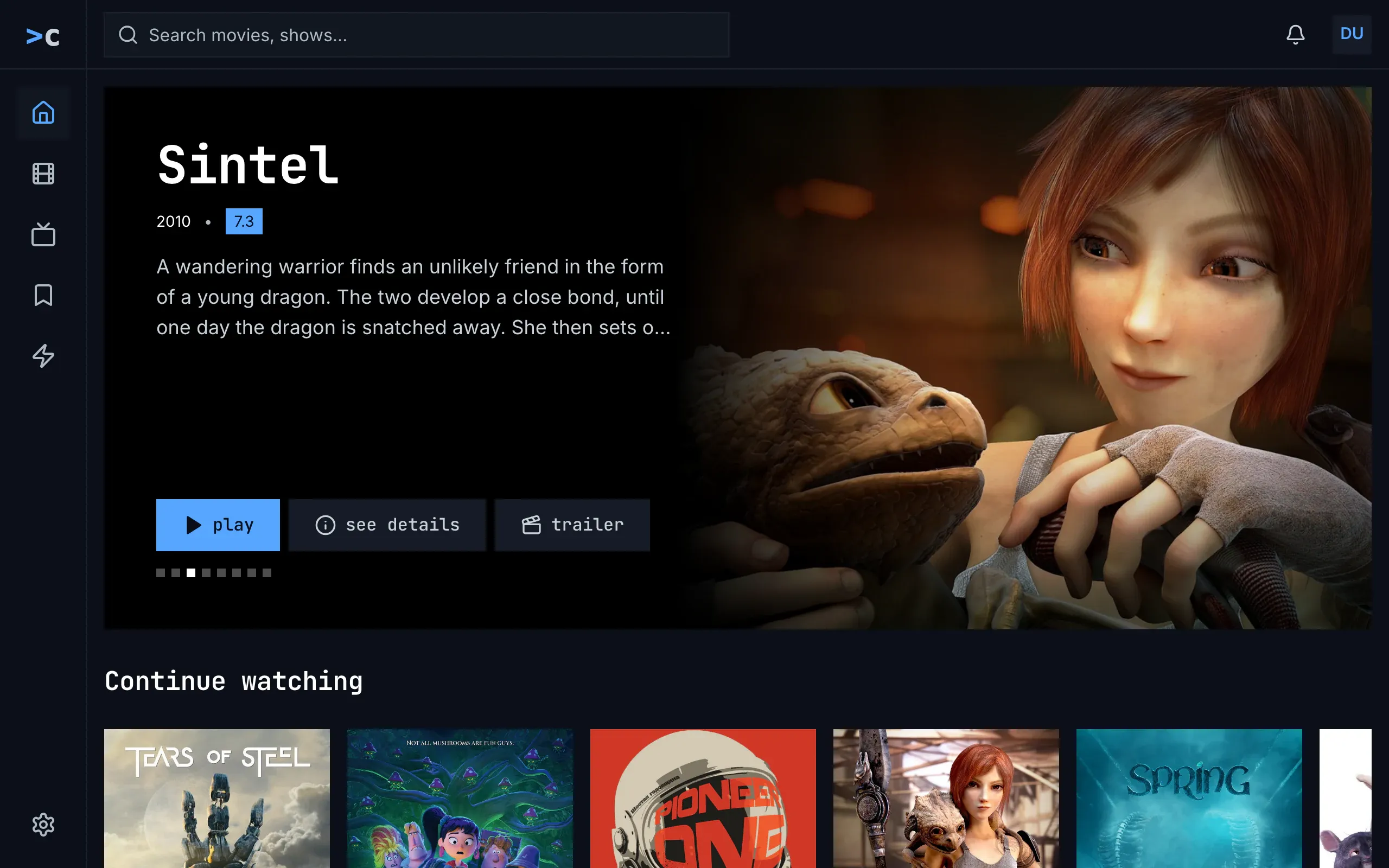
Figure 2.1: The web's frame as deployed on 6 November 2026, on a computer, at 1280 × 800.
- Top left: the logo, “>c”, in a square the height of the bar, without the product's name. It leads to home; its tooltip is “Chino — Home”.
- The side navigation down the left edge, 80 px wide: home, movies, shows, watchlist and zap as icons alone, a house, a film strip, a television, a bookmark and a lightning bolt, each in a 48 px square. The current view, home, has its icon in blue on a lighter square. The views' names are their tooltips and what a screen reader says, capitalised: “Home”, “Movies”, “Shows”, “Watchlist”, “Zap”.
- Bottom left: settings, a gear, pinned at the foot of the side navigation. Settings is a view like the others: while it is open, its gear is the current one.
- The search field at the left of the top bar, up to 576 px wide and square, with the placeholder “Search movies, shows…”.
- Top right: the bell and the avatar. The bell shows no count here; it has one only while something is unread. The avatar is the account's initials in capitals, “DU”, blue on a grey square; it opens the menu of figure 2.4.
The views have no address of their own: the address bar shows only the watchlist's and the search's, so a reload on movies, shows, zap or settings opens home. A title's page, a person's page and the account page are shown without the frame, with no top bar and no side navigation; their own back arrow leads back.
Figure 2.2 shows the frame on a phone held upright.
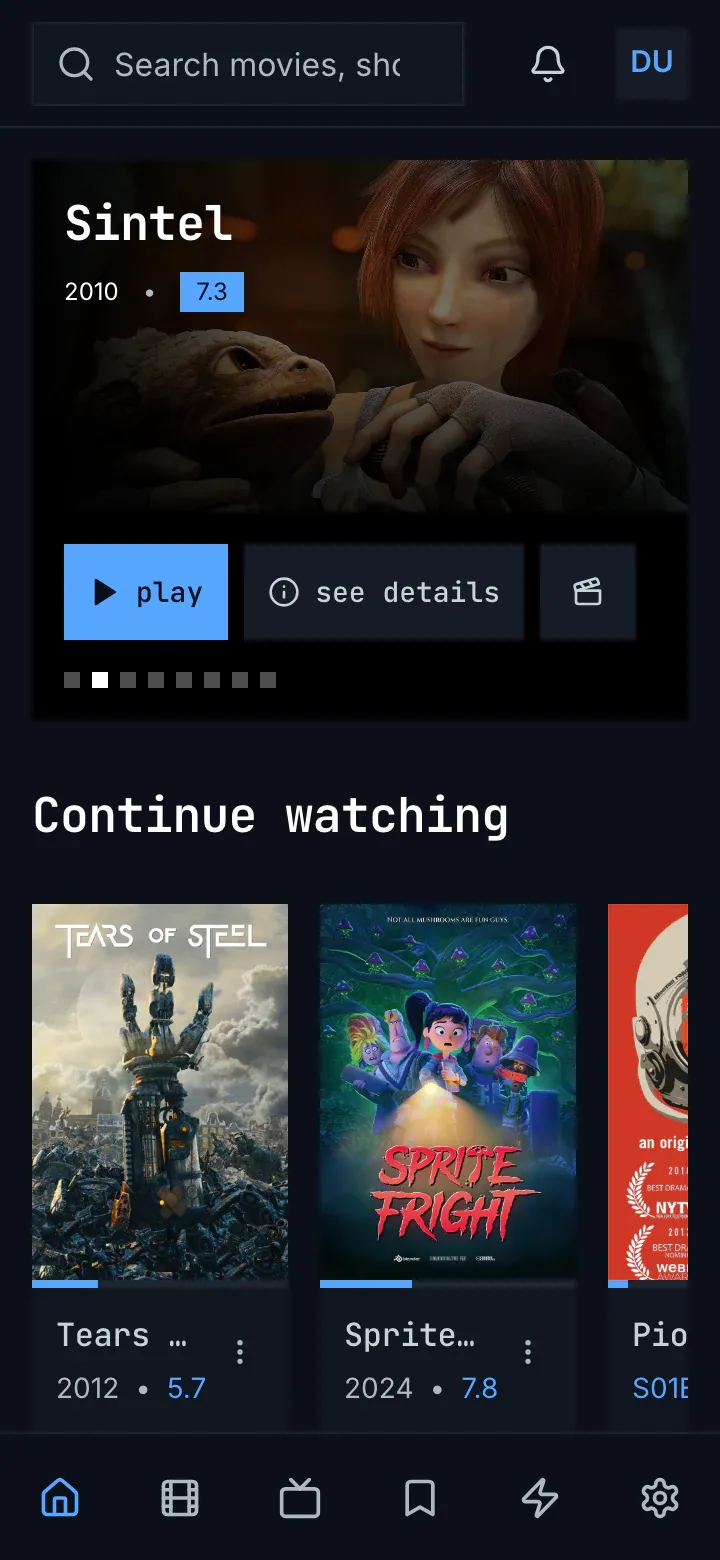
Figure 2.2: The web's frame as deployed on 6 November 2026, on a phone held upright, at 360 × 780.
- Top: the search field across most of the bar, its placeholder cut off, “Search movies, sho”. Narrower than 768 px, the web shows no logo and no product's name.
- Top right: the bell and the avatar, as on a computer.
- The tabs along the bottom, 64 px high: six icons alone, home, movies, shows, watchlist, zap and settings, each an equal share of the width. The current one, home, is blue. Their names are only what a screen reader says, as in figure 2.1.
Figure 2.3 shows the frame on a phone held sideways.

Figure 2.3: The web's frame as deployed on 6 November 2026, on a phone held sideways, at 780 × 360.
- Top: the logo and the search field, as on a computer: from 768 px wide the web has the frame of figure 2.1, and a phone held sideways is 780 px wide.
- Left: home, movies, shows and watchlist, with zap out of view below them. Where the views don't fit the side navigation's height, their column scrolls, and the current view is scrolled into view.
- Bottom left: settings, pinned at the foot, where zap would be.
Figure 2.4 shows the avatar's menu open on a computer.
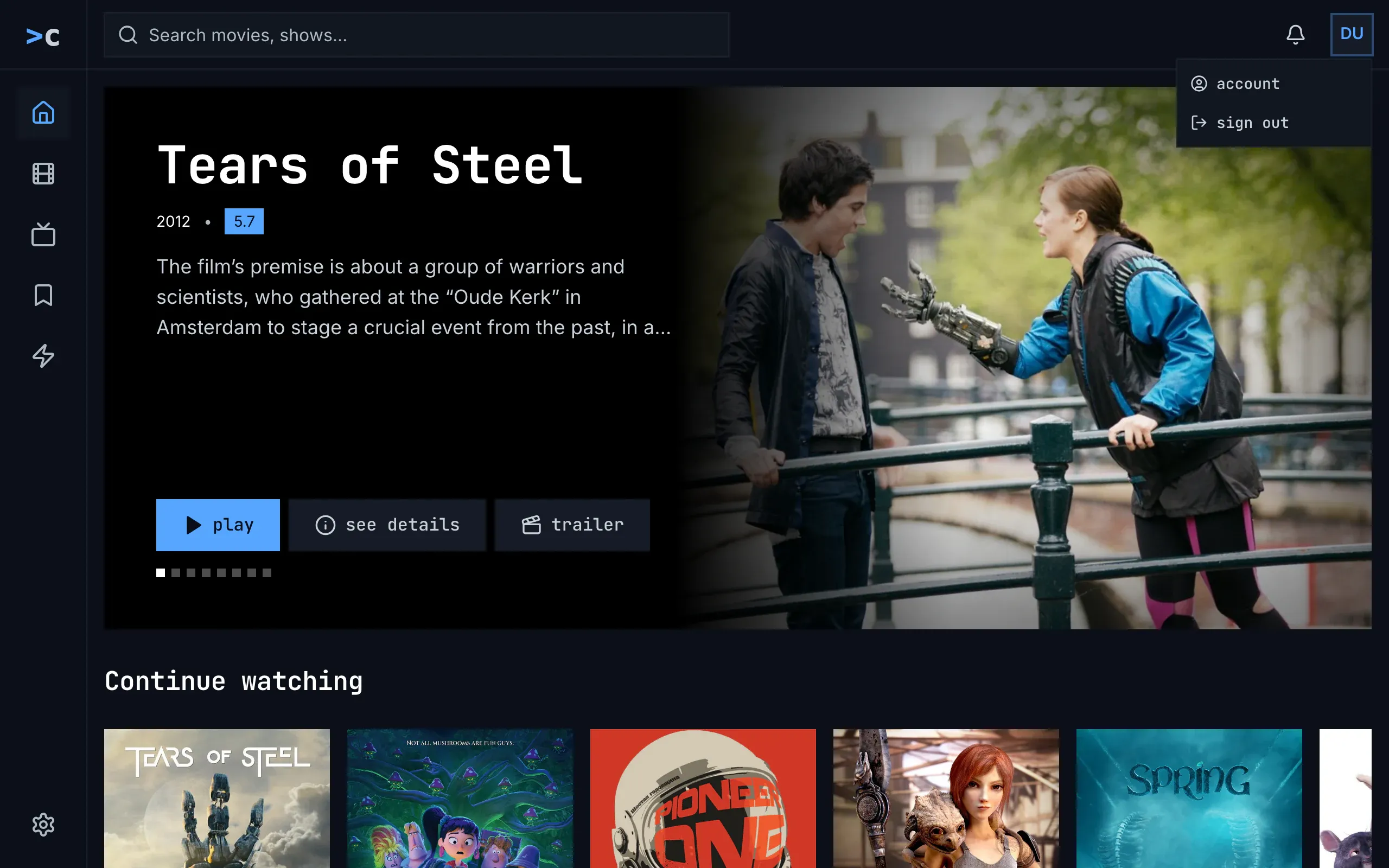
Figure 2.4: The web's avatar menu as deployed on 6 November 2026, on a computer, at 1280 × 800.
- Top right: the avatar, ringed in blue while the pointer is on it.
- The menu under it: account, with a person in a circle, and sign out, with an arrow leaving a door, in the monospace face. It doesn't say who is signed in, and it has no settings. account opens the account page (chapter 16); sign out signs out at once, without asking, at the server's sign-in service too, which then sends the browser back to the site.
The menu closes with a click outside it or on the avatar. Esc doesn't close it, and the arrow keys don't move through it. Figure 2.5 shows it on a phone.
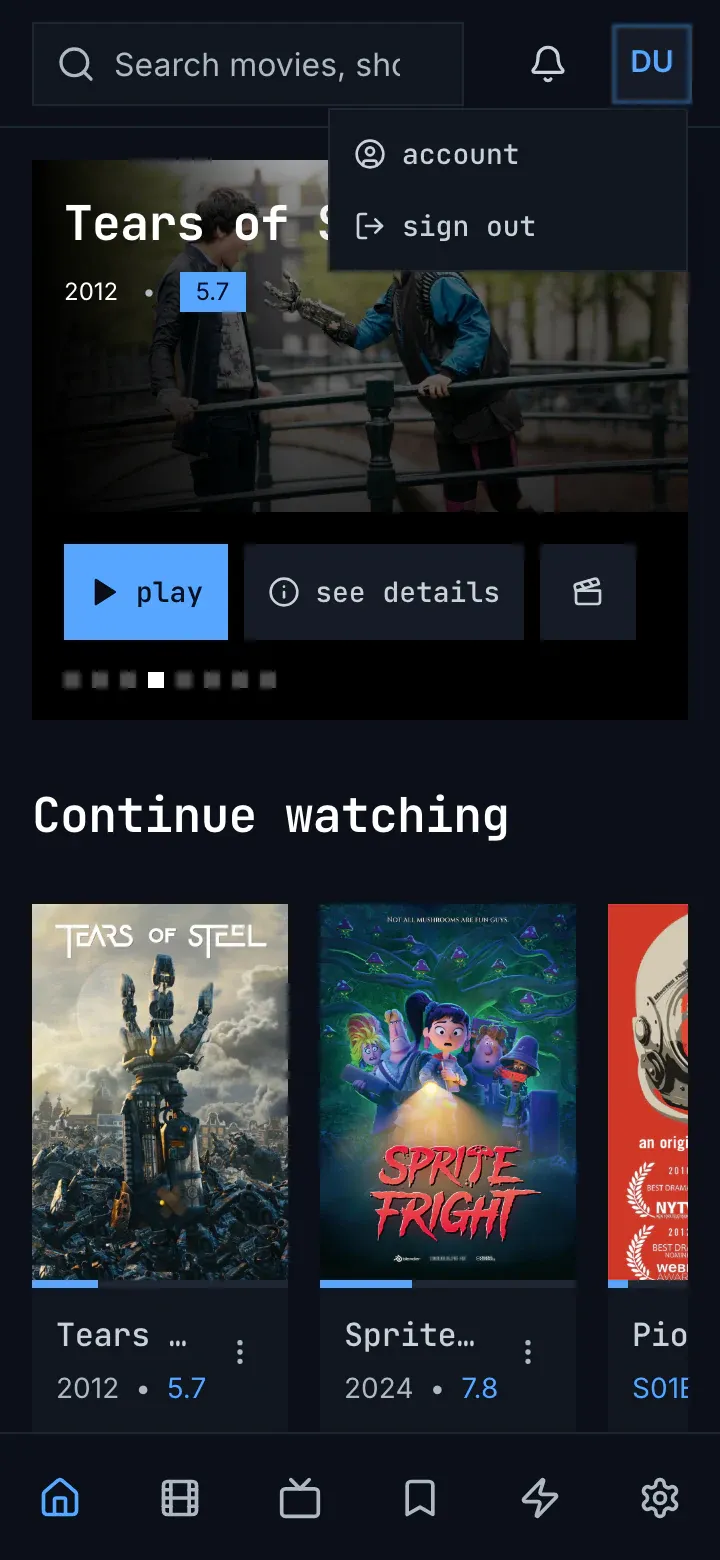
Figure 2.5: The web's avatar menu as deployed on 6 November 2026, on a phone held upright, at 360 × 780.
- The menu drops down under the avatar, as on a computer, with the same two items, over the page.
2.2.2 The phone app
Section titled “2.2.2 The phone app”The phone app has the web's frame, with downloads among the views. Upright, narrower than 600 dp, its top bar holds an open search field, “Search movies, shows…”, 42 dp high, then the bell and the avatar; there is no logo and no product's name. Along the bottom, the tabs are icons alone, in the web's order: home, movies, shows, watchlist, zap, downloads and settings. Downloads is there only in the Android app, and only while the server offers downloads or something is on the phone, so the iOS app has six tabs. The current tab's icon is blue, and the tabs' names, “Home” to “Settings”, are only what a screen reader says.
From 600 dp wide, measured on the window, the app has the web's computer frame: an 80 dp rail at the left, the logo at its top, the tabs' icons in 48 dp squares, settings pinned at its foot, and the same top bar, its search field at most 576 dp wide; there are no tabs at the bottom. A phone held sideways, some 780 × 360 dp, is wider than 600 dp, so it gets the rail; where the tabs don't fit the rail's height, they scroll, and the open one is scrolled into view.
The bell shows only while the server's notifications answer, and opens a screen of its own; a screen reader calls it “Notices”, or “Notices, 2 unread”. The avatar has no menu: it opens the account page at once, and it has no name of its own for a screen reader. A screen opened from a tab, such as a title's page, the account page or the notifications, covers the whole frame, tabs included, and has its own top: a back arrow and its name, or on a title's page back, home and cast. Settings and zap are tabs, so they keep the frame; the player covers it.
2.2.3 Android TV
Section titled “2.2.3 Android TV”Android TV has the web's computer frame, and nothing in it opens: a rail at the left, 80 dp wide and always as narrow, with the logo at its top, then home, movies, shows, watchlist and zap as icons alone, and settings at its foot; and a top bar right of the rail with a search field, “Search movies, shows…”, that opens the search screen, then the bell with its count and the avatar, a circle. A screen reader names the rail's items “Home”, “Movies”, “Series”, “Watchlist”, “Zap” and “Settings”: shows is “Series” there, though its screen is headed “shows”. The bell is “Notices”, or “Notices, 2 unread”.
Left from a screen's first column moves the focus into the rail, onto the current view's item, and right moves it back. A focused item has the focus ring outside it and grows by 5 %; the current view's icon is blue on a lighter square. The avatar opens who's watching (chapter 3). A title's page, the player, zap and delete account have no rail and no top bar; a person's page has both. The frame keeps no safe area: the rail starts at the screen's left edge and the bar at its top, and only the player and zap keep to the safe area.
2.2.4 Samsung TV
Section titled “2.2.4 Samsung TV”The Samsung TV app has the same frame: a narrow rail at the left with the logo, home, movies, shows, watchlist and zap as icons alone, and settings at its foot, named for a screen reader “Home”, “Movies”, “Series”, “Watchlist”, “Zap” and “Settings”; and a top bar with a search field, “Search movies, shows…”, that opens the search screen, the bell with its count, and the avatar, a square with one capital letter, dark on blue, with the account's name beside it. The rail never opens. The arrow keys move the focus to the nearest item in their direction, into the rail and out of it, and nothing remembers where the focus was; a focused item has the blue ring outside it and doesn't grow. The avatar opens settings. A title's page, the player, zap and delete account have no frame, and the frame keeps no safe area.
2.2.5 Feature by feature
Section titled “2.2.5 Feature by feature”The table compares the four frames feature by feature. “—” is a feature the app doesn't have.
| Feature | Web | Phone app | Android TV | Samsung TV |
|---|---|---|---|---|
| The views | a side navigation down the left edge, 80 px wide; narrower than 768 px, tabs at the bottom | tabs at the bottom; from 600 dp wide, a rail down the left edge, 80 dp wide | a rail down the left edge, 80 dp wide, always as narrow | a rail down the left edge, always as narrow |
| Their order | home, movies, shows, watchlist, zap, then settings | home, movies, shows, watchlist, zap, downloads, then settings | home, movies, shows, watchlist, zap, then settings | as on Android TV |
| A view in the navigation | its icon alone; its name a tooltip and what a screen reader says, “Home” | its icon alone; its name only for a screen reader | its icon alone; for a screen reader “Home”, and “Series” for shows | as on Android TV |
| The current view | its icon blue on a lighter square; on a phone, its icon blue | the same | the same | the same |
| Settings | a gear at the foot of the side navigation; on a phone, the sixth tab | the last tab, or the foot of the rail | at the foot of the rail | at the foot of the rail, and behind the avatar |
| Zap | a view; on a phone, the fifth tab | a tab, between watchlist and downloads | a view | a view |
| Downloads | — | Android only: a tab while the server offers downloads or something is on the phone | — | — |
| The product's name | the logo, “>c”, at the top of the side navigation; none on a phone | none; the logo at the top of the rail | the logo at the top of the rail | the logo at the top of the rail |
| The top bar | the search field, the bell and the avatar, 64 px high | the same, 64 dp high, its field 42 dp | the search field, the bell and the avatar, right of the rail | the same |
| The search | a square field, “Search movies, shows…”, with suggestions under it as the person types | a field, “Search movies, shows…”; the results take the page while it holds words | a field, “Search movies, shows…”, that opens the search screen | as on Android TV |
| The bell | its count, “99+” past 99; a panel under it; for a screen reader “Notices”, “Notices, 2 unread” | there only while the server's notifications answer; a screen of its own; “Notices, 2 unread” | there once the notifications answer; a screen of its own; “Notices, 2 unread” | there only while the notifications answer; a screen of its own; “Notices, 2 unread” |
| What the avatar opens | a menu with account and sign out | the account page | who's watching | settings |
| The avatar for a screen reader | the button “Account”; the initials inside named by the account's name | no name of its own | no name of its own | the account's name |
| The avatar's menu | account and sign out, without the name or the email address; a click outside or on the avatar closes it, Esc doesn't | — | — | — |
| A phone held sideways | from 768 px wide, the computer's frame; the views scroll in their column, zap out of view | from 600 dp wide, the rail; the tabs scroll in it | — | — |
| A screen opened from a view | a title's page, a person's page and the account page without the frame, each with its own back arrow | covers the frame, tabs included, with its own top | a title's page without the frame; a person's page and the account page in it | a title's page without the frame |
| Screens without the frame | the player, and the screens above | the player, and every screen opened from a tab | the player, zap, a title's page, delete account | the player, zap, a title's page, delete account |
| Zap and the frame | in the frame | in the frame: the top bar and the tabs stay | without the frame | without the frame |
| The rail opening | — | — | never; it has no names | never; it has no names |
| The focus into the rail | — | — | left from a screen's first column, onto the current view; right goes back | the arrow keys, to the nearest item |
| A focused item in the rail | — | — | the focus ring outside it, 5 % larger | the blue ring outside it; nothing grows |
| The safe area | — | — | none for the frame; the player and zap keep 48 × 27 dp | none |
| A view's address | only the watchlist and the search; a reload elsewhere opens home | — | — | — |
2.3 The frame on a computer
Section titled “2.3 The frame on a computer”Figure 2.6 shows the frame on a computer, with movies as the current view.
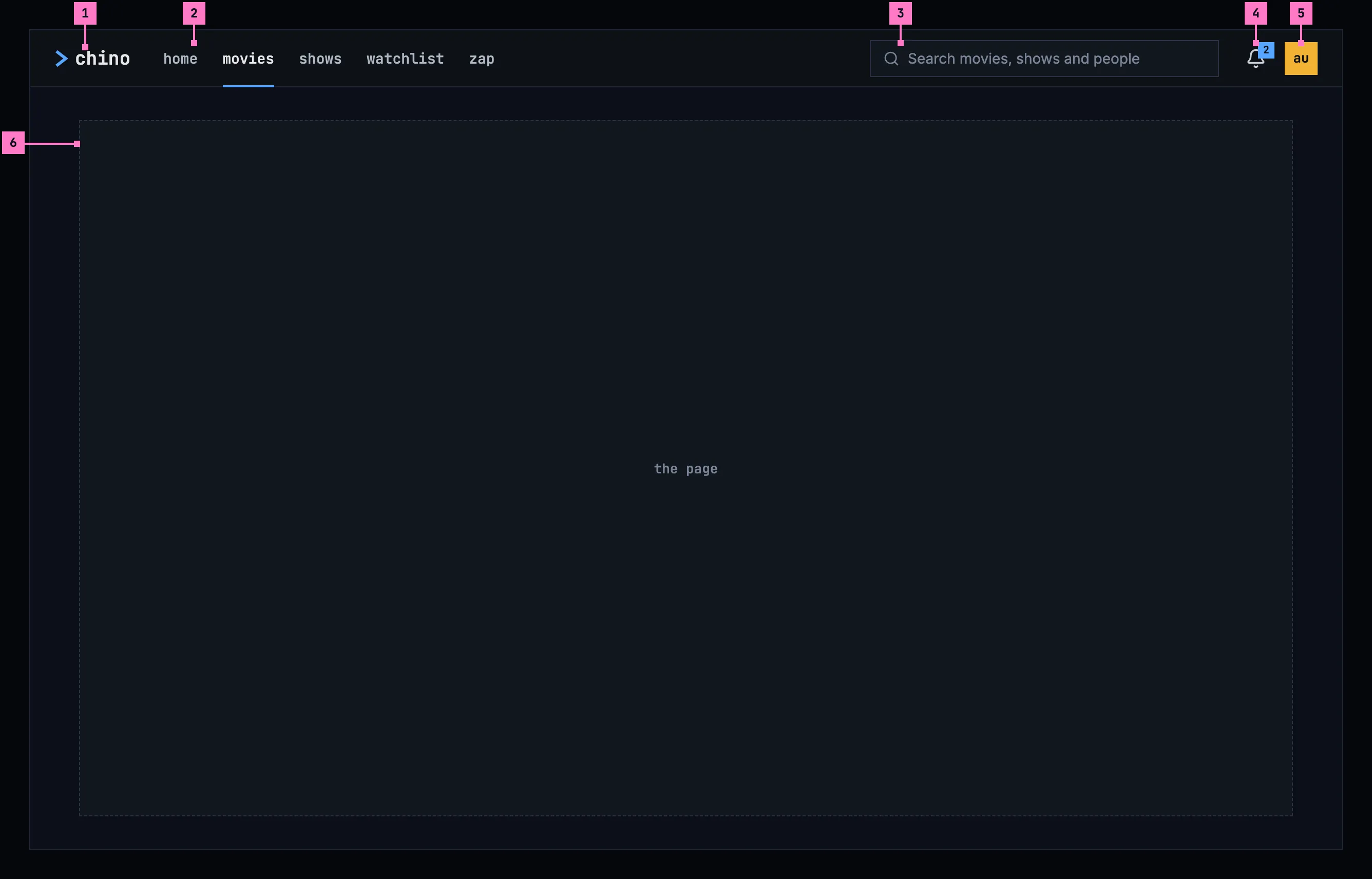
Figure 2.6: The frame on a computer, at 1280 × 800.
- The product's name, chino, with the chevron. It leads to home.
- The five views: home, movies, shows, watchlist and zap. The current one is in the brighter colour with a blue line under it. Settings is not a view: it's in the avatar's menu (part 5).
- The search, the only one in the product. Its placeholder says what it finds: “Search movies, shows and people”. Typing in it shows the results (chapter 9).
- The bell. Its number counts the notifications the person hasn't read; with none unread, the number goes. The bell opens the notifications (chapter 15).
- The avatar: a square with the person's initials, dark on one of twelve colours (chapter 3). It opens the menu of figure 2.7.
- The page, everything under the bar. There's no side navigation: the views are all in the bar.
Every screen but the player keeps the bar: a title's page, a person's page, settings and the account page open under it. Each view, and settings, has an address of its own, so a reload, a link or the browser's back brings the person back to it, as the design system's app navigation has it.
This frame is for a computer and a tablet, a screen or a window 600 dp or more on its short side. One smaller than that, a phone held either way, has the phone's frame of section 2.4. Where a window is too narrow for the search field beside the five views, the search becomes the phone's search icon.
Figure 2.7 shows the avatar's menu open.
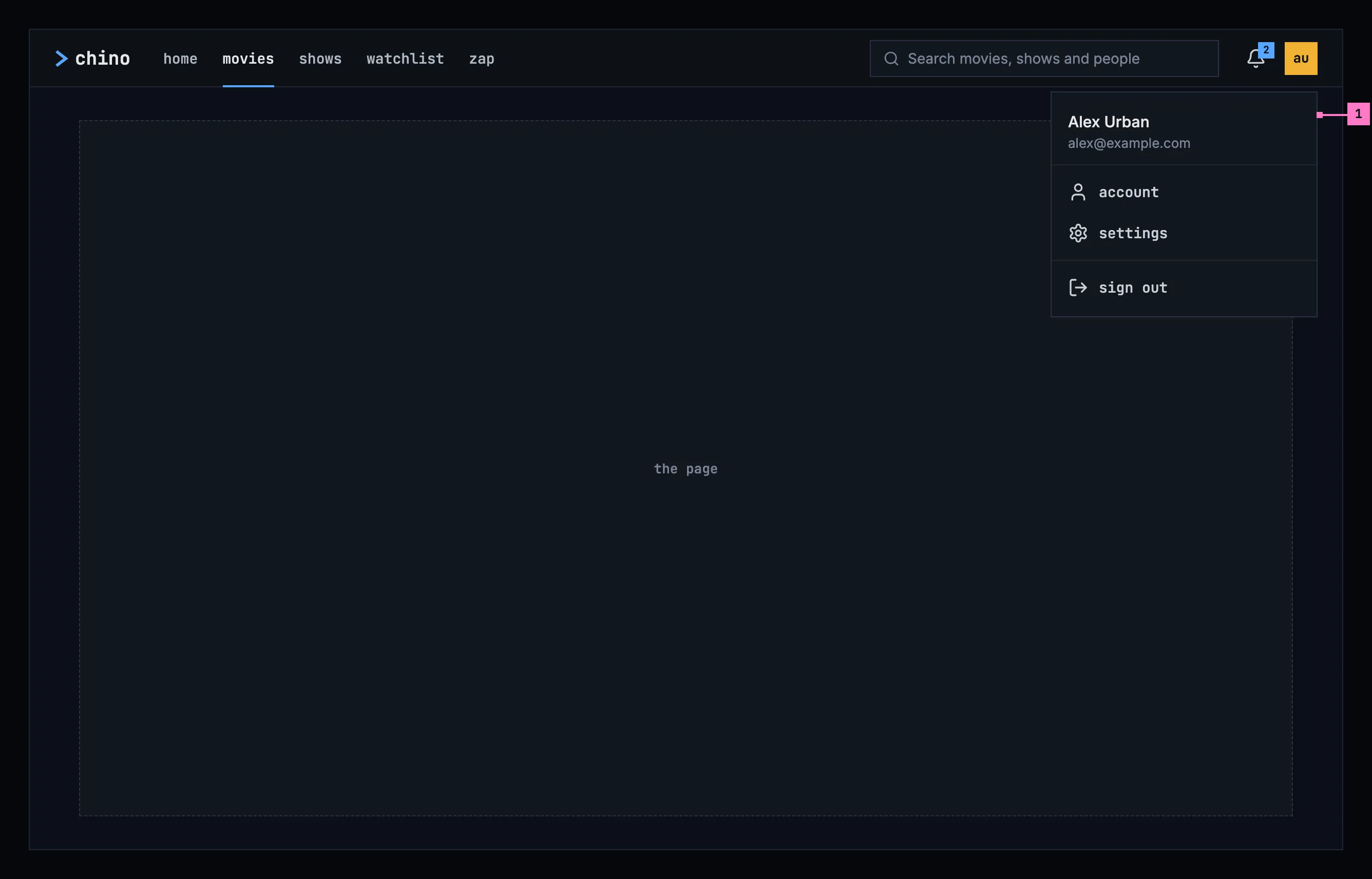
Figure 2.7: The avatar's menu, on a computer.
- The menu starts with the person's name and, quieter, their email address, then holds account, settings and sign out. account and settings open the screens of chapter 16; sign out signs out of this server, as chapter 16 describes. The menu closes with Esc, a click outside it, or a second click on the avatar, and the focus goes back to the avatar. The arrow keys move between its items.
2.4 The frame on a phone
Section titled “2.4 The frame on a phone”The phone has a frame of its own, held upright and held sideways. Figure 2.8 shows it upright and figure 2.10 sideways; section 2.4.3 says what happens when the phone is turned.
2.4.1 Held upright
Section titled “2.4.1 Held upright”The bar keeps what every screen needs, and the views move to tabs at the bottom, in reach of a thumb.
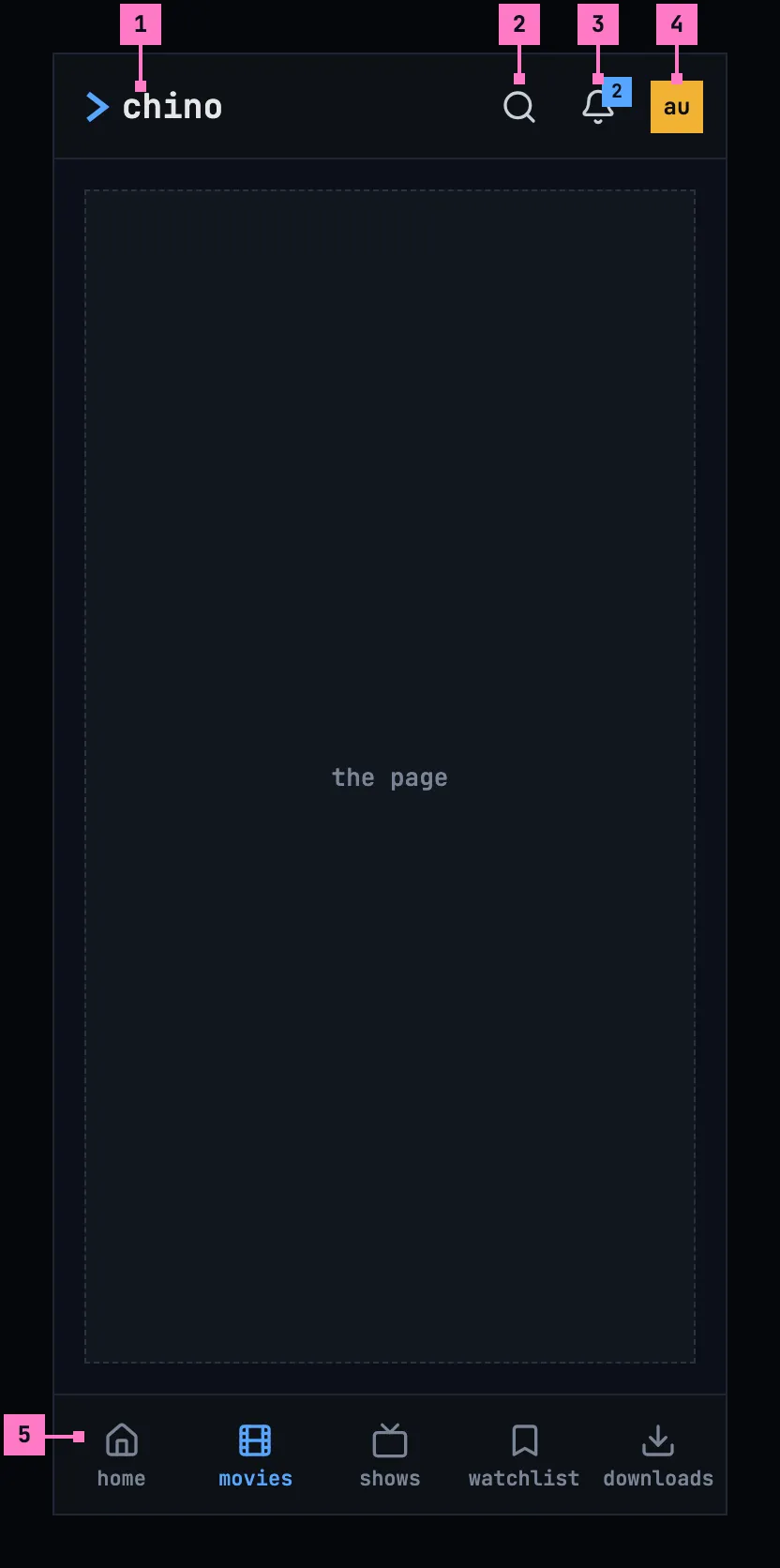
Figure 2.8: The frame on a phone held upright, at 360 × 780 dp.
- The product's name, as on a computer.
- The search is an icon. It opens a field across the whole width of the bar, with the keyboard (chapter 9).
- The bell, as on a computer. On a phone it opens a screen of its own.
- The avatar, as on a computer. Its menu opens from the bottom of the screen, with the same items as figure 2.7.
- The tabs: home, movies, shows, watchlist and downloads, each an icon with its name. The current tab is blue. Zap, the computer's fifth view, starts from home on a phone (chapter 4), and downloads take its place, because the phone keeps titles to watch offline (chapter 13).
The downloads tab is there while the server offers downloads or something is on the phone (chapter 13); without it, the phone has four tabs. A screen opened from a view, such as settings or a title's page, shows a back arrow and its name in place of the bar. The tabs stay.
Figure 2.9 shows the web on a phone. It has no downloads, so zap stays the fifth tab.
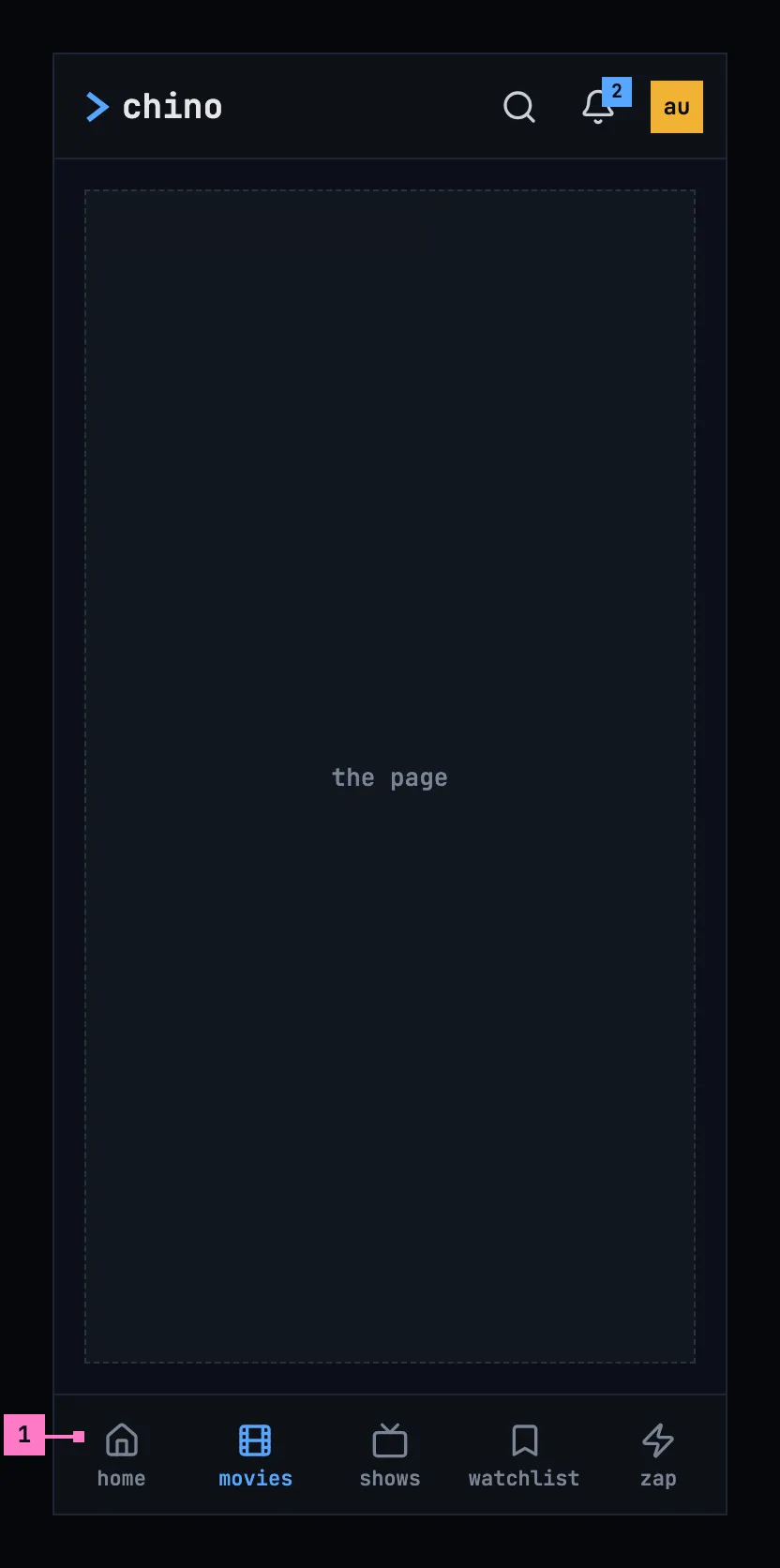
Figure 2.9: The web on a phone held upright, at 360 × 780 dp.
- The tabs of the web on a phone: home, movies, shows, watchlist and zap. The rest of the frame is as in figure 2.8.
2.4.2 Held sideways
Section titled “2.4.2 Held sideways”A phone held sideways is wide but low. Its frame keeps the phone's parts where the person knows them and gives the page the height, as figure 2.10 shows. The numbers mark what differs from figure 2.8.
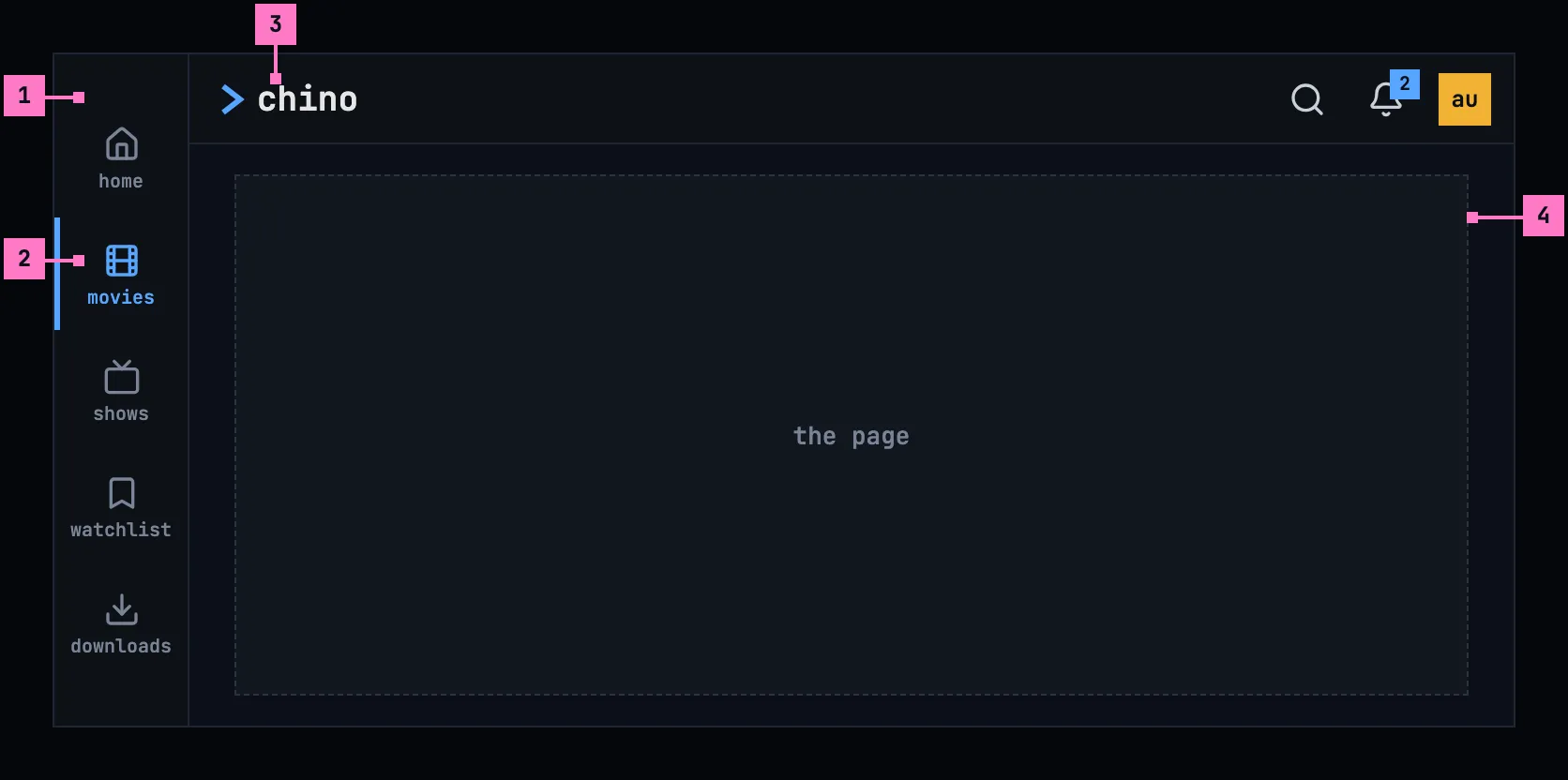
Figure 2.10: The frame on a phone held sideways, at 780 × 360 dp.
- The tabs, as a rail down the left edge, 72 dp wide: the same tabs in the same order, each its icon over its name.
- The current tab is blue, with a blue bar on its edge.
- The bar, 48 dp high instead of 56, with the product's name, the search icon, the bell and the avatar, as upright.
- The page takes the rest: the whole height under the bar.
This is the target for a phone held sideways: turned, a phone keeps the phone's frame, however wide it is, because the frame follows the screen's short side, not its width (section 2.3). The web held sideways has the same rail, with zap in place of downloads. The rail and the bar keep clear of the camera's cutout and of the phone's navigation bar, on whichever side they are. A screen opened from a view shows its back arrow and its name in the slimmer bar, and the rail stays.
Today's apps go by the width instead: the phone app from 600 dp and the web from 768 px take their wide layout, the computer's frame with the views as icons in a rail and settings at its foot, so a phone held sideways gets it (figure 2.3 and section 2.2.2).
2.4.3 Turning the phone
Section titled “2.4.3 Turning the phone”The frame turns with the phone, and turning it never loses the person's place: the current tab stays current, a screen opened from a view keeps its back arrow and its name, and the page stays as it was, scrolled where it was, its filters set, a menu that was open still open. Turned sideways, the tabs move from the foot of the screen to the rail at the left and the bar becomes slimmer; turned upright again, they go back.
2.5 The frame on a TV
Section titled “2.5 The frame on a TV”A TV has no top bar. Figure 2.11 shows the rail on the left, which holds the same things as the bar, one under the other.
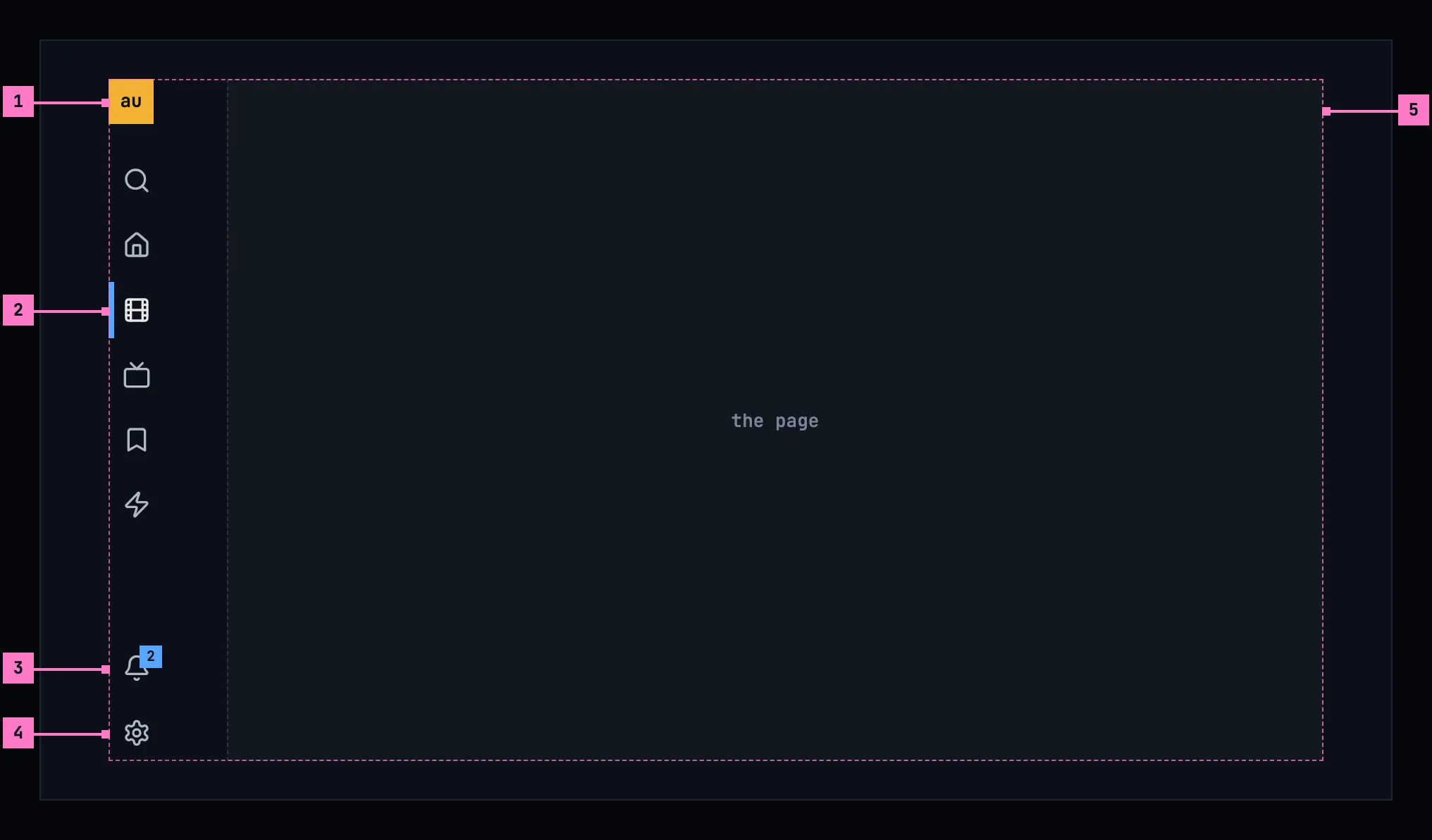
Figure 2.11: The frame on a TV, at 960 × 540 dp.
- The avatar, at the top. It opens who's watching, to switch to another account on this TV (chapter 3).
- The views, under the search: home, movies, shows, watchlist and zap. When the focus is on the page, the current view keeps a blue bar on its left, so the person always knows where they came from.
- The bell, at the foot. Its count works as on a computer.
- settings, the last item. On a TV, settings sit in the rail, because the avatar opens who's watching there.
- The page, right of the rail. Everything that matters on it stays inside the TV's safe area, the dashed outline: 48 dp from the left and right edges and 27 dp from the top and bottom, as the design system's TV focus sets out. Artwork may run to the edge.
Moving the focus into the rail opens it, with the names beside the icons, as figure 2.12 shows.
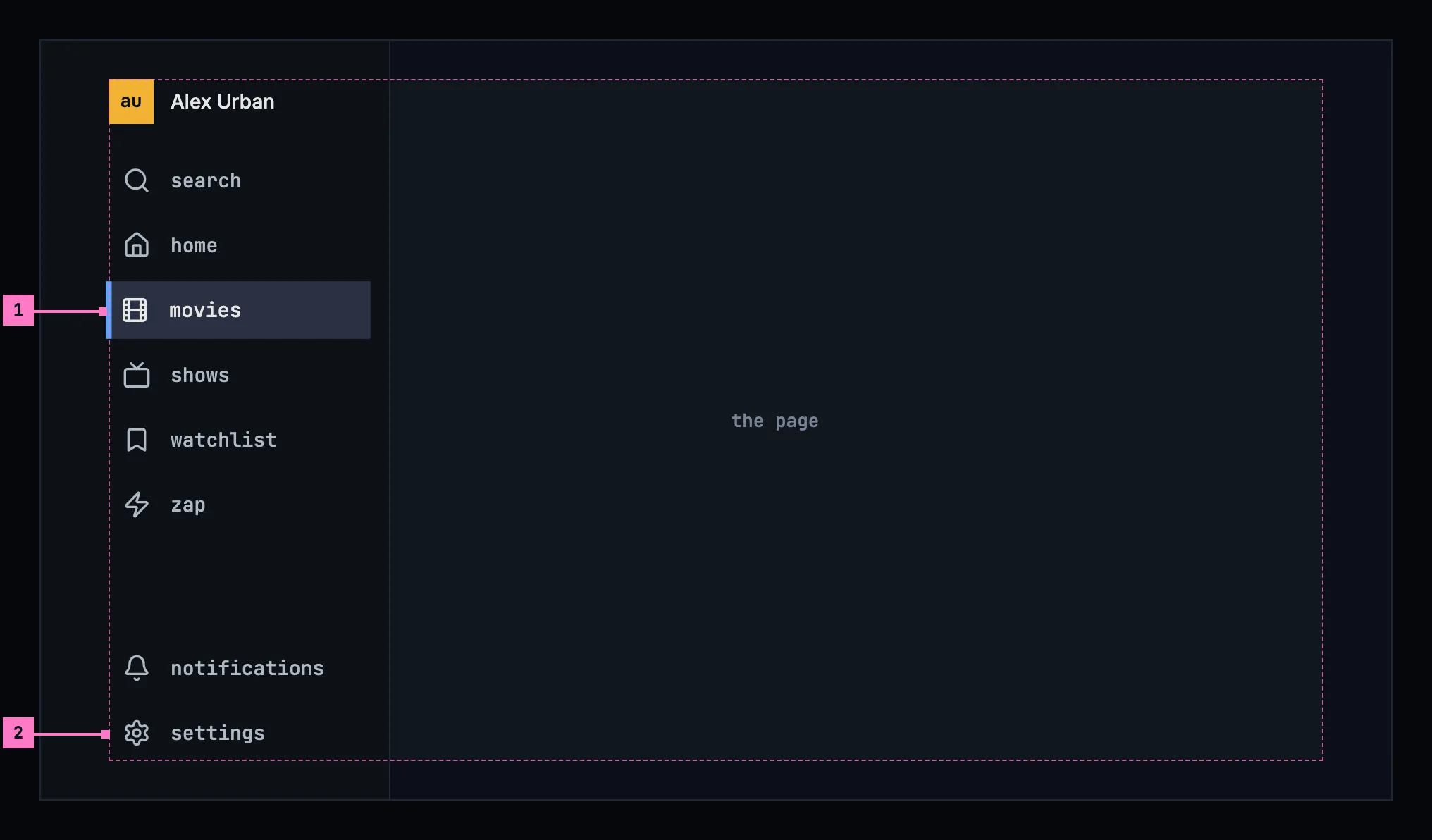
Figure 2.12: The rail opened, on a TV.
- The focused item fills its row in the focus colour, with the ring inside it, and grows by 2 %. Up and down move between the items, and OK opens one. Right, or Back, closes the rail and puts the focus back on the page.
- The items keep their order: search, the five views, then notifications and settings at the foot. The avatar sits at the top with the person's name.
2.6 Changes
Section titled “2.6 Changes”Every difference between section 2.2 and the target is one change in the table. A change names the apps it is built in, what they do today and the target, with the figure or the section that sets it out; it is built as its row says, and nothing else changes with it. Each change starts as proposed; once the owner approves it, it is built, one change at a time. A target that starts with “Recommended” was an open decision. The bell's count, its name and what it opens belong to chapter 15, what the search finds and its words to chapter 9, the avatar's look to chapter 3, and what settings and the account page hold to chapter 16.
| No. | Change | Apps | Today | Target | Status |
|---|---|---|---|---|---|
| 2.C1 | The avatar's menu, with settings in it | Web, Phone app | Web: account and sign out, without the name or the email address and without settings; it closes only with a click outside it or on the avatar, and on a phone it drops down under the avatar. Phone app: no menu; the avatar opens the account page | figure 2.7: the name and, quieter, the email address, then account, settings and sign out; Esc, a click outside it or on the avatar closes it, the focus back on the avatar; the arrow keys move between its items; on a phone it opens from the bottom of the screen (section 2.4.1). Built before 2.C2 and 2.C3, which take settings out of the views | proposed |
| 2.C2 | The computer's frame: the views in the top bar | Web | the views as icons alone in a side navigation down the left edge, the logo “>c” at its top and settings, a gear, at its foot; their names only tooltips and for screen readers, capitalised | figure 2.6: chino with the chevron at the left of the bar, then home, movies, shows, watchlist and zap as words, the current one brighter with a blue line under it; no side navigation; settings only in the avatar's menu (2.C1) | proposed |
| 2.C3 | The phone's frame held upright: the bar and five named tabs | Web, Phone app | Web: the bar a search field, the bell and the avatar, without the product's name; six tabs, icons alone, zap fifth and settings sixth. Phone app: the same bar; seven tabs on Android and six on iOS, icons alone, zap and settings among them; on Android downloads is left out where the server offers none and nothing is on the phone | figures 2.8 and 2.9: chino with the chevron, the search icon, the bell and the avatar in the bar; each tab its icon over its name: home, movies, shows, watchlist and downloads, four without downloads, and on the web zap in place of downloads; settings in the avatar's menu (2.C1); zap from home in the phone app (chapter 4) | proposed |
| 2.C4 | The phone's frame held sideways | Web, Phone app | by the width: the web from 768 px wide has the computer's frame, its views scrolling in their column on a phone held sideways (figure 2.3); the phone app from 600 dp wide, measured on the window, has an 80 dp rail with the logo, the tabs' icons and settings at its foot, under the upright bar | by the short side: a screen or a window less than 600 dp on its short side has the phone's frame held either way, sideways the tabs as a 72 dp rail at the left with their names and the bar 48 dp high (figure 2.10); 600 dp and more, the computer's frame (section 2.3) | proposed |
| 2.C5 | Every screen in the frame, but the player and zap | Web, Phone app, Android TV, Samsung TV | Web: a title's page, a person's page and the account page without the frame. Phone app: every screen opened from a tab covers the frame, tabs included, with its own top; zap keeps the top bar and the tabs. Android TV, Samsung TV: a title's page has no rail and no bar | every screen inside the frame except the player, and except zap in the phone app and on a TV; on a phone, a screen opened from a view has a back arrow and its name in place of the bar, and the tabs stay (section 2.4.1). This change builds the frame's part and the account page; the screens with a change of their own follow it: a title's page 6.C1, a person's page 7.C1, the phone app's notifications 15.C5 and zap in the phone app 10.C1 | proposed |
| 2.C6 | Web: an address for every view | Web | only the watchlist and the search have an address of their own; a reload on movies, shows, zap or settings opens home | each view and settings with its own address, so a reload, a link or back brings the person to it (section 2.3) | proposed |
| 2.C7 | The TV's rail holds the frame, and opens | Android TV, Samsung TV | a rail of icons alone, with the logo at its top, the five views and settings at its foot, which never opens, and a top bar with the search field, the bell and the avatar; shows named “Series” for a screen reader. Android TV: a focused item has the ring outside it, 5 % larger. Samsung TV: the arrow keys move to the nearest item, and the avatar opens settings | figures 2.11 and 2.12: one rail and no top bar, with the avatar at its top, then search, home, movies, shows, watchlist and zap, the bell and settings at its foot; moving the focus into it opens it with the names, the focused row filled in the focus colour with the ring inside, 2 % larger; up and down move, OK opens, right or back closes it; the current view keeps a blue bar; the avatar opens who's watching (3.C11) | proposed |
| 2.C8 | The TV keeps to the safe area | Android TV, Samsung TV | the rail starts at the screen's left edge and the bar at its top; Android TV keeps the safe area only in the player and zap, the Samsung TV nowhere | everything that matters inside the safe area, 48 dp from the left and right edges and 27 dp from the top and bottom (figure 2.11, part 5) | proposed |
| 2.C9 | The avatar's name for a screen reader | Web, Phone app, Android TV, Samsung TV | Web: the button “Account”, the initials inside it named by the account's name. Phone app, Android TV: no name of its own. Samsung TV: the account's name | “Alex Urban, user menu” on a computer and a phone; on a TV the account's name, “Alex Urban” (section 2.7) | proposed |
| 2.C10 | help in the avatar's menu | Web, Phone app | no help | Recommended: help between settings and sign out, as the design system's top bar has it, once there is a guide for the people watching; until then none, so the menu never offers something with nothing behind it | proposed |
2.7 Words
Section titled “2.7 Words”| Where | Text |
|---|---|
| The product's name | chino |
| The views | home · movies · shows · watchlist · zap |
| The phone's tabs | home · movies · shows · watchlist · downloads |
| The web's tabs on a phone | home · movies · shows · watchlist · zap |
| The search's placeholder on a computer | Search movies, shows and people |
| The search on a phone | the icon, named “search” for screen readers; the field it opens says “Search” |
| The bell, for screen readers | notifications, 2 unread |
| The avatar, for screen readers | Alex Urban, user menu |
| The avatar on a TV, for screen readers | Alex Urban |
| The avatar's menu | account · settings · sign out |
| The TV's rail | search · home · movies · shows · watchlist · zap · notifications · settings |