16 Settings and account
Section 16.2 describes settings and the account as they are deployed today. The sections after it are the target, the screens as they are meant to be, and section 16.7 lists every difference between the two as a numbered change. Only a change the owner has approved is built, one change at a time; anything no change names stays as it is deployed.
The chapter covers settings and the account: what can be set, who is signed in, signing out, removing an account from a device, deleting it, and reporting a bug. The frame around these screens is in chapter 2; connecting to a server and signing in are in chapter 3.
16.1 Purpose
Section titled “16.1 Purpose”Settings hold what a person sets once and then forgets: the languages titles play in, how episodes follow one another, and on a phone how titles download. The account page says who is signed in, and it is where the person signs out or deletes the account.
Neither is a view of its own. On a computer and a phone, both open from the avatar's menu (chapter 2); on a phone they open as screens with a back arrow and their name in place of the bar. On a TV, settings is the last item of the rail, and the account page is the first row of settings.
A setting applies the moment it changes, as the design system's forms and settings has it for switches: there is no save button. Settings are kept on the device, for everyone who watches on it.
16.2 As deployed
Section titled “16.2 As deployed”This section says what the four apps' settings and account pages do as of 6 November 2026: the web as the public demo showed it that day, on the same build as production, and the apps as their code had them that day. The phone app, Android TV and the Samsung TV are described from their code until screenshots of them are taken. The Samsung TV app isn't released yet.
16.2.1 The web
Section titled “16.2.1 The web”Figures 16.1 to 16.6 are screenshots of the web's settings, its account page and the question before an account is deleted. Figure 16.1 shows settings on a computer.
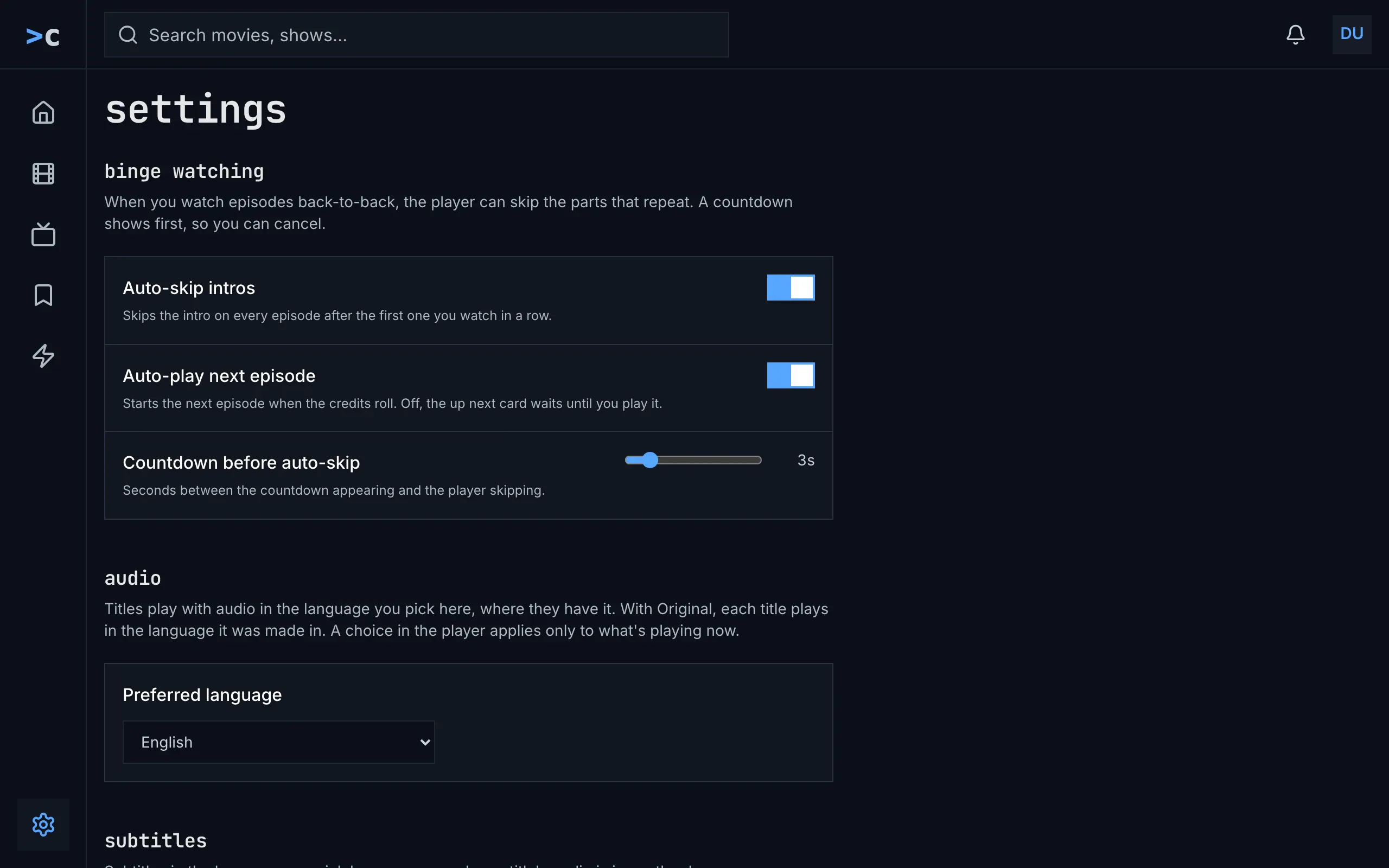
Figure 16.1: The web's settings as deployed on 6 November 2026, on a computer, at 1280 × 800.
- Bottom left: settings in the side navigation, its gear blue: settings is one of the frame's views (chapter 2).
- binge watching, the first group, with a line of its own under its name: “When you watch episodes back-to-back, the player can skip the parts that repeat. A countdown shows first, so you can cancel.”
- Auto-skip intros and Auto-play next episode, two switches, on, each with its line: “Skips the intro on every episode after the first one you watch in a row.” and “Starts the next episode when the credits roll. Off, the up next card waits until you play it.”
- Countdown before auto-skip: a slider from 1 to 15 seconds with the value beside it, “3s”, over “Seconds between the countdown appearing and the player skipping.”
- audio, with its text under the group's name, then a card with Preferred language, the browser's own list: “Original”, then every language in alphabetical order. English is set until it is changed.
Figure 16.2 shows the end of the same page.
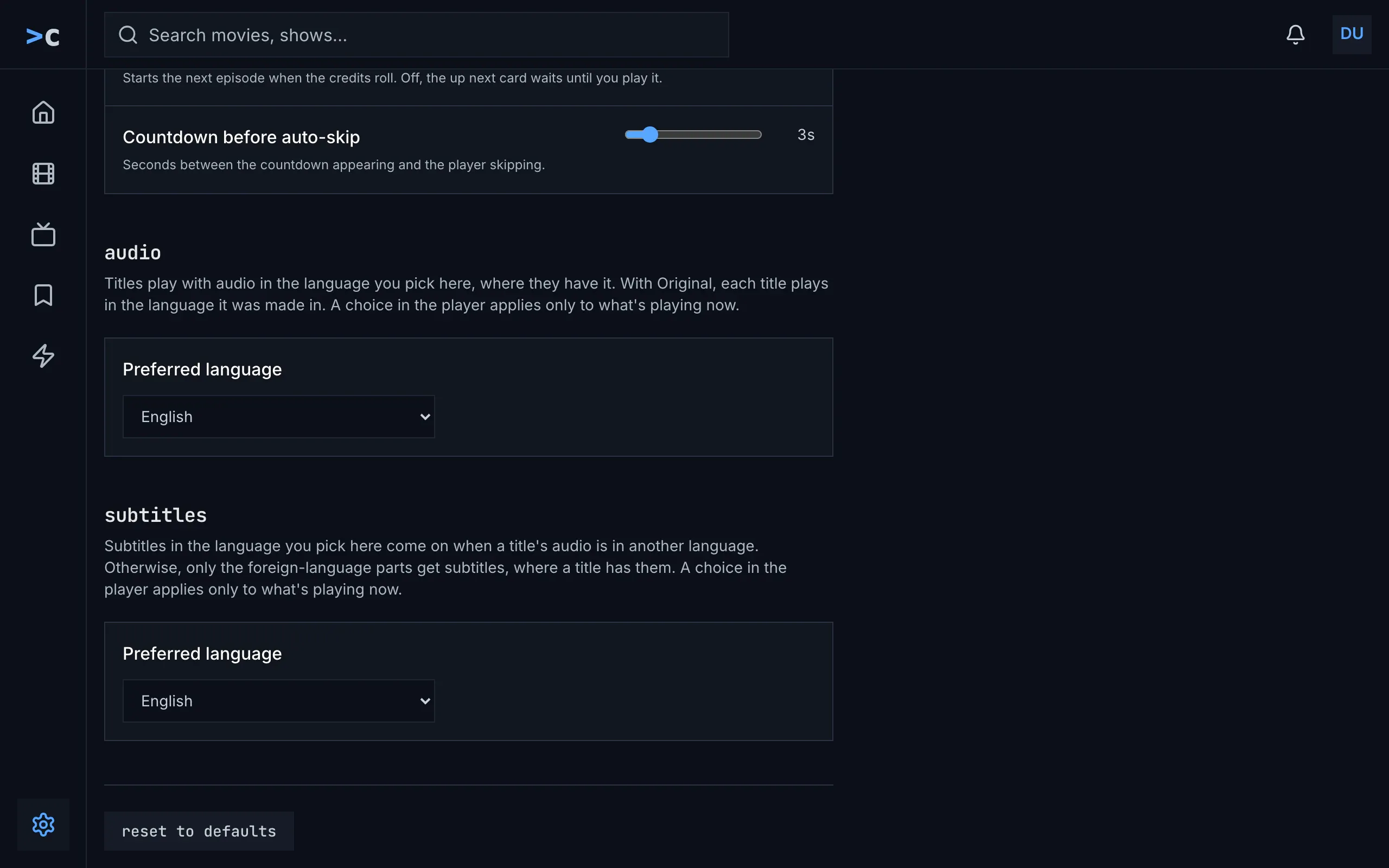
Figure 16.2: The web's settings as deployed on 6 November 2026, further down, on a computer, at 1280 × 800.
- subtitles, with its text, then Preferred language: a list of every language, because the demo's server names no subtitle languages; on a server that names a few, they are a row of buttons, with “off” first. English is set until it is changed.
- reset to defaults, at the page's end, sets every setting back at once, without asking.
The demo's server takes no reports, so its settings have no feedback group. On a server that takes them, feedback comes before reset to defaults, with “Reports go to the people who run this server, with a screenshot of the page if you attach one.”, a row named “Report a bug” with “Opens a short form. Crashes and playback failures are also reported automatically, without a screenshot.”, and report a bug. Settings has no version. While the server's subtitle languages load, their card shows the loader with “Loading the subtitle languages…”; when they couldn't load, “couldn't load the subtitle languages”, the reason and try again. The settings are kept in the browser.
Figure 16.3 shows settings on a phone.
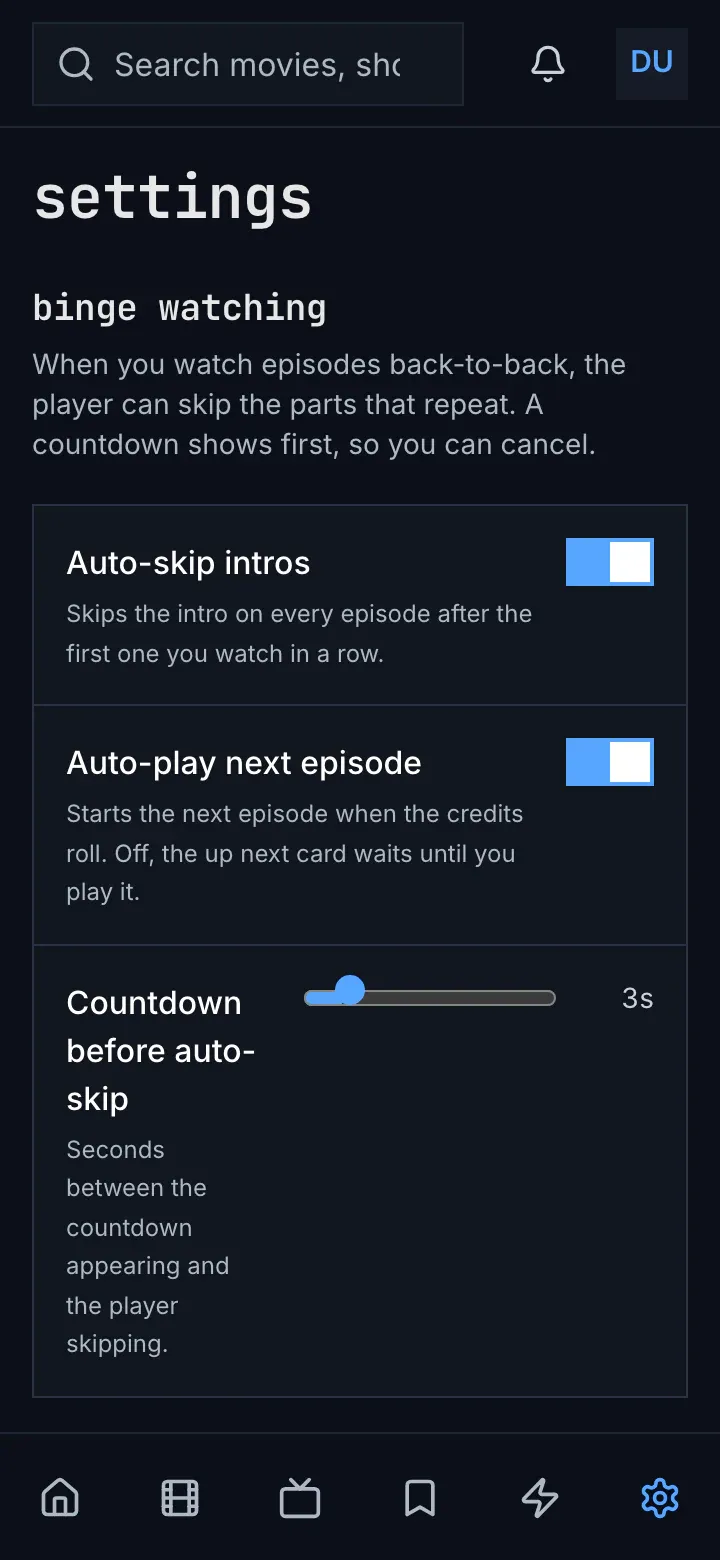
Figure 16.3: The web's settings as deployed on 6 November 2026, on a phone held upright, at 360 × 780.
- The tabs, with settings the sixth, blue.
- Countdown before auto-skip: its name and its line wrap in a narrow column beside the slider.
The rest is as in figure 16.1, the groups one under another. Figure 16.4 shows the account page on a computer, which account in the avatar's menu opens.
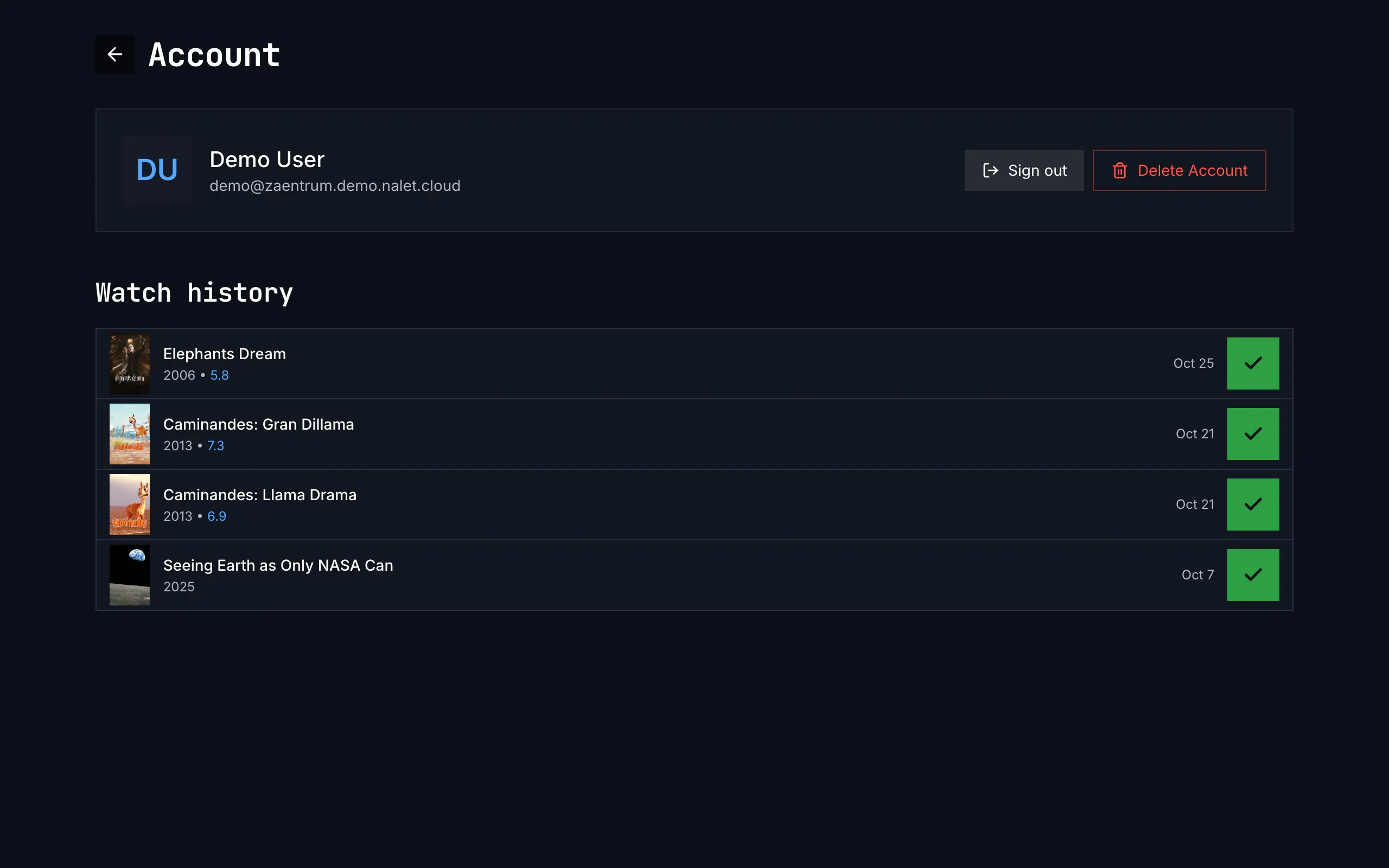
Figure 16.4: The web's account page as deployed on 6 November 2026, on a computer, at 1280 × 800.
- Top left: back and the heading, “Account”, capitalised. The page has no frame: no top bar and no side navigation.
- Who is signed in: the avatar, the name and the email address, as the sign-in gives them.
- Sign out and Delete Account, capitalised, in the body face; Delete Account red, with a red outline. Sign out signs out at once, without asking, at the server's sign-in service too.
- Watch history, capitalised: what the person has finished, newest first, up to 60 titles, here four movies, each with its year and its rating; an episode stands under its show's name, with its code and its own name. Each row has the day it was finished, “Oct 25”, and the watched mark, a dark check on green, which takes the title off the list.
Figure 16.5 shows the account page on a phone.
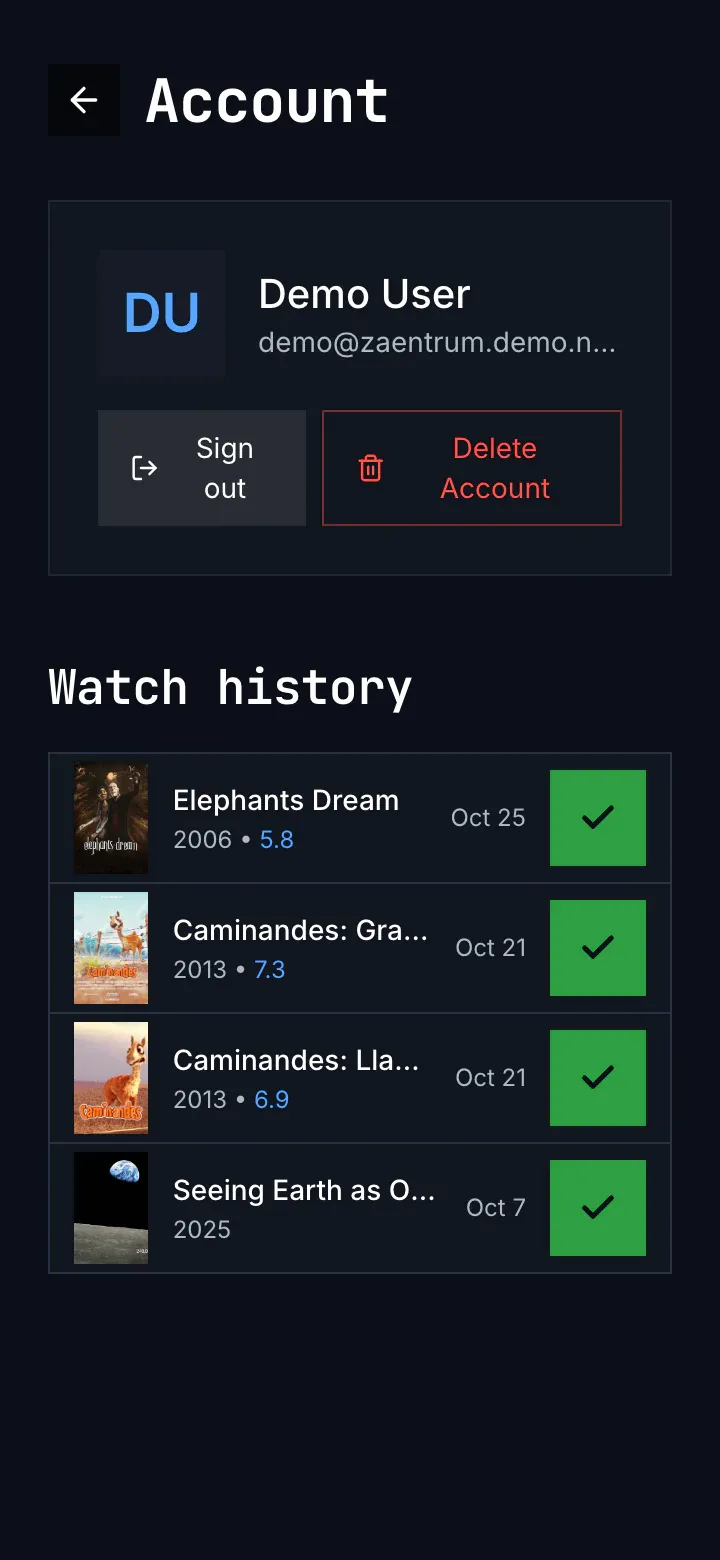
Figure 16.5: The web's account page as deployed on 6 November 2026, on a phone held upright, at 360 × 780.
- Sign out and Delete Account take a row of their own under the name, each half the width, their words on two lines.
- The email address is cut short, with an ellipsis.
Before anything is watched, the history is one line without a heading: “Nothing watched yet. A movie or an episode shows here once you finish it, or mark it as watched.” A history that couldn't load shows the same line. Figure 16.6 shows the question before an account is deleted.
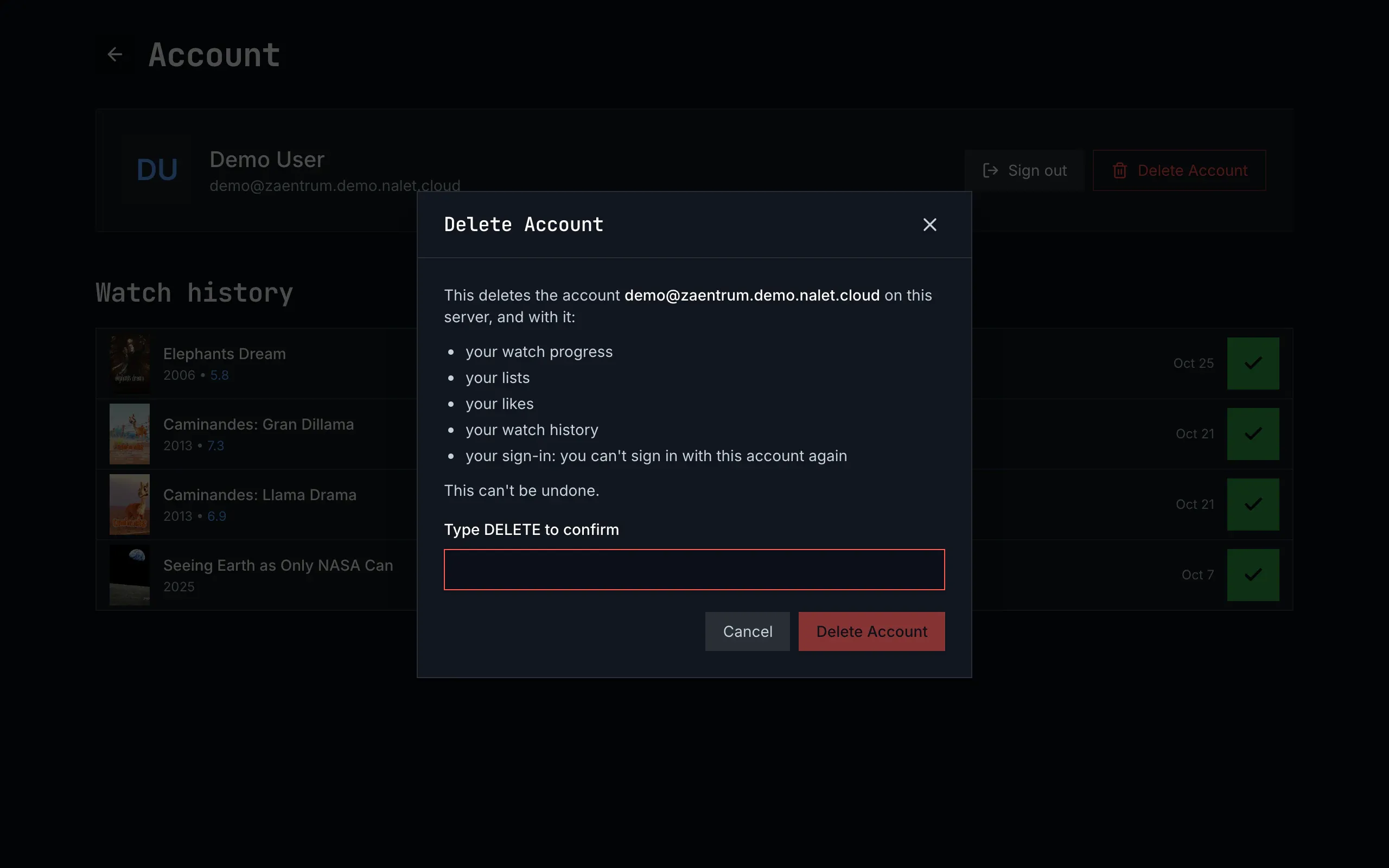
Figure 16.6: The web's delete account dialog as deployed on 6 November 2026, on a computer, at 1280 × 800.
- The title, “Delete Account”, capitalised, with ✕.
- What goes, the target's list, with the account named by its email address “on this server”, without the server's name.
- Type DELETE to confirm: a field, edged in red, for the word.
- Cancel, and Delete Account filled red, dimmed until DELETE is typed.
After a deletion the web shows “account deleted”, with “Your account is deleted, with everything this server kept of you, and you're signed out.” and sign in. A server that refuses shows its reason under “Not Deleted”, one that deletes no accounts “Deleting your account isn't available on this server — ask its administrator.” under “Not Available”, and anything else its message under “Try Again Later”; after the first two, Cancel becomes Close.
report a bug opens a dialog headed “report a bug”: “What happened?” over a box, “What were you doing, what did you expect, what happened instead?”, the player's details under details with “Sent with the report.”, then “Attach a screenshot of the page”, off until it is ticked, which takes the screenshot, with retake, and cancel and send report. Sent, it says “Thanks for the report.” and “It went to the people who run this server as #482.”, or “The people who run this server already have this one. Your details were added to #482.”; not sent, “Couldn't file the report.” and the reason, or “Bug reporting is switched off on this server, so this report can't be filed.”
16.2.2 The phone app
Section titled “16.2.2 The phone app”Settings is the last tab, headed “Settings”, and its groups come in this order, headed in mixed case:
- Account: “Your account”, with the email address under it, which opens the account page; “Switch account”, with “Switch users or add another account”; “Sign out”, with the account's name under it; and “Delete Account” in red, with “Delete your account and what this server keeps of it”.
- Binge watching: three switches without a line under them, on at first: “Auto-skip intros & recaps”, “Auto-skip credits” and “Auto-play next episode”. There is no countdown; the player counts 5 seconds. The player reads only Auto-play next episode, so it skips nothing by itself.
- Downloads, in the Android app where the server offers them: “Download quality”, the qualities with what an hour takes at each, the chosen one blue with a check mark, Medium (720p) at first, and “Download over Wi-Fi only”, on.
- Server: a row, “Change server”, with the server's address under it.
- Support, only where the server takes reports: a row “Report a bug”, with “Tell the people who run this server. The app's and the device's details go with your report.”
- Audio and Subtitles, last, each with the target's text. Audio offers “Original” and eight languages, English at first; subtitles “off”, then the server's subtitle languages, or every language where it names none, off at first. A field opens its menu under it, in the page, the chosen language blue with a small square before it.
There is no version and no reset. The account page opens from the avatar and from Your account: the avatar, the name and the email address with Sign out beside them, and the watch history, up to 60 titles, dated “Jun 12”, each with the watched mark that takes it off; it has no switch account and no delete account. While the history loads a spinner turns, and one that couldn't load reads “Nothing watched yet. A movie or an episode shows here once you finish it, or mark it as watched.”, as an empty one does.
Sign out asks first only where downloads would go or a cast would stop: “sign out”, “Your 23 downloads, 12.4 GB, are deleted from this phone.”, “Casting on Living Room TV stops.”, cancel and sign out; then the app opens who's watching, or sign in where no account is left. Remove account, on who's watching, always asks: “The 8 downloads of Anna, 2.6 GB, are deleted from this phone.”, or without downloads “This removes Anna from this phone. You'll need to sign in again to use the account.” Change server asks once the new server has answered, and only where downloads, anyone's, would go or a cast would stop, with “Your 31 downloads, 15 GB, are deleted from this phone.”; it says nothing of the other accounts, and then signs every account out and opens sign in.
Delete account, only in settings, is a dialog headed “delete account”: “This deletes the account alex@example.com on media.example.com, and with it:”, the target's list, the downloads' sentence where there are some, and “This can't be undone.”, with cancel and delete account, and “Deleting your account…” while it runs; nothing is typed. Its answers sit under “Not Deleted”, “Not Available” and “Try Again Later”, with the web's sentences; a deleted account goes without a word, to who's watching or sign in.
Report a bug, from Support or from the player's error, takes the screenshot before the dialog opens. The dialog is headed “Report a bug”; its box has no label, only “What went wrong? What did you expect to happen?”, and from the player it starts with “Playback failed while watching this item.” and the technical details. “Include screenshot”, with “Attached to the report”, is on until it is switched off. Cancel and Submit close it; sent, it says “Filed bug #482” or “Added to existing bug #482”, and “Thanks — the report reached the people who run this server.” Not sent, it says “Too many reports right now — try again in a few minutes.”, “Bug reporting isn't set up on this server.” or “Couldn't send the report. Check your connection and try again.”
16.2.3 Android TV
Section titled “16.2.3 Android TV”Settings opens from the rail's settings, headed “settings”, and each group's line sits under its controls:
- binge watching, with “Skip recurring parts back-to-back without leaving the player. A short countdown gives you a chance to cancel before each skip fires.”: “Auto-skip intros & recaps”, “Auto-skip credits” and “Auto-play next episode”, each with a line of its own and on and off buttons, on at first, and “Countdown before auto-skip”, − and + from 1 to 15, 5 s at first.
- audio and subtitles, each with the target's text and a row named “Language”. Its menu, “audio language” or “subtitle language”, opens over the page, the chosen language blue with a small square: for the audio “Original”, then every language, the one set and the TV's own first, English at first; for the subtitles “off”, then the server's subtitle languages, or every language, off at first.
- account, with “See your account and its watch history, sign in to another account or add one, or delete your account.”: see your account, switch account and delete account.
- server: “Connected to media.example.com.” and change server.
- feedback, only where the server takes reports, with the phone app's line and report a problem.
There is no version. The account page, headed “account” and inside the frame, shows the avatar, the name and the email address, and the watch history, up to 60 titles, dated “Jun 12”, without the watched mark: OK on a row opens the title. It says “Loading your account…” while it loads, “Nothing watched yet. Watched items appear here once you finish a movie or episode (or mark one watched on a detail page).” when it is empty, and “couldn't load your watch history” when it couldn't load. Nothing signs out: an account leaves the TV by its long press on who's watching (chapter 3), by delete account, or with a change of server, which asks nothing and signs every account out.
Delete account is a screen of its own, without the frame: the phone app's words, headed “delete account”, the focus on cancel, then delete account, and last “Press BACK to keep your account.”; its answers are the phone app's, and a deleted account goes without a word. report a problem opens a list under “What's going wrong? Pick the closest match.”, in sentence case: “Playback won't start”, “Video stutters or freezes”, “Audio out of sync”, “Subtitles wrong or missing”, “App is slow” and “Something else”. OK on one sends it at once, with “Sending the report…”, and then says “Filed bug #482” and “Sent to the people who run this server.”, with Close; not sent, the phone app's sentences.
16.2.4 Samsung TV
Section titled “16.2.4 Samsung TV”Settings opens from the rail's settings and from the avatar, headed “Settings”, its groups in mixed case, each with a line of its own:
- Binge watching: Android TV's rows and lines, each switch one button that reads ON or OFF, and the countdown, “Seconds the countdown stays on screen before the player skips. Shorter feels snappier; longer gives more time to cancel.”, − and + from 1 to 15, 10 s at first.
- Audio, with “Default audio language. Picks the closest matching track on each item. Original keeps whatever the source marks as the default track.”: nine buttons, “Original”, “English”, “Deutsch”, “Français”, “Español”, “Italiano”, “日本語”, “Português” and “Nederlands”, Original at first.
- Subtitles, with “Your subtitle language. Subtitles in it come on by default when a title's audio is in another language. Off keeps them off by default. Forced subtitles, for the lines a title's audio has in another language, come on either way.”: “Off” and the same eight, Off at first.
- Account, with “Sign in as a different user on this TV, sign out of the current one, or delete your account.”: the name and the email address, and Switch account, Sign out and Delete Account.
- Server: “Connected to media.example.com.”, “Connecting to a different server signs out the accounts on this one.” and Change server, which signs every account out at once, before an address is typed, and asks nothing.
- Feedback, whether or not the server takes reports: “Something not working? File a bug straight to the dev backlog — no typing needed, device and app details ride along automatically.” and Report a problem, which opens Android TV's list; sent, it says “Filed bug #482” and “Thanks — the report landed on the dev backlog.”
There is no version, no account page and no watch history. Sign out asks nothing and takes the account off the TV only: another account becomes the active one and settings stays, or, with none left, sign in asks for a new code. Delete Account is a screen of its own, without the frame, with Android TV's words, headed “Delete Account”, the focus on Cancel; after a deletion the next account's home opens, or sign in.
16.2.5 Feature by feature
Section titled “16.2.5 Feature by feature”The table compares the four apps feature by feature. “—” is a feature the app doesn't have.
| Feature | Web | Phone app | Android TV | Samsung TV |
|---|---|---|---|---|
| Where settings opens | the gear at the foot of the side navigation; on a phone, the sixth tab | the last tab | the rail's settings | the rail's settings, and the avatar |
| Its heading | “settings” | “Settings” | “settings” | “Settings” |
| The groups, in order | binge watching, audio, subtitles, feedback, then reset to defaults | Account, Binge watching, Downloads, Server, Support, Audio, Subtitles | binge watching, audio, subtitles, account, server, feedback | Binge watching, Audio, Subtitles, Account, Server, Feedback |
| A group's own line | under binge watching, audio and subtitles | none | under each group's controls | under each group's heading |
| Auto-skip | “Auto-skip intros”, “Skips the intro on every episode after the first one you watch in a row.” | “Auto-skip intros & recaps”, without a line; the player doesn't read it | “Auto-skip intros & recaps”, “Skips the title sequence and any "Previously on…" recap at the top of an episode.” | as on Android TV |
| Auto-skip credits | — | a switch the player doesn't read | “Auto-skip credits”, on | “Auto-skip credits”, on |
| Auto-play next episode | with the target's line | a switch without a line | “Starts the next episode automatically when credits roll.” | as on Android TV |
| The controls | switches | switches | on and off buttons | one button, ON or OFF |
| The countdown | “Countdown before auto-skip”, a slider from 1 to 15, 3 s at first | none: the player counts 5 s | − and +, 1 to 15, 5 s at first | − and +, 1 to 15, 10 s at first |
| The audio language | “Preferred language”, the browser's list: Original, then every language in alphabetical order; English at first | Original and eight languages; English at first | “Language”: Original, then every language, the one set and the TV's own first; English at first | nine buttons, each language in its own words; Original at first |
| The subtitle language | “Preferred language”: off, then the server's languages as buttons, or every language as the browser's list; English at first | off, then the server's languages, or every language; off at first | “Language”: off, then the server's languages, or every language; off at first | Off and eight buttons; Off at first |
| The texts under them | the target's | the target's | the target's | its own |
| A language's menu | the browser's own list | under the field, in the page; the chosen one blue with a small square | over the page; the chosen one blue with a small square | buttons, no menu |
| Downloads | — | Android: the qualities with an hour's size, the chosen one blue with a check mark; Download over Wi-Fi only, on | — | — |
| The server | — | a row, “Change server”, with the address under it | “Connected to media.example.com.”, change server | the same, with “Connecting to a different server signs out the accounts on this one.” |
| Report a bug in settings | feedback, only where the server takes reports | “Support”, only where the server takes reports | feedback, only where the server takes reports; report a problem | Feedback, always; Report a problem |
| The version | none | none | none | none |
| Reset to defaults | reset to defaults, without asking | — | — | — |
| The account page | “Account”, without the frame, from the avatar's menu | “Account”, from the avatar and Your account | “account”, in the frame, from see your account | none |
| Sign out | on the account page and in the avatar's menu; asks nothing; at the sign-in service too | on the account page and in settings; asks where downloads go or a cast stops | none | in settings; asks nothing; the account off the TV only |
| After a sign-out | the sign-in service sends the browser back to the site | who's watching, or sign in | — | another account, settings staying, or sign in |
| Switch account | — | in settings, to who's watching | in settings, to who's watching | in settings: a list over the page |
| Delete account | on the account page, a dialog | in settings, a dialog | in settings, a screen of its own | in settings, a screen of its own |
| Its question | “Delete Account”, the account “on this server”, “Type DELETE to confirm”, a filled red button | “delete account”, the account on media.example.com, the downloads' sentence | “delete account”, the same, “Press BACK to keep your account.”, the focus on cancel | “Delete Account”, the same, the focus on Cancel |
| Its answers | under “Not Deleted”, “Not Available” and “Try Again Later” | the same | the same | the same |
| After a deletion | “account deleted”, with sign in | who's watching or sign in, without a word | the same | the next account's home, or sign in |
| The watch history | on the account page: up to 60, “Oct 25”, the watched mark takes a title off | the same, “Jun 12” | up to 60, “Jun 12”; OK opens the title; no mark | — |
| Nothing watched yet | “Nothing watched yet. A movie or an episode shows here once you finish it, or mark it as watched.”, without a heading | the same | “Nothing watched yet. Watched items appear here once you finish a movie or episode (or mark one watched on a detail page).” | — |
| The history couldn't load | it reads as nothing watched | it reads as nothing watched | “couldn't load your watch history” | — |
| Report a bug: the screenshot | off until ticked, then taken of the page under the dialog | taken before the dialog opens, attached unless switched off | none | none |
| Its words | “What happened?”, cancel, send report | no label, “What went wrong? What did you expect to happen?”, Cancel, Submit | six choices in sentence case; OK sends | as on Android TV |
| A report sent | “Thanks for the report.”, “It went to the people who run this server as #482.” | “Filed bug #482”, “Thanks — the report reached the people who run this server.” | “Filed bug #482”, “Sent to the people who run this server.” | “Filed bug #482”, “Thanks — the report landed on the dev backlog.” |
| A report not sent | “Couldn't file the report.” and the reason | “Couldn't send the report. Check your connection and try again.”, and two others | the phone app's sentences | the phone app's sentences |
| Remove account's question | — | always; without downloads “This removes Anna from this phone. You'll need to sign in again to use the account.” | always: “You'll need to sign in again to use this account on this TV.” | — |
| Change server | — | asks once the new server has answered, where downloads go or a cast stops; then every account signed out | asks nothing; a new server signs every account out | signs every account out at once, before an address is typed; asks nothing |
16.3 Settings
Section titled “16.3 Settings”16.3.1 On a computer
Section titled “16.3.1 On a computer”Figure 16.7 shows settings on a computer: the heading, then the groups in two columns, each a heading over a card.
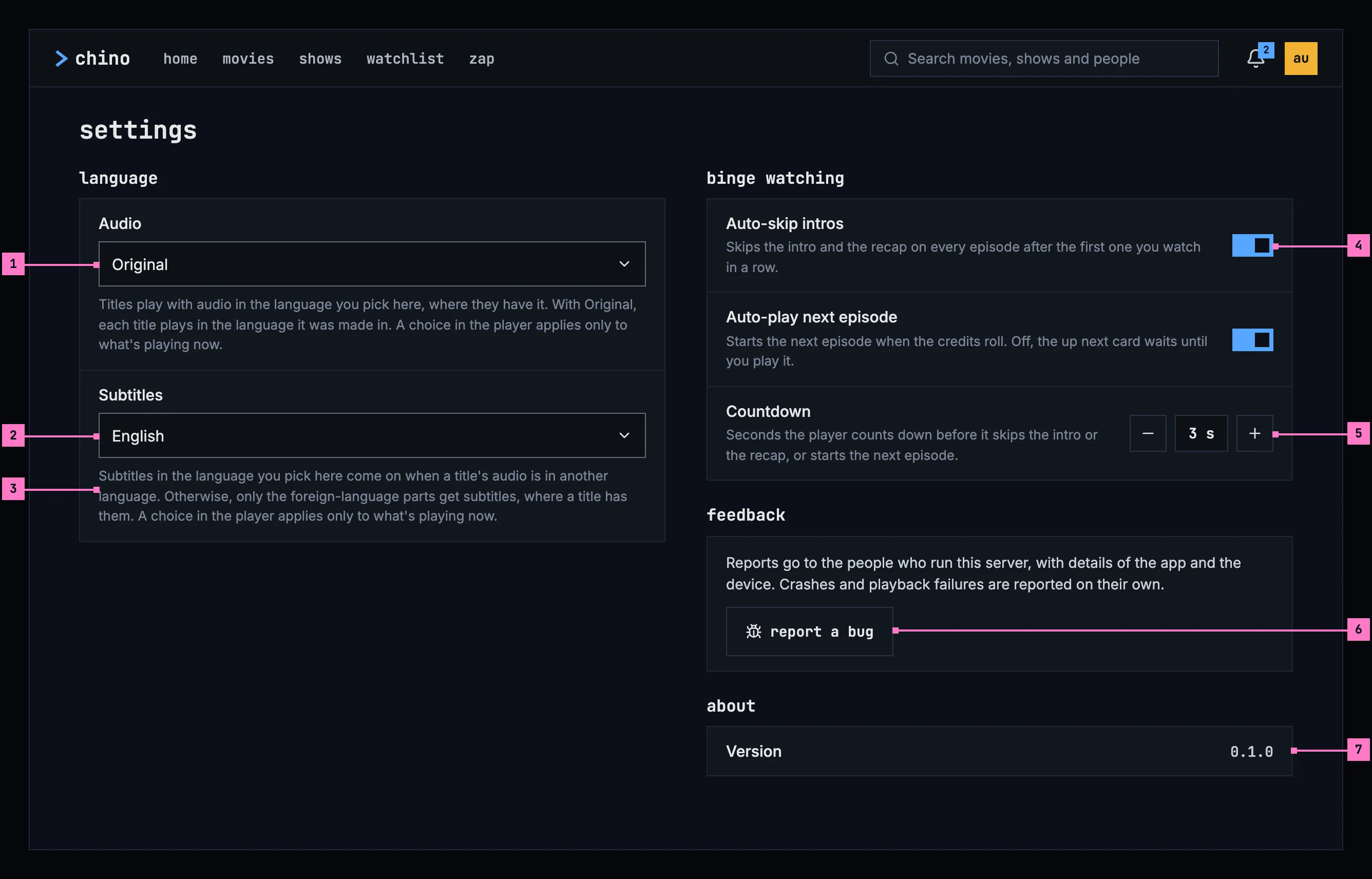
Figure 16.7: Settings on a computer, at 1280 × 800.
- Audio, the language titles play in: “Original” or a language (section 16.4.1).
- Subtitles, the language subtitles come on in: “off” or one of the server's subtitle languages (section 16.4.1).
- The text under a setting says what it does. The two language settings have the same text in every app, the audio's from chapter 11 and the subtitles' from chapter 12.
- A switch applies at once, with nothing to save, and says what it does in the line under its name (section 16.4.2).
- The countdown, in seconds, with − and + on either side.
- report a bug, only where the server takes reports (section 16.4.5).
- Version, the app's version (section 16.4.6).
16.3.2 On a phone held upright
Section titled “16.3.2 On a phone held upright”Figure 16.8 shows settings on a phone, where they open as a screen of their own. The groups of figure 16.7 come one under the other; the numbers mark what differs.
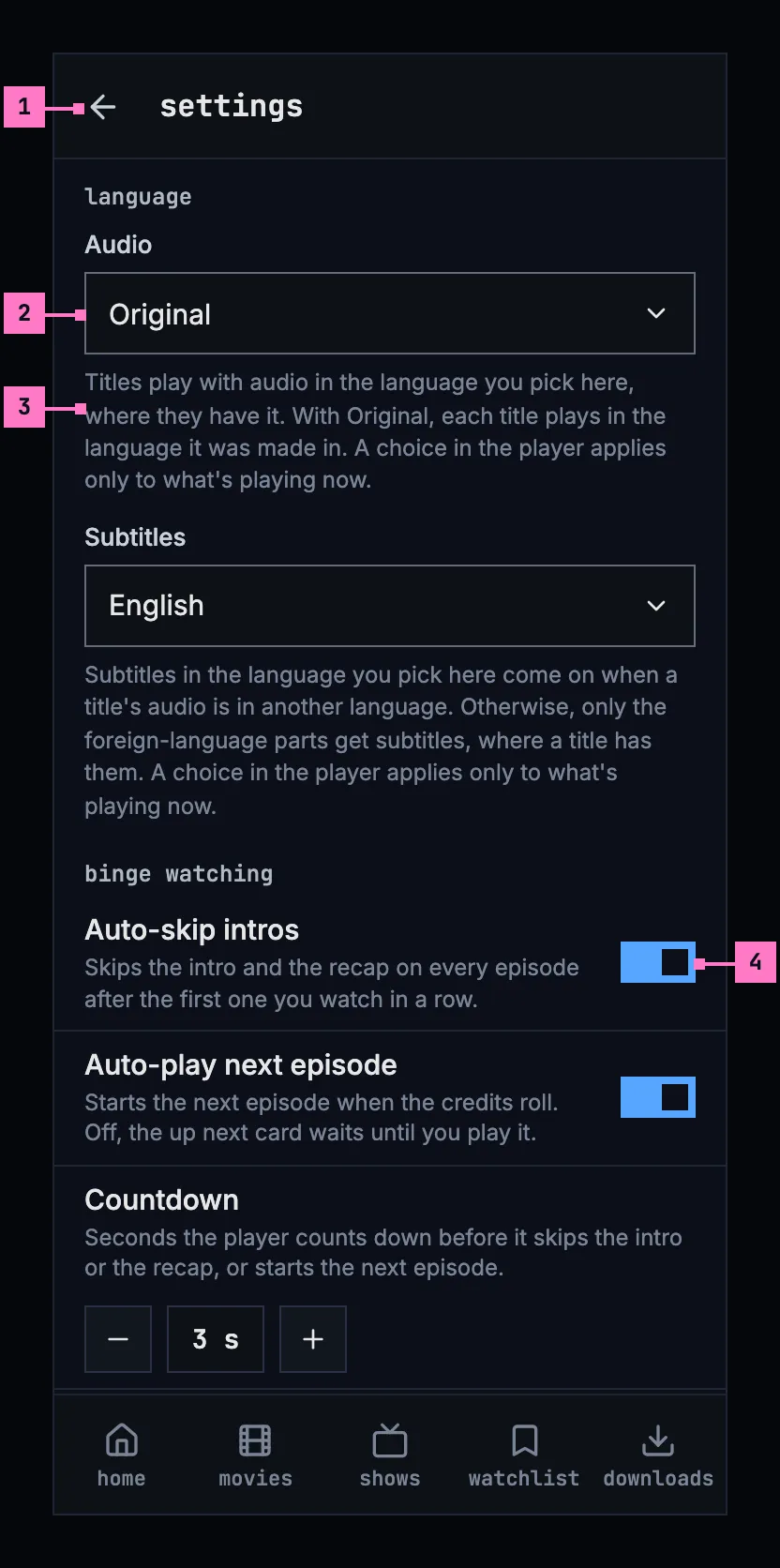
Figure 16.8: Settings on a phone held upright, at 360 × 780 dp.
- The back arrow goes back to the screen settings were opened from. The tabs stay, as chapter 2 describes.
- A language field opens a menu of one choice under it, inside the page and as wide as the field. The chosen language is in the accent blue, with a small filled square before it, as in the player's menus (chapter 11). A long menu scrolls within itself.
- The text under the field, as on a computer.
- The switches sit at the end of their rows, and a tap anywhere on the row flips them.
Figure 16.9 shows the end of the page, which on a phone holds two groups more.
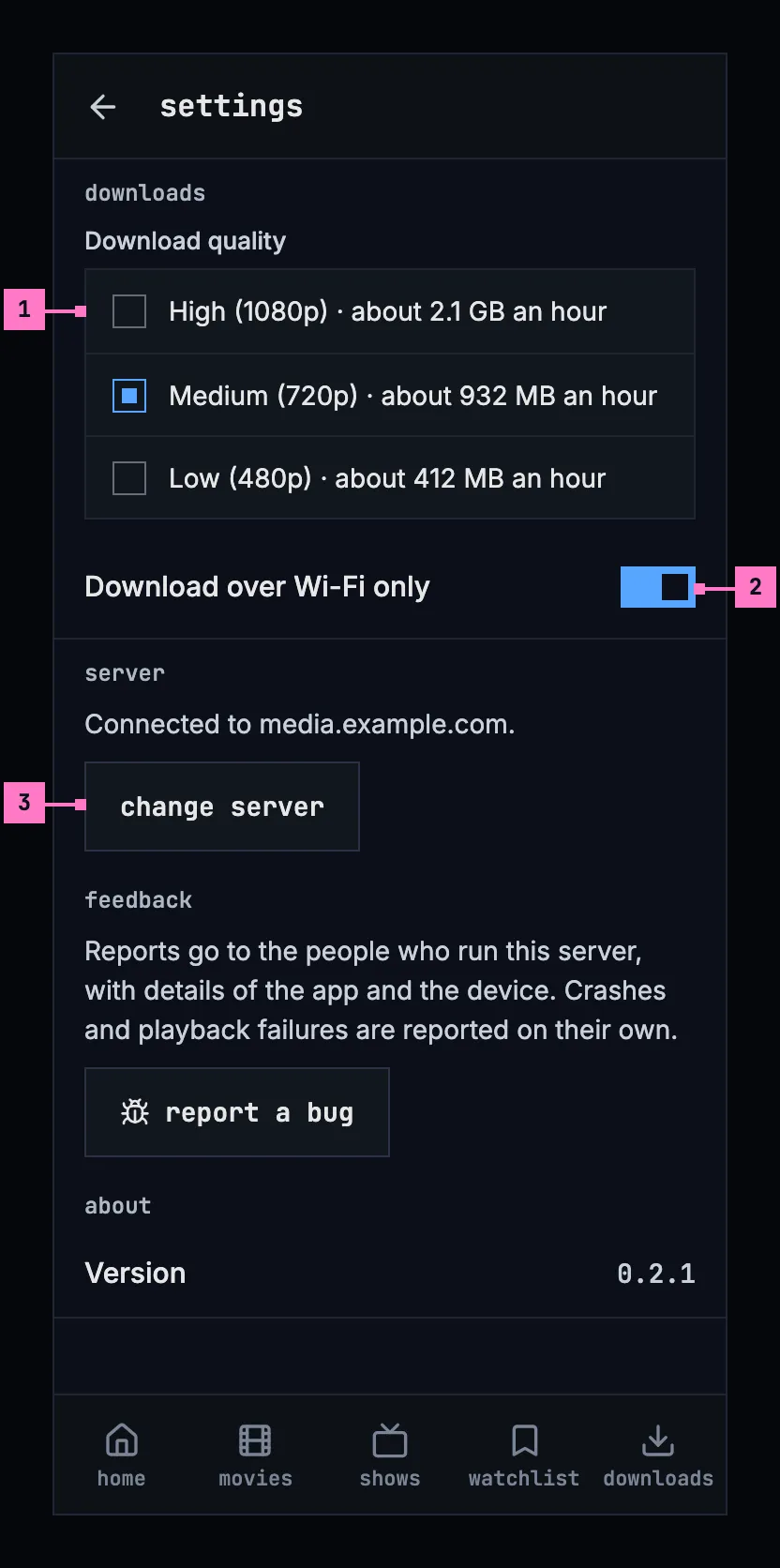
Figure 16.9: Settings on a phone held upright, further down.
- downloads: the quality titles download in, each with what an hour takes at it, as chapter 13 specifies. The group shows only where the phone keeps downloads and the server offers them.
- Download over Wi-Fi only, on until it is switched off (chapter 13).
- server: the server the app is connected to, and change server (section 16.4.4).
The groups feedback and about follow, as on a computer. The web on a phone has the layout of figure 16.8, without downloads and server.
16.3.3 On a phone held sideways
Section titled “16.3.3 On a phone held sideways”Figure 16.10 shows settings on a phone held sideways. The page has room for two columns, so the groups go in two, as on a computer; the numbers mark what differs from figure 16.8.
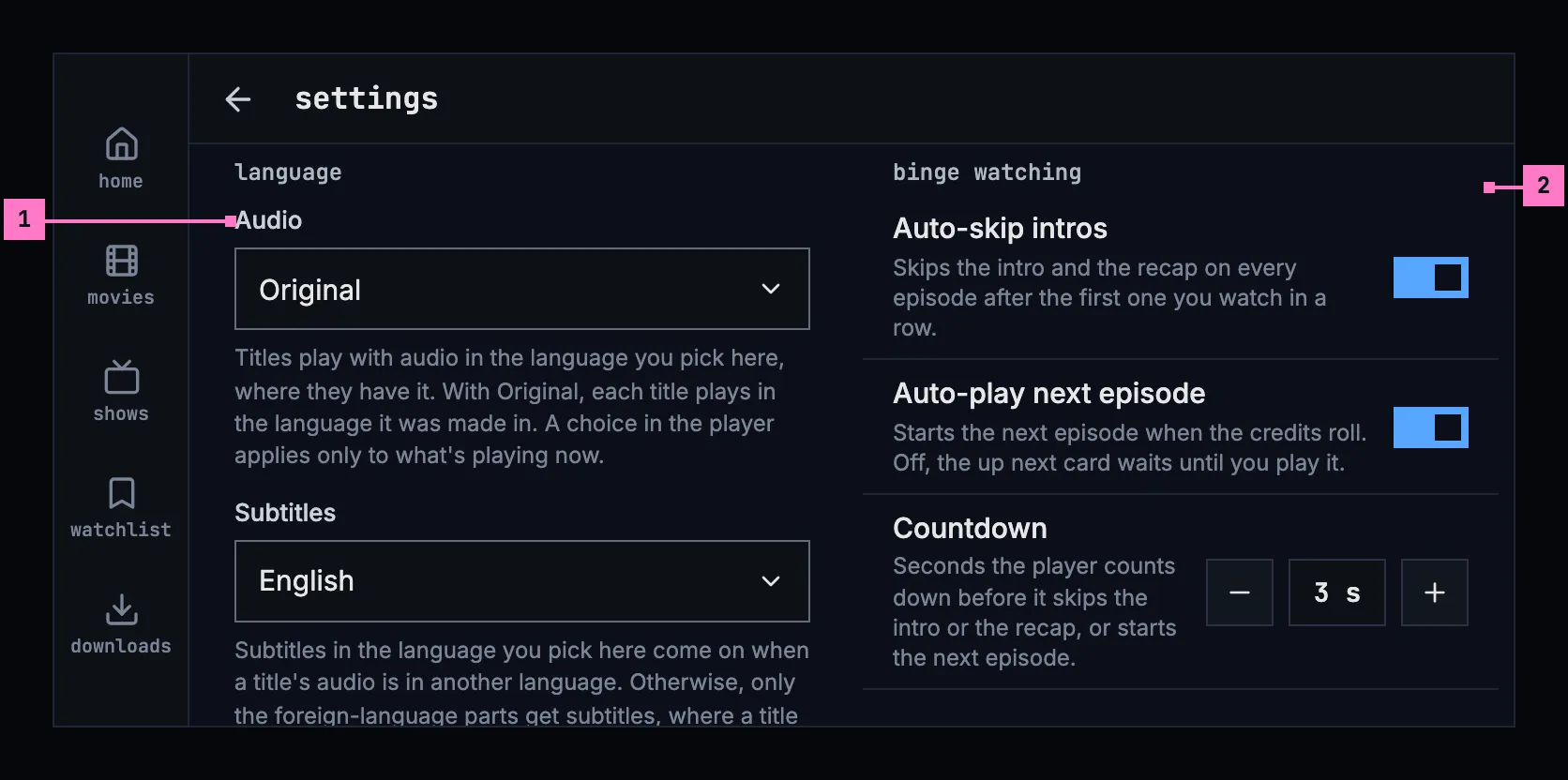
Figure 16.10: Settings on a phone held sideways, at 780 × 360 dp.
- language, alone in the left column, with Audio and Subtitles and their texts.
- binge watching heads the right column, and downloads, server, feedback and about follow under it, as the computer has its groups; the page scrolls.
The tabs are the rail at the left and the bar is slimmer, as on every screen of a phone held sideways (chapter 2). A language field's menu opens under it, within its column.
16.3.4 On a TV
Section titled “16.3.4 On a TV”Figure 16.11 shows settings on a TV, opened from the rail. Right moves the focus onto the page, and up and down go from row to row.
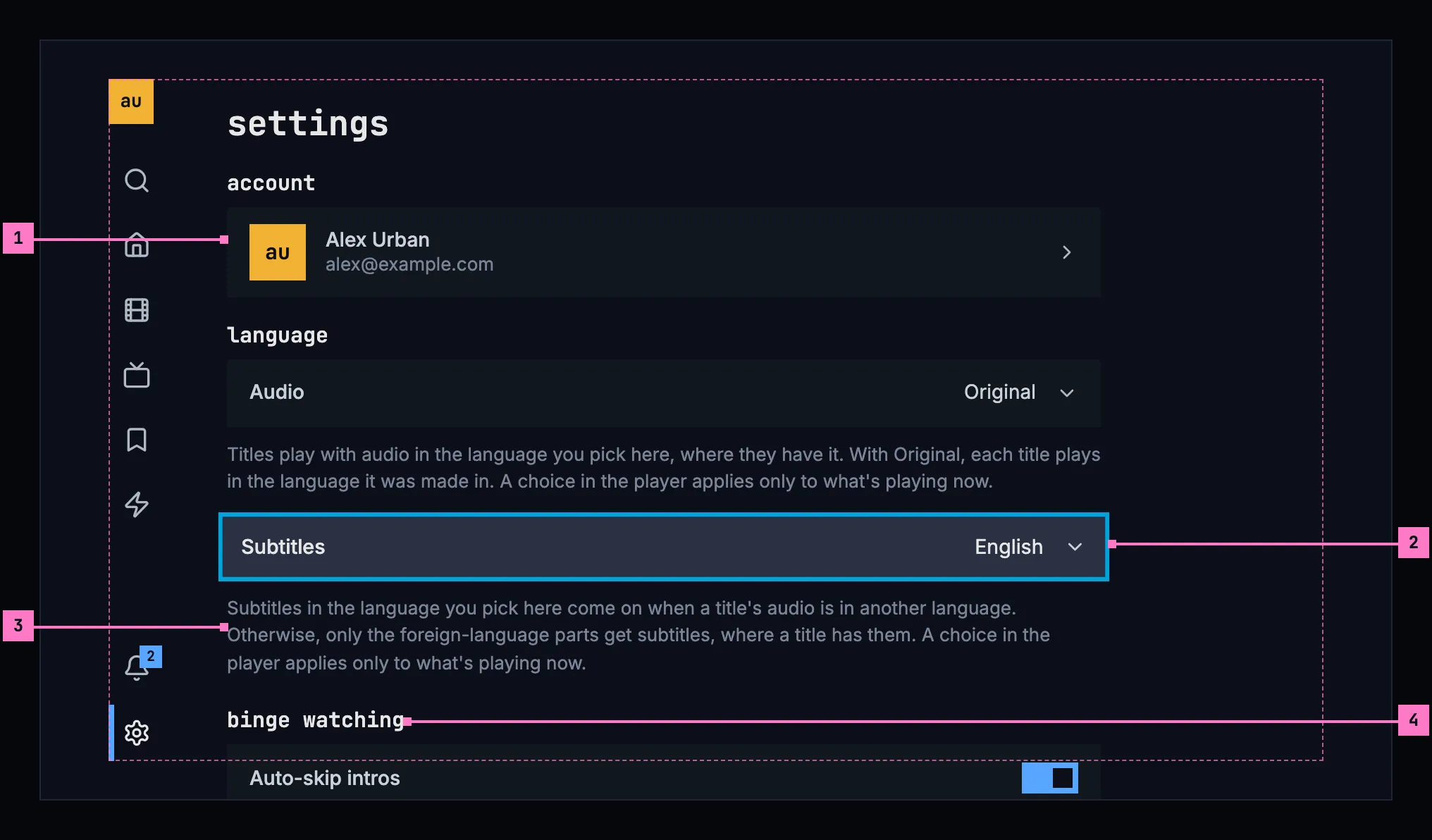
Figure 16.11: Settings on a TV, at 960 × 540 dp.
- account: who is signed in. OK opens the account page (section 16.5.4). A TV has no avatar's menu, so this row is its way to the account.
- A row with a language shows what is set. OK opens its menu of one choice over the page, in the look of the player's menus, with the setting's language focused; picking one closes it, and so does Back.
- The text under the row, as on a computer.
- binge watching and the groups after it follow below. The page scrolls as the focus goes down, and OK flips a switch.
A TV has no downloads: server, feedback and about follow binge watching, as on a phone.
16.4 What settings holds
Section titled “16.4 What settings holds”16.4.1 Language
Section titled “16.4.1 Language”Two settings, one for the audio and one for the subtitles. Each has a text under it that is the same in every app.
Audio offers “Original”, then every language by name, as no server names the languages of its audio. With “Original”, each title plays in the language it was made in. Its text, from chapter 11:
Titles play with audio in the language you pick here, where they have it. With Original, each title plays in the language it was made in. A choice in the player applies only to what's playing now.
Subtitles offers “off”, then the server's subtitle languages, read from its configuration; a server that names none offers every language by name. Its text, from chapter 12:
Subtitles in the language you pick here come on when a title's audio is in another language. Otherwise, only the foreign-language parts get subtitles, where a title has them. A choice in the player applies only to what's playing now.
Where every language is offered, the person's own come first: the one set, and the language of the device or the browser. All the others follow in alphabetical order. Each language has the name the player's menus give it, “German”, “Chinese (Simplified)”, and a language set before that the list no longer has stays in it, so the setting always shows what is set.
While the server's subtitle languages load, the subtitles field is a grey block; when they couldn't load, the reason and try again take its place (figure 16.21).
16.4.2 Binge watching
Section titled “16.4.2 Binge watching”| Setting | The line under it | At first |
|---|---|---|
| Auto-skip intros | Skips the intro and the recap on every episode after the first one you watch in a row. | on |
| Auto-play next episode | Starts the next episode when the credits roll. Off, the up next card waits until you play it. | on |
| Countdown | Seconds the player counts down before it skips the intro or the recap, or starts the next episode. | 3 seconds, from 1 to 15 |
What the player skips, its countdown and its up next card are specified in chapter 11. An episode that starts with its intro and was opened from the one before starts past it at once, without a countdown, while Auto-skip intros is on.
16.4.3 Downloads
Section titled “16.4.3 Downloads”On a phone, settings hold the download quality and Download over Wi-Fi only, as chapter 13 specifies; figure 16.9 shows them. The group shows only where the phone keeps downloads and the server offers them.
16.4.4 Server
Section titled “16.4.4 Server”The phone and TV apps say which server they are connected to: “Connected to media.example.com.” change server opens the screen of chapter 3 headed change server, with the address of the server connected now in its field, and cancel. Once the new server has answered, the app asks first where something would be lost (section 16.5.5), then signs every account on the device out and opens sign in on the new server. The web has no server group: it belongs to the server it comes from.
16.4.5 Report a bug
Section titled “16.4.5 Report a bug”The group feedback shows only when the server takes reports, which its configuration says. Without it, the group isn't there at all, so the app never offers a report that goes nowhere. Its text says who receives the reports and what goes with them: “Reports go to the people who run this server, with details of the app and the device. Crashes and playback failures are reported on their own.”
report a bug opens the dialog of figure 16.12.
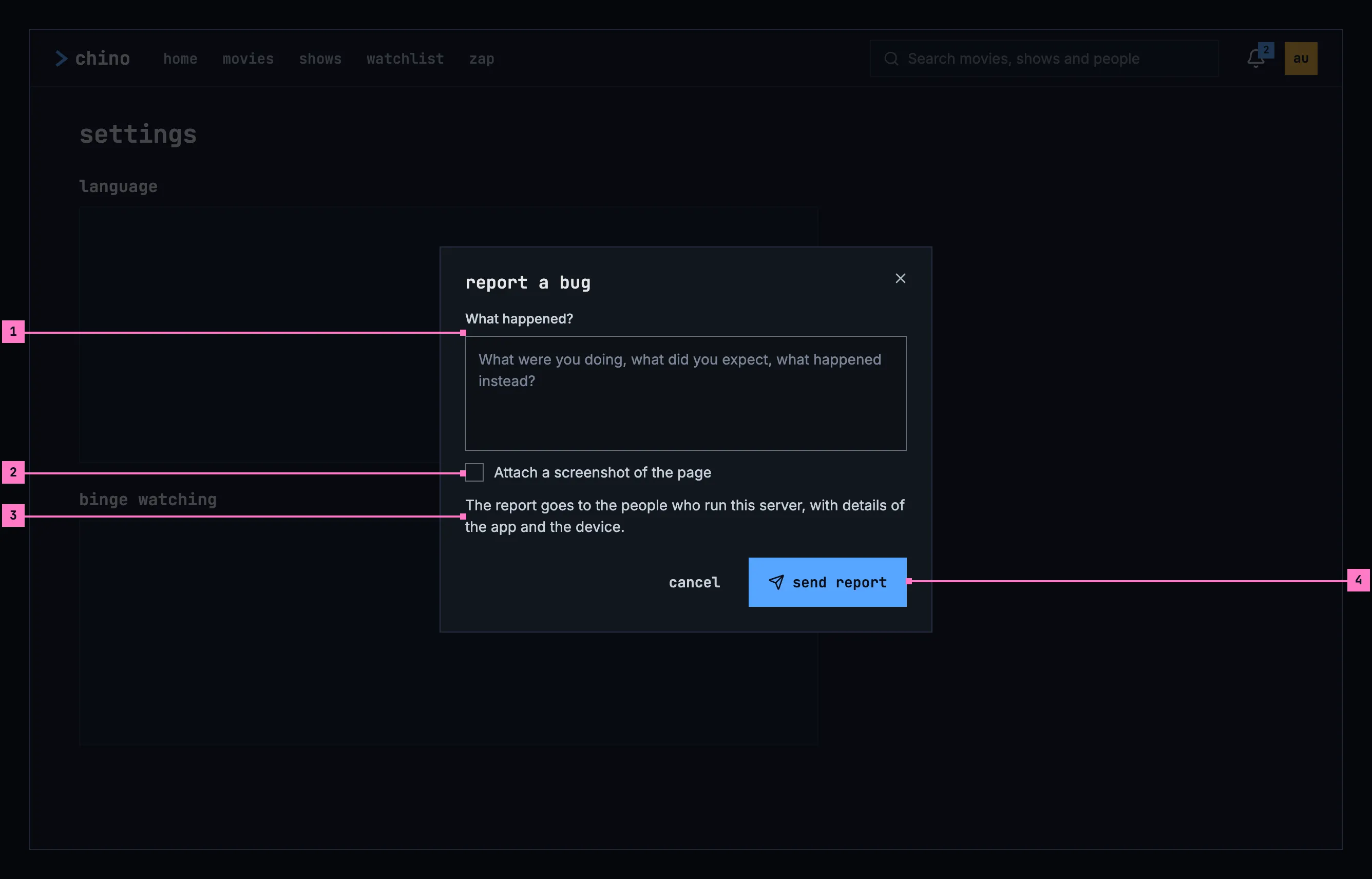
Figure 16.12: Report a bug, on a computer.
- What happened? holds the person's own words, and the report needs them: sent without any, the field says “Describe what happened to send the report.” It opens empty.
- Attach a screenshot of the page is off until it is ticked, and only the tick takes the screenshot: of the screen under the dialog, without the dialog. A small preview then shows under the box, with retake. On a phone it says “Attach a screenshot of the screen”.
- Who receives the report, and what goes with it.
- send report is busy while the report goes, and then the dialog says it went (figure 16.23).
When the report couldn't be sent, an error banner over the buttons says why, by cause, and the words stay: “Couldn't send the report. Can't reach the server.” A server that has stopped taking reports since says “Bug reporting is switched off on this server, so this report can't be sent.”
The same dialog opens from the player when a title won't play (chapter 17). What the player knows of the failure is then under details in the dialog: it goes with the report, but never into the box the person types in.
On a TV, typing with a remote is slow, so the dialog asks for no words. Under its heading, “What's going wrong? Pick the closest match.”, it lists playback won't start, video stutters or freezes, audio out of sync, subtitles wrong or missing, the app is slow and something else; OK on one sends the report, with that as its title.
16.4.6 About
Section titled “16.4.6 About”about holds the app's version, so the person can tell the people who run the server which one they have when something goes wrong.
16.5 The account
Section titled “16.5 The account”The account page says who is signed in, holds what ends a sign-in, and lists what the person has watched. On a computer and a phone, account in the avatar's menu opens it; on a TV, the first row of settings.
16.5.1 On a computer
Section titled “16.5.1 On a computer”Figure 16.13 shows the account page on a computer.
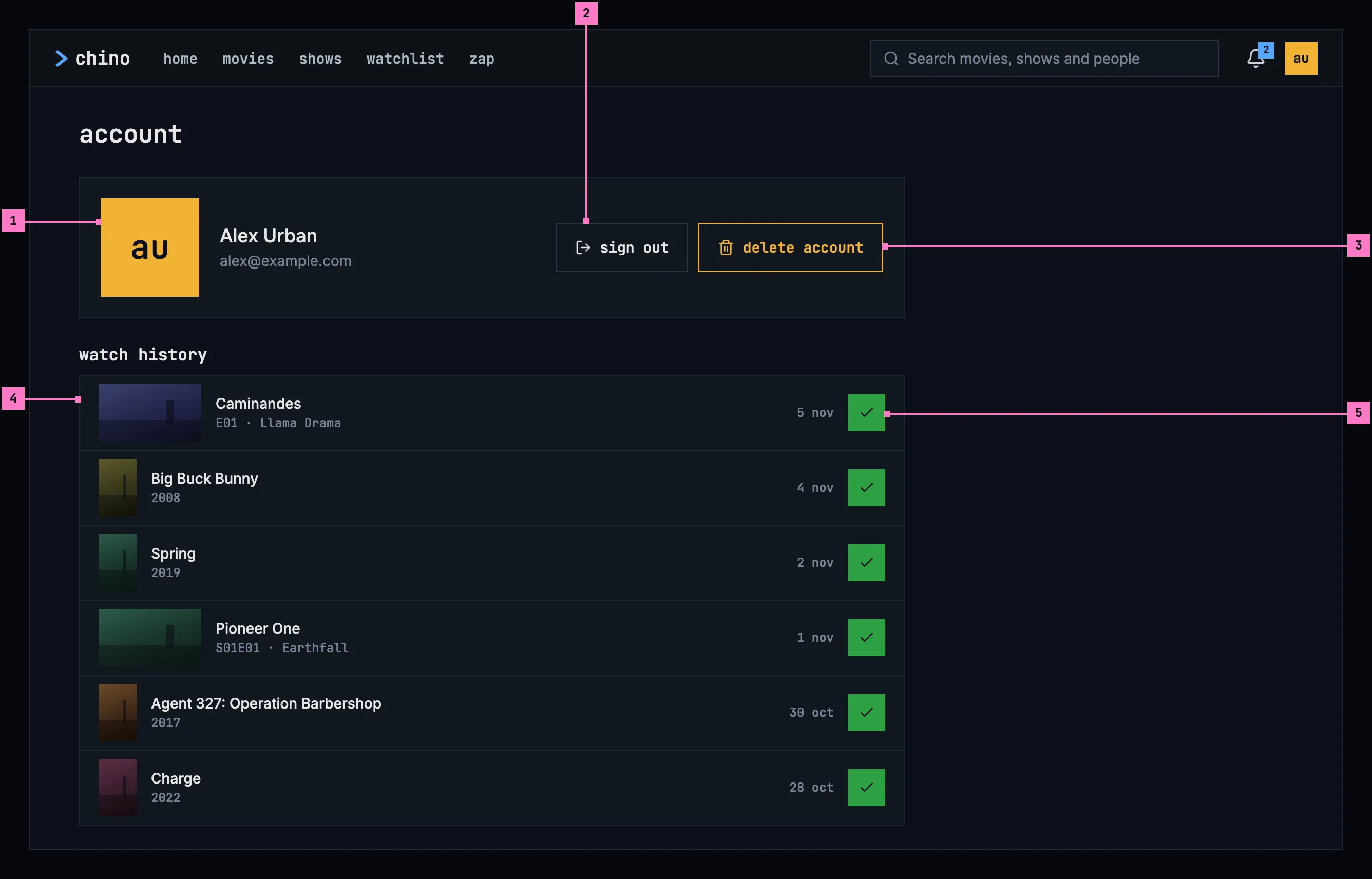
Figure 16.13: The account, on a computer, at 1280 × 800.
- Who is signed in: the avatar (chapter 3), the name and the email address, as the server's sign-in gives them.
- sign out signs out of this server (section 16.5.5). On the web it also ends the sign-in on the server's sign-in page, where the web then goes.
- delete account is the design system's amber-outline danger button, as it deletes what can't be brought back (section 16.5.6).
- watch history: what the person has finished, newest first, up to 60 titles. A movie shows its year, an episode its show, its code and its name, and each row the day it was finished. A row opens the title page (chapter 6).
- The watched mark, the title actions' dark check on green (chapter 6), takes a title off the history: it marks it as not watched, and the row goes.
16.5.2 On a phone held upright
Section titled “16.5.2 On a phone held upright”Figure 16.14 shows the account page on a phone. It has the parts of figure 16.13; the numbers mark what differs.
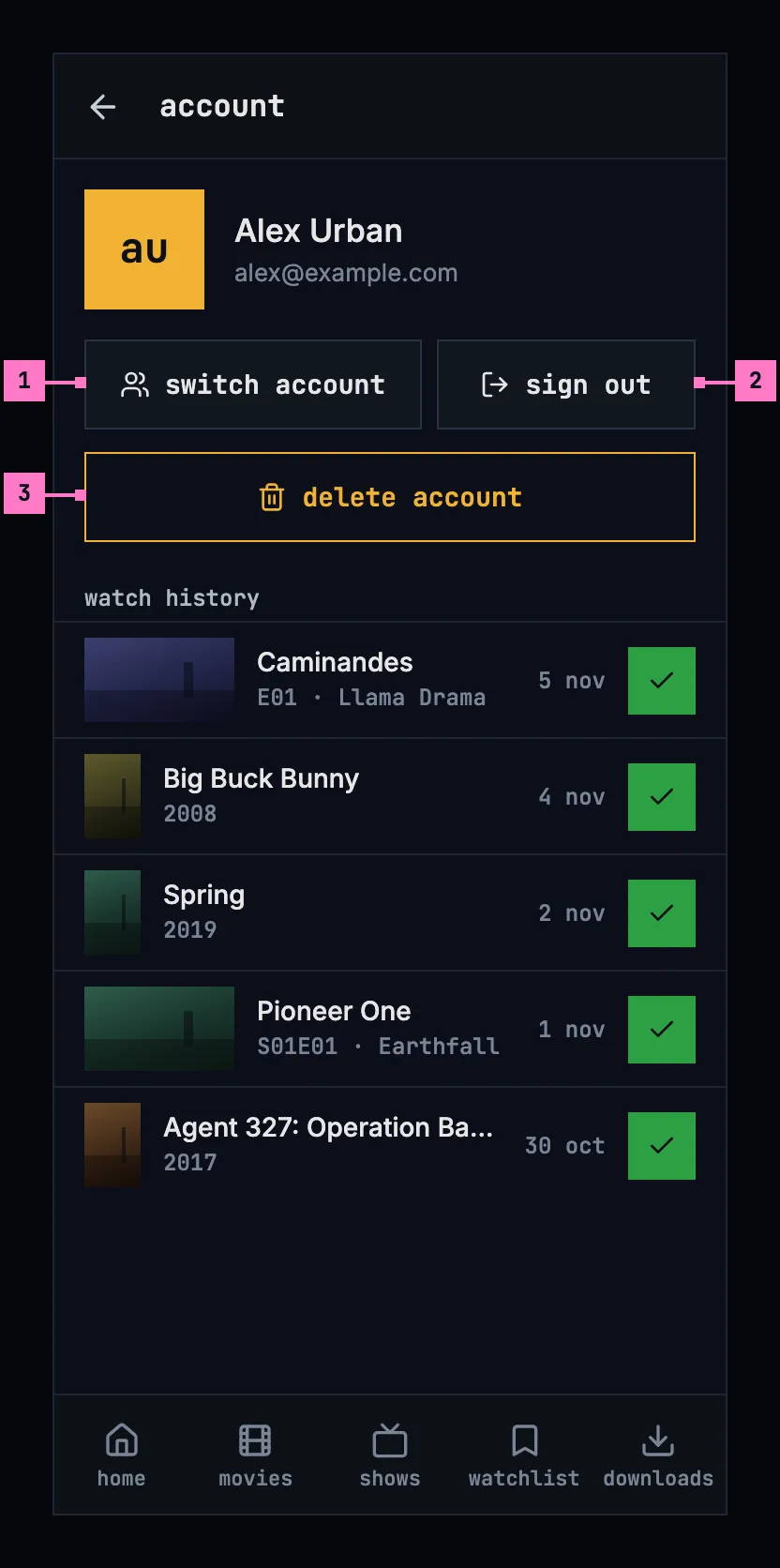
Figure 16.14: The account, on a phone held upright, at 360 × 780 dp.
- switch account opens who's watching (chapter 3), where the phone's other accounts are and another one is added.
- sign out, as on a computer, except that on a phone it asks first when downloads would go (section 16.5.5).
- delete account, across the width.
16.5.3 On a phone held sideways
Section titled “16.5.3 On a phone held sideways”Figure 16.15 shows the account page on a phone held sideways. It has the parts of figure 16.14; the numbers mark what differs.
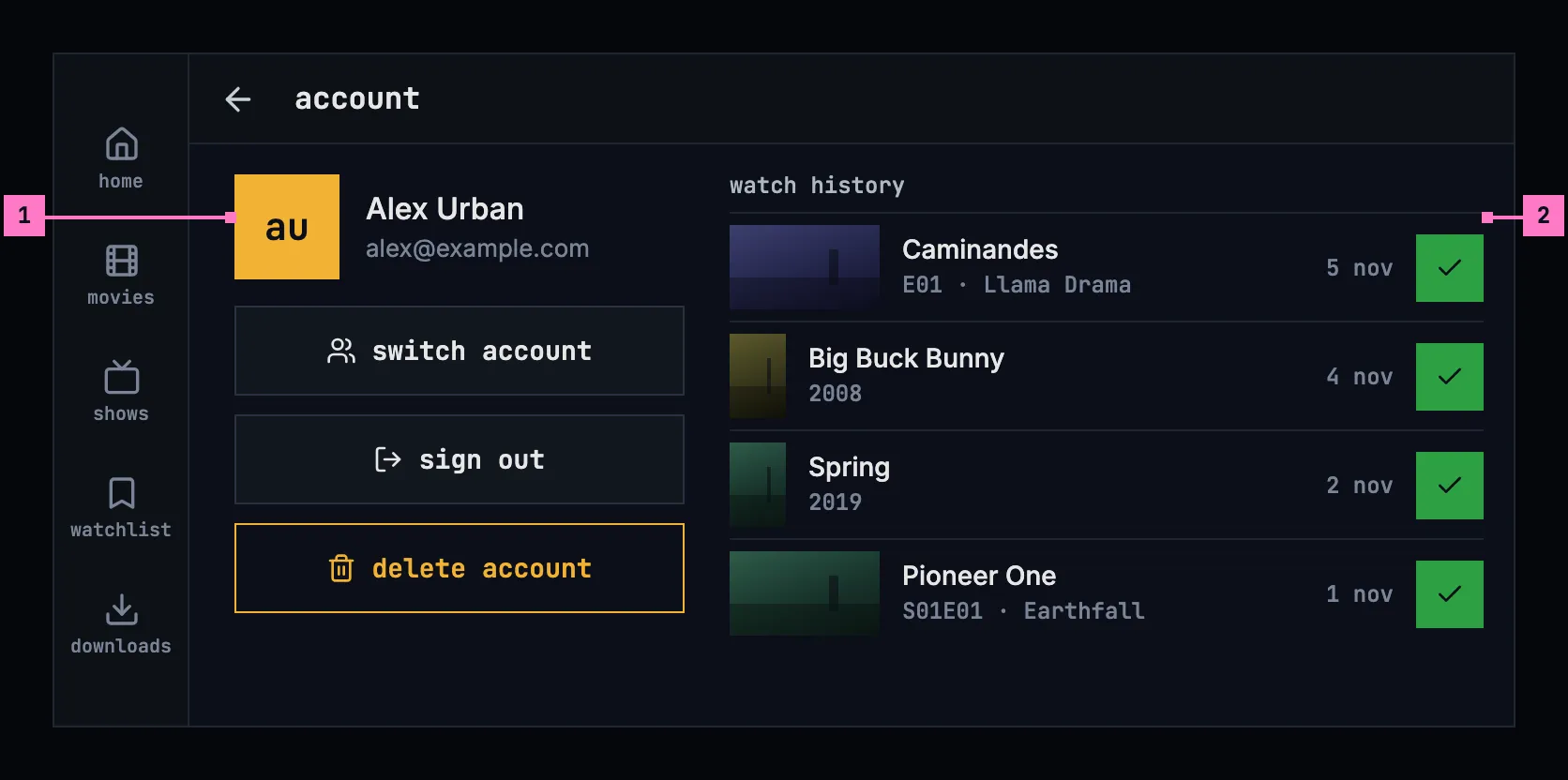
Figure 16.15: The account, on a phone held sideways, at 780 × 360 dp.
- Who is signed in and the account's buttons, switch account, sign out and delete account, one under the other in a column of their own at the left.
- watch history takes the rest of the width beside them, and scrolls while the account's column stays.
16.5.4 On a TV
Section titled “16.5.4 On a TV”Figure 16.16 shows the account page on a TV, opened from settings.
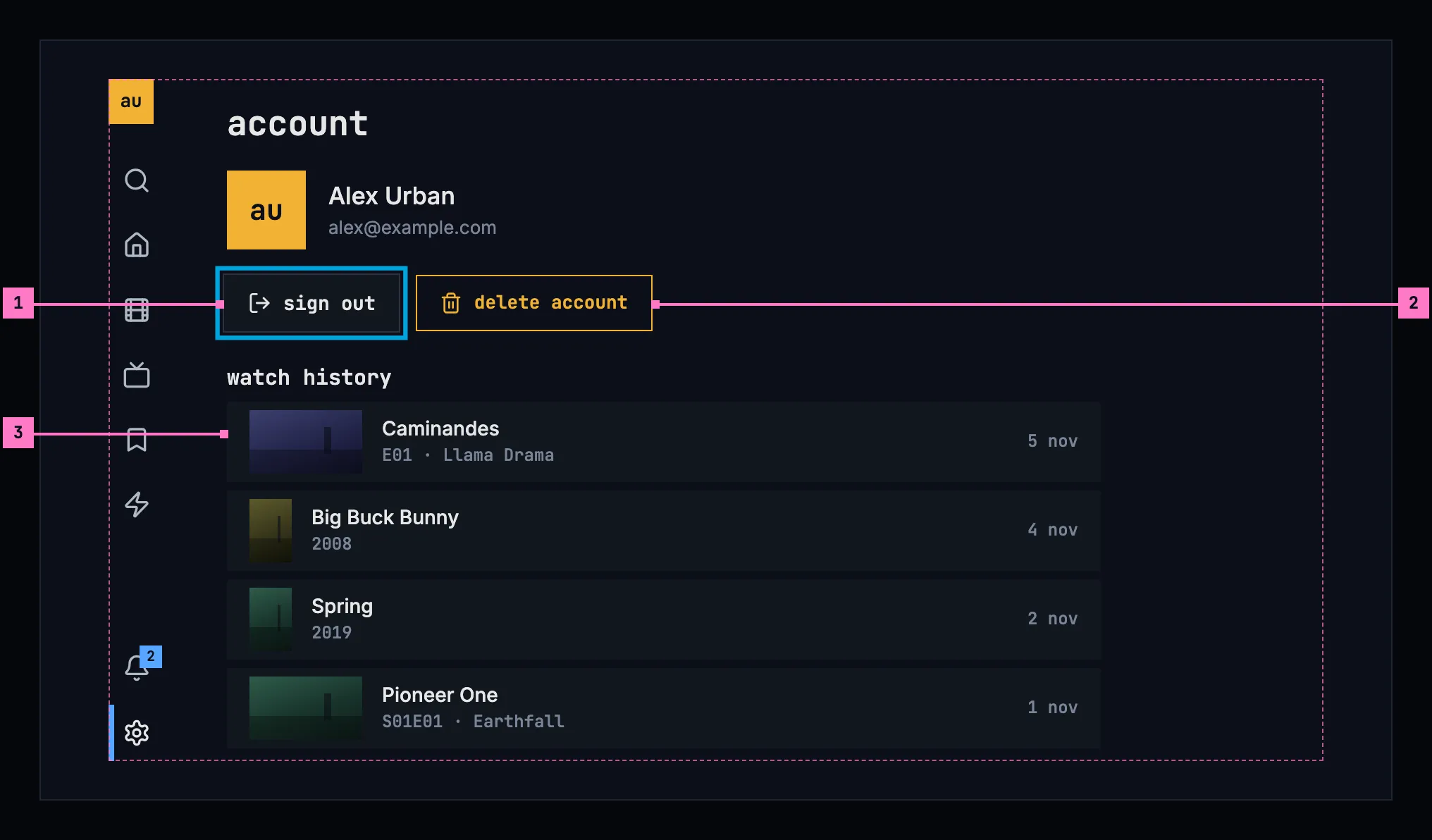
Figure 16.16: The account, on a TV, at 960 × 540 dp.
- sign out has the focus when the page opens.
- delete account, right of it.
- The rows of the history take the focus one by one, and OK opens the title page. On a TV, a title leaves the history on its title page, where its watched mark is (chapter 6).
On a TV, the avatar at the top of the rail opens who's watching (chapter 2), so the page has no switch account.
16.5.5 Sign out, remove account and change server
Section titled “16.5.5 Sign out, remove account and change server”Three actions take accounts off a device. sign out takes the account signed in now; remove account, on who's watching, any account on a phone or a TV (chapter 3); change server every account. On a phone or a TV, signing out removes the account from the device just as remove account does, and signing in again brings it back.
What signing in again doesn't bring back is lost: downloads, a cast that is running, and the sign-in of another person's account. So each action asks first when it would lose one of them. The dialog's title is the action, its sentence says what is lost, and its confirming button repeats the title as the amber-outline danger button, with cancel before it, as the design system's modal has it.
| Action | Asks first when | Its sentence |
|---|---|---|
| sign out | it deletes downloads, or stops a cast | “Your 23 downloads, 12.4 GB, are deleted from this phone.” |
| remove account | always, as the account may be someone else's | “The 8 downloads of Anna, 2.6 GB, are deleted from this phone.”; without downloads, “This removes Anna from this phone. Signing in again brings the account back.” |
| change server | it deletes downloads, stops a cast, or signs out another account than the one signed in now | “All 3 accounts on this phone are signed out, and their 31 downloads, 15 GB, are deleted.”; on a TV, “All 3 accounts on this TV are signed out.” |
The downloads are counted as chapter 13 counts them, one download in the singular: “Your download, 281 MB, is deleted from this phone.” While a cast is running, the sentence adds “Casting on Living Room TV stops.” (chapter 14). On a tablet, the sentences say “tablet”.
Figure 16.17 shows the question before a sign-out on a phone.
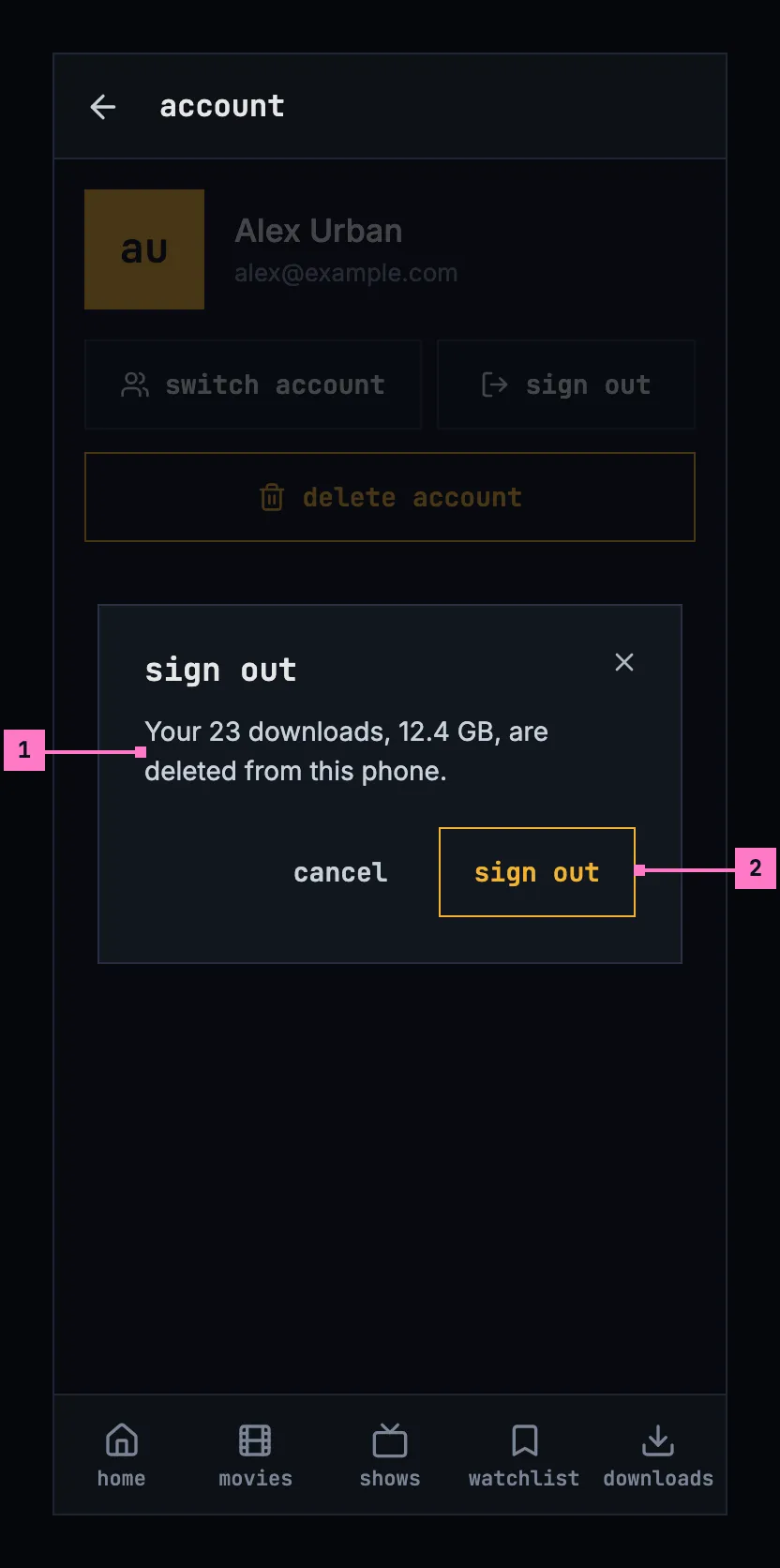
Figure 16.17: Sign out, on a phone.
- What is lost: the account's downloads on this phone.
- sign out, the danger button, repeats the title. While it runs it is busy and the dialog stays: a cast stops first, with its position written for the account.
After a sign-out, the app opens who's watching when other accounts remain on the device, and sign in when none does (chapter 3). The web goes to the server's sign-in page.
Figure 16.18 shows the question before an account is removed on a TV.
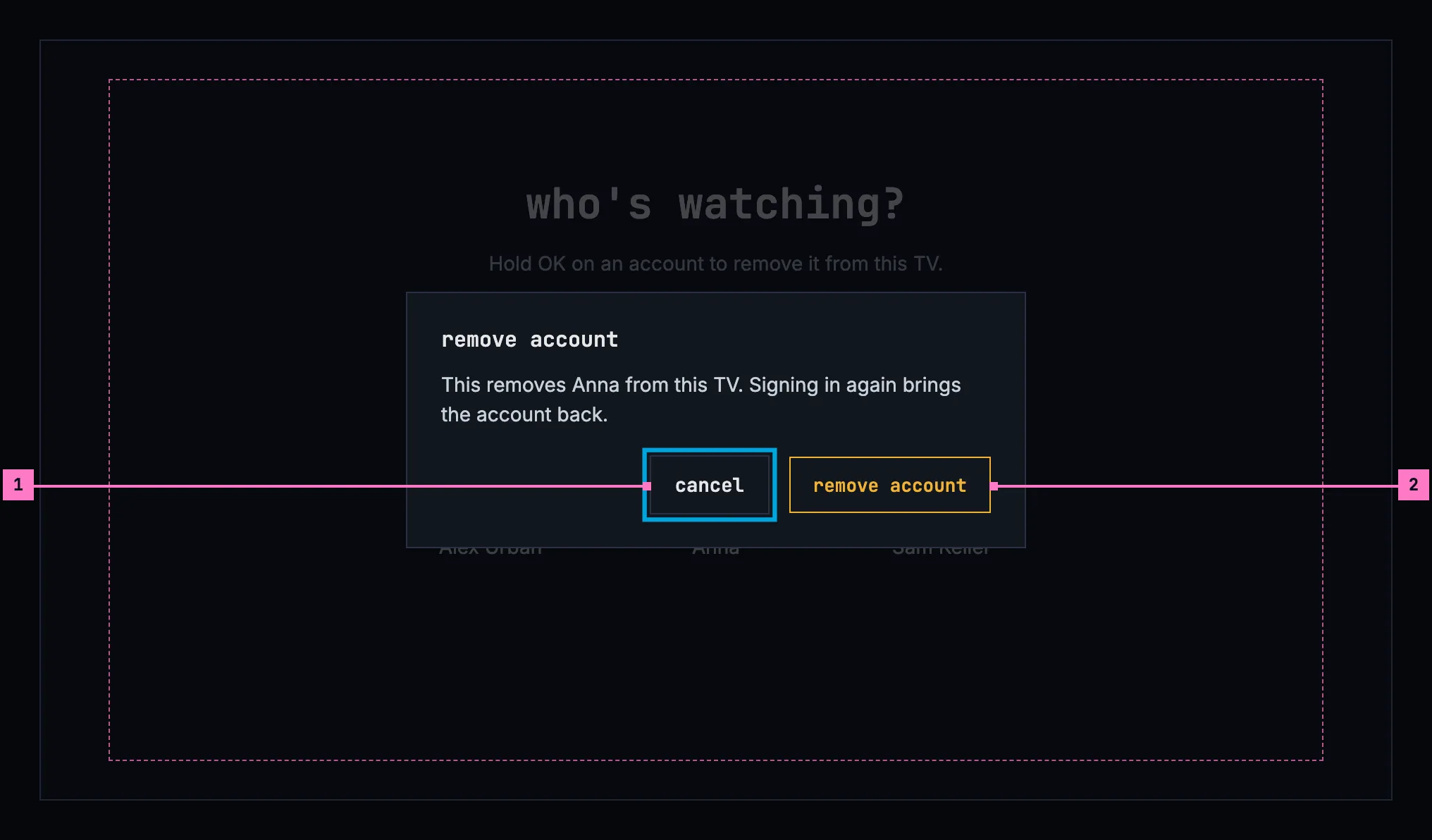
Figure 16.18: Remove account, on a TV.
- The focus starts on cancel, so a stray OK keeps the account.
- remove account takes the account off who's watching at once.
Figure 16.19 shows the question before a change of server on a phone.
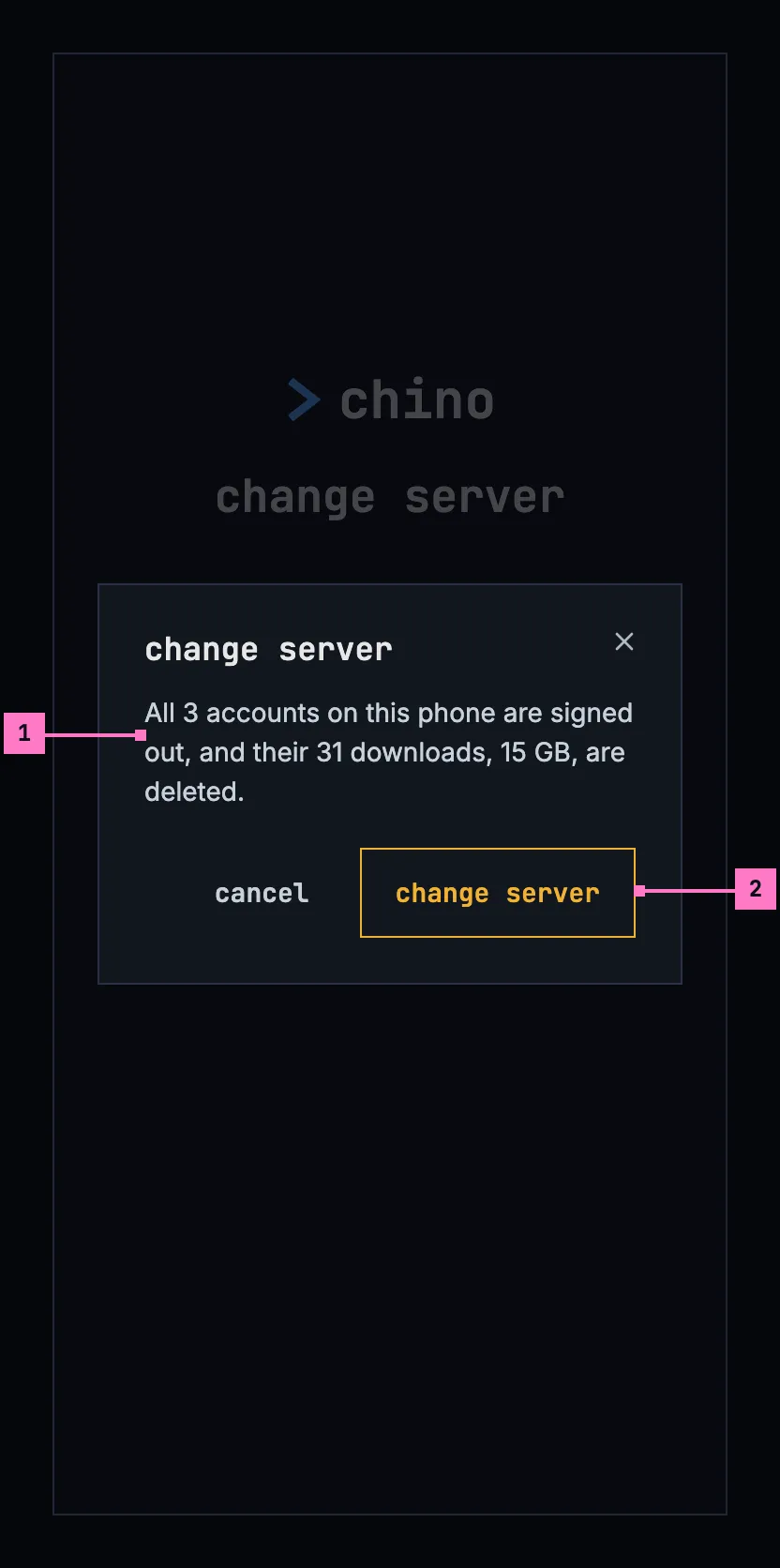
Figure 16.19: Change server, on a phone.
- It is asked once the new server has answered, so a mistyped address changes nothing. What goes is every account on this phone and their downloads.
- change server signs them out, deletes the downloads, and opens sign in on the new server.
16.5.6 Delete account
Section titled “16.5.6 Delete account”delete account deletes the account on the server: the person's watch progress, lists, likes and watch history there, and the sign-in itself. It can't be undone, so it always asks first, in the dialog of figure 16.20.
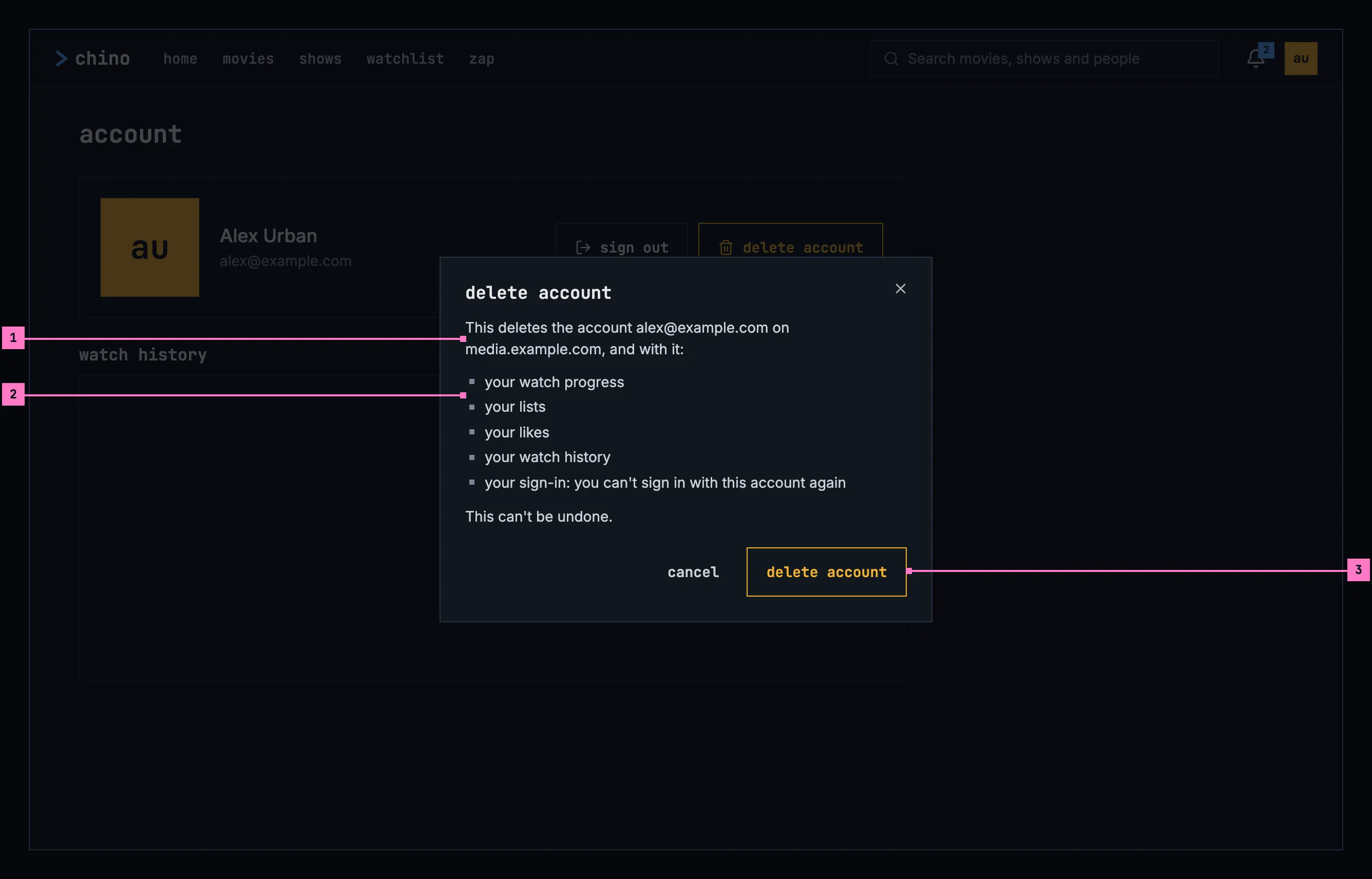
Figure 16.20: Delete account, on a computer.
- The account and the server, by name, so nobody deletes the wrong one.
- What goes, one line each.
- delete account, the danger button, repeats the title, and is busy while the server deletes.
On a phone with downloads, the dialog adds “Your 23 downloads, 12.4 GB, are deleted from this phone.” before “This can't be undone.” On a TV it is a dialog too, and the focus starts on cancel. The server's answer decides what follows:
| The server | The dialog |
|---|---|
| Deleted the account | It closes, and the account is signed out. The web says so on a screen of its own, “account deleted”, with sign in; the phone and TV apps open who's watching or sign in, with the toast “Account deleted”. |
| Refused, with its reason | The reason in an error banner. delete account goes, and cancel becomes close. |
| Doesn't delete accounts from the apps | Figure 16.22, with close. |
| Didn't answer, or failed | “Couldn't delete the account, so nothing was deleted.” and the reason in an error banner, with delete account to try again. |
16.6 Turning the phone
Section titled “16.6 Turning the phone”Settings and the account turn with the phone and keep the person's place: the page scrolled to the same group, a language menu that was open still open, a question still asked. Upright, the groups are one column and the account's buttons stand under its name; sideways, the groups go in two columns and the account's buttons stand beside its history (figures 16.10 and 16.15).
16.7 Changes
Section titled “16.7 Changes”Every difference between section 16.2 and the target is one change in the table. A change names the apps it is built in, what they do today and the target, with the figure or the section that sets it out; it is built as its row says, and nothing else changes with it. Each change starts as proposed; once the owner approves it, it is built, one change at a time. A target that starts with “Recommended” was an open decision, or takes away something an app has today. Where settings and the account open from belongs to chapter 2 (2.C1 to 2.C5), and what the player does with the binge watching settings to chapter 11.
| No. | Change | Apps | Today | Target | Status |
|---|---|---|---|---|---|
| 16.C1 | The groups, their order and their headings | Web, Phone app, Android TV, Samsung TV | Web: binge watching, audio, subtitles, feedback, then reset to defaults, the first three with a line under the heading. Phone app: Account, Binge watching, Downloads, Server, Support, Audio, Subtitles, in mixed case. Android TV: binge watching, audio, subtitles, account, server, feedback, each with a line under its controls. Samsung TV: Binge watching, Audio, Subtitles, Account, Server, Feedback, in mixed case, each with a line | figures 16.7 to 16.11: language, binge watching, downloads (phone), server (phone and TV), feedback, about, lowercase, without a line of a group's own; on a TV the account row first; on a computer and on a phone held sideways, two columns. The phone app's Account group goes with 16.C12 | proposed |
| 16.C2 | The language settings: their names, texts and menus | Web, Android TV, Samsung TV | Web: the groups audio and subtitles, their texts above the cards, each field named “Preferred language”, the browser's own list; a server's few subtitle languages a row of buttons. Android TV: rows named “Language”, their menus headed “audio language” and “subtitle language”. Samsung TV: buttons, each language in its own words, “Deutsch”, “日本語”, and texts of its own, “Default audio language. …” | figures 16.7, 16.8 and 16.11: one group, language, with the fields Audio and Subtitles, each with its text under it (section 16.4.1); a field opens a menu of one choice, the chosen language blue with the small square, on a phone under the field and on a TV over the page | proposed |
| 16.C3 | The languages offered, and their order | Web, Phone app, Samsung TV | Web: Original or off, then every language in alphabetical order. Phone app: Original and eight languages for the audio. Samsung TV: Original or Off and the same eight, for both | section 16.4.1: Original, then the person's own languages, the one set and the device's or the browser's, then every other in alphabetical order, each named as the player's menus name it; for the subtitles off, then the server's subtitle languages, or every language where it names none | proposed |
| 16.C4 | Binge watching: three settings with their lines | Web, Phone app, Android TV, Samsung TV | Web: Auto-skip intros' line without the recap; the countdown a slider, “Countdown before auto-skip”, “3s”, over “Seconds between the countdown appearing and the player skipping.” Phone app: “Auto-skip intros & recaps”, “Auto-skip credits” and “Auto-play next episode”, without lines, and no countdown. Android TV: the same three as on and off buttons with lines of their own, and “Countdown before auto-skip”, 5 s at first. Samsung TV: the same as one ON or OFF button each, the countdown 10 s at first | the table in section 16.4.2: Auto-skip intros and Auto-play next episode as switches, Countdown with − and +, from 1 to 15, 3 s at first, each with its line; no Auto-skip credits. The player's side is chapter 11's (11.C20, 11.C22, 11.C27) | proposed |
| 16.C5 | Downloads: the picked quality | Phone app | the chosen quality's row blue, with a check mark | a radio before each quality, the chosen one filled (figure 16.9); the qualities' words as chapter 13 has them | proposed |
| 16.C6 | The server group | Phone app, Samsung TV | Phone app: a row, “Change server”, with the server's address under it. Samsung TV: “Connected to media.example.com.”, then “Connecting to a different server signs out the accounts on this one.” and Change server | “Connected to media.example.com.” and change server (figure 16.9) | proposed |
| 16.C7 | The feedback group | Web, Phone app, Android TV, Samsung TV | Web: “Reports go to the people who run this server, with a screenshot of the page if you attach one.”, a row “Report a bug” with “Opens a short form. Crashes and playback failures are also reported automatically, without a screenshot.” Phone app: “Support”, a row “Report a bug” with “Tell the people who run this server. The app's and the device's details go with your report.” Android TV: that line, and report a problem. Samsung TV: always there, “Something not working? File a bug straight to the dev backlog — …”, Report a problem | feedback, only where the server takes reports, with “Reports go to the people who run this server, with details of the app and the device. Crashes and playback failures are reported on their own.” and report a bug (figure 16.7, section 16.4.5) | proposed |
| 16.C8 | about, with the version | Web, Phone app, Android TV, Samsung TV | no app shows its version | about, with Version and the app's version (figure 16.7, section 16.4.6) | proposed |
| 16.C9 | Web: no reset to defaults | Web | reset to defaults at the page's end sets every setting back at once, without asking | Recommended: left out, as no other app has it: a setting is set back by hand, and a stray press loses nothing | proposed |
| 16.C10 | Report a bug: the dialog | Web, Phone app | Web: not sent, “Couldn't file the report.” and the reason, or “Bug reporting is switched off on this server, so this report can't be filed.” Phone app: the screenshot taken before the dialog opens and attached until “Include screenshot” is switched off; the box without a label, “What went wrong? What did you expect to happen?”, from the player with its error in it; Cancel and Submit; sent, “Filed bug #482” or “Added to existing bug #482” and “Thanks — the report reached the people who run this server.” | figures 16.12 and 16.23: What happened?, the screenshot off until ticked and taken then, the player's details under details and never in the box, cancel and send report, then “Thanks for the report.” and “It went to the people who run this server as #482.”; not sent, “Couldn't send the report.” and the reason (section 16.4.5) | proposed |
| 16.C11 | Report a bug on a TV | Android TV, Samsung TV | headed “report a problem” (Samsung TV “Report a problem”), the choices in sentence case, “Playback won't start”, “App is slow”; sent, “Filed bug #482”, then “Sent to the people who run this server.” (Android TV) or “Thanks — the report landed on the dev backlog.” (Samsung TV), and Close | report a bug, with “What's going wrong? Pick the closest match.” and the choices of section 16.4.5 in lowercase, playback won't start to something else; sent, the words of figure 16.23 | proposed |
| 16.C12 | The account page on a computer and a phone | Web, Phone app | Web: “Account”, “Sign out” and “Delete Account” capitalised in the body face, Delete Account in a red outline, “Watch history”, dates such as “Oct 25”. Phone app: Sign out beside the name; switch account and delete account only in settings' Account group, with “Your account” and “Sign out” | figures 16.13 and 16.14: account, sign out, on a phone switch account, delete account the amber-outline danger button, watch history, dates such as “5 nov”; settings without an account group | proposed |
| 16.C13 | The account on a TV | Android TV, Samsung TV | Android TV: settings' account group with see your account, switch account and delete account; the account page without buttons; nothing signs out. Samsung TV: settings' Account group with the name, Switch account, Sign out and Delete Account; no account page and no watch history; after a sign-out another account becomes active and settings stays | figures 16.11 and 16.16: the account row first in settings; the account page with sign out, focused, delete account and the watch history; switching from the avatar (chapter 3); after a sign-out, who's watching or sign in (section 16.5.5) | proposed |
| 16.C14 | The questions before an account leaves a device | Phone app, Android TV, Samsung TV | Phone app: remove account without downloads, “This removes Anna from this phone. You'll need to sign in again to use the account.”; change server asked only where downloads go or a cast stops, with “Your 31 downloads, 15 GB, are deleted from this phone.”, and nothing of the other accounts. Android TV: remove account, “You'll need to sign in again to use this account on this TV.”; change server asks nothing. Samsung TV: change server signs every account out at once, before an address is typed, and asks nothing | the table in section 16.5.5: “This removes Anna from this phone. Signing in again brings the account back.”, on a TV with the focus on cancel (figure 16.18); change server from the screen of chapter 3, asked once the new server has answered, where downloads, a cast or another account's sign-in would go (figure 16.19). One change with 13.C5 | proposed |
| 16.C15 | Delete account: one dialog, by name, with nothing to type | Web, Phone app, Android TV, Samsung TV | Web: headed “Delete Account”, the account by its email address “on this server”, “Type DELETE to confirm”, the button filled red. Phone app: only in settings. Android TV, Samsung TV: a screen of its own without the frame, ending in “Press BACK to keep your account.”, the Samsung TV's headed “Delete Account”. The apps: a deleted account goes without a word | figure 16.20: delete account, the account and the server by name, what goes, the amber-outline danger button, nothing to type; on a TV a dialog with the focus on cancel; after a deletion the toast “Account deleted” in the apps (section 16.5.6) | proposed |
| 16.C16 | Delete account's answers | Web, Phone app, Android TV, Samsung TV | each answer under a heading of its own: “Not Deleted” with the server's reason or “This server won't delete your account.”; “Not Available” with “Deleting your account isn't available on this server — ask its administrator.”; “Try Again Later” with the server's message, “Your account couldn't be deleted right now (HTTP 500).”, “The server couldn't be reached.” or “Another account is signed in now. Open Delete Account again.” | the table in section 16.5.6: the reason in an error banner; “This server doesn't delete accounts from the apps. Ask the people who run it.” (figure 16.22); “Couldn't delete the account, so nothing was deleted.” and the reason by cause (chapter 17) | proposed |
| 16.C17 | delete account only where the server deletes accounts | Web, Phone app, Android TV, Samsung TV, the server | delete account is offered on every server; a server says it deletes none only when it is asked to delete one | Recommended: the server says in its configuration whether it deletes accounts, as it says whether it takes reports, and the apps offer delete account only where it does | proposed |
| 16.C18 | The settings' first values | Web, Phone app, Android TV, Samsung TV | until the person picks: Web: audio English, subtitles English. Phone app, Android TV: audio English, subtitles off. Samsung TV: audio Original, subtitles off | Recommended: audio Original, and subtitles in the device's or the browser's language where the server offers it, else off, in every app; so a title made in another language comes with subtitles, and one in the person's language without (section 16.4.1, chapter 12) | proposed |
| 16.C19 | Loading and couldn't load | Web, Phone app, Android TV | Web: the subtitle languages load under the loader with “Loading the subtitle languages…”; the watch history loads under the loader, and one that couldn't load reads as nothing watched; nothing watched is a line without a heading. Phone app: the history under a spinner, and one that couldn't load reads as nothing watched. Android TV: “Loading your account…”, and “Nothing watched yet. Watched items appear here once you finish a movie or episode (or mark one watched on a detail page).” | the table in section 16.8: grey blocks in the shape of what loads; nothing watched yet over “A movie or an episode shows here once you finish it, or mark it as watched.”; “couldn't load your watch history”, the reason and try again | proposed |
16.8 States
Section titled “16.8 States”Settings and the account are drawn in figures 16.7 to 16.20 with everything loaded. Figures 16.21 to 16.23 show the states that matter most.
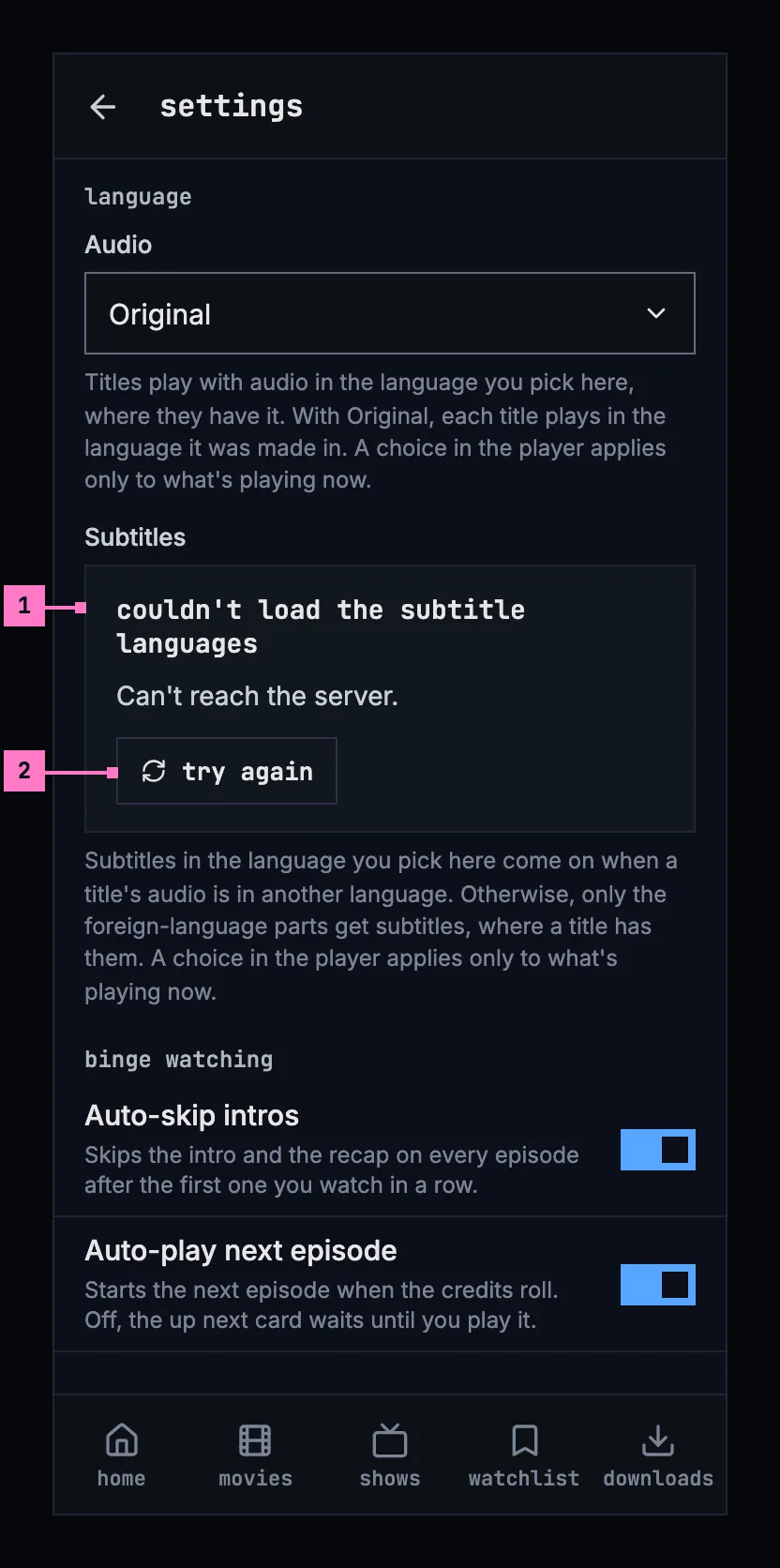
Figure 16.21: The subtitle languages couldn't load, on a phone.
- What couldn't load, and why, in the field's place, by cause (chapter 17). The rest of settings works, as it is kept on the phone.
- try again asks the server again.
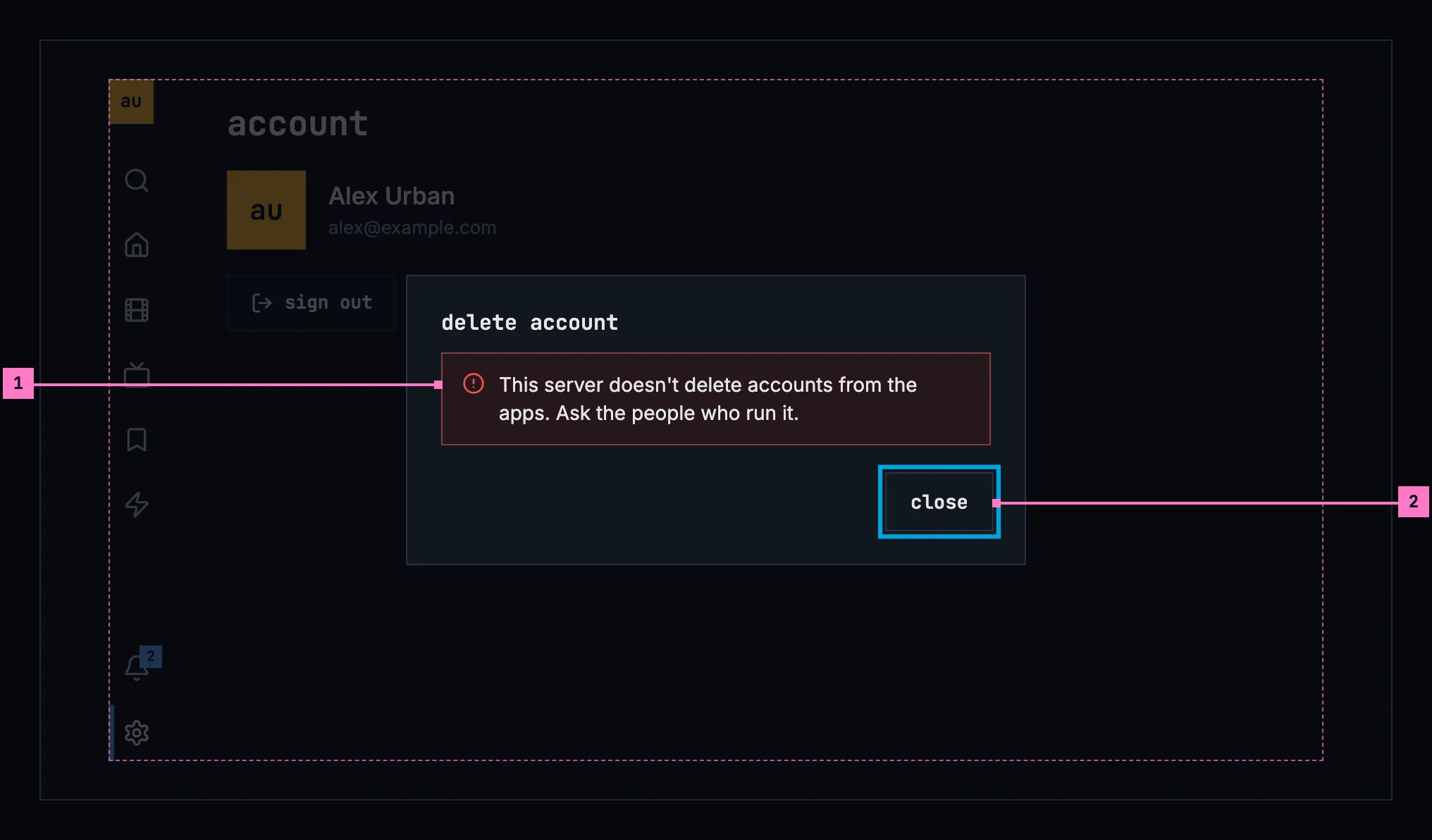
Figure 16.22: The server doesn't delete accounts, on a TV.
- Why the account is still there, in an error banner inside the dialog.
- close has the focus. Asking again would change nothing, so delete account is gone.
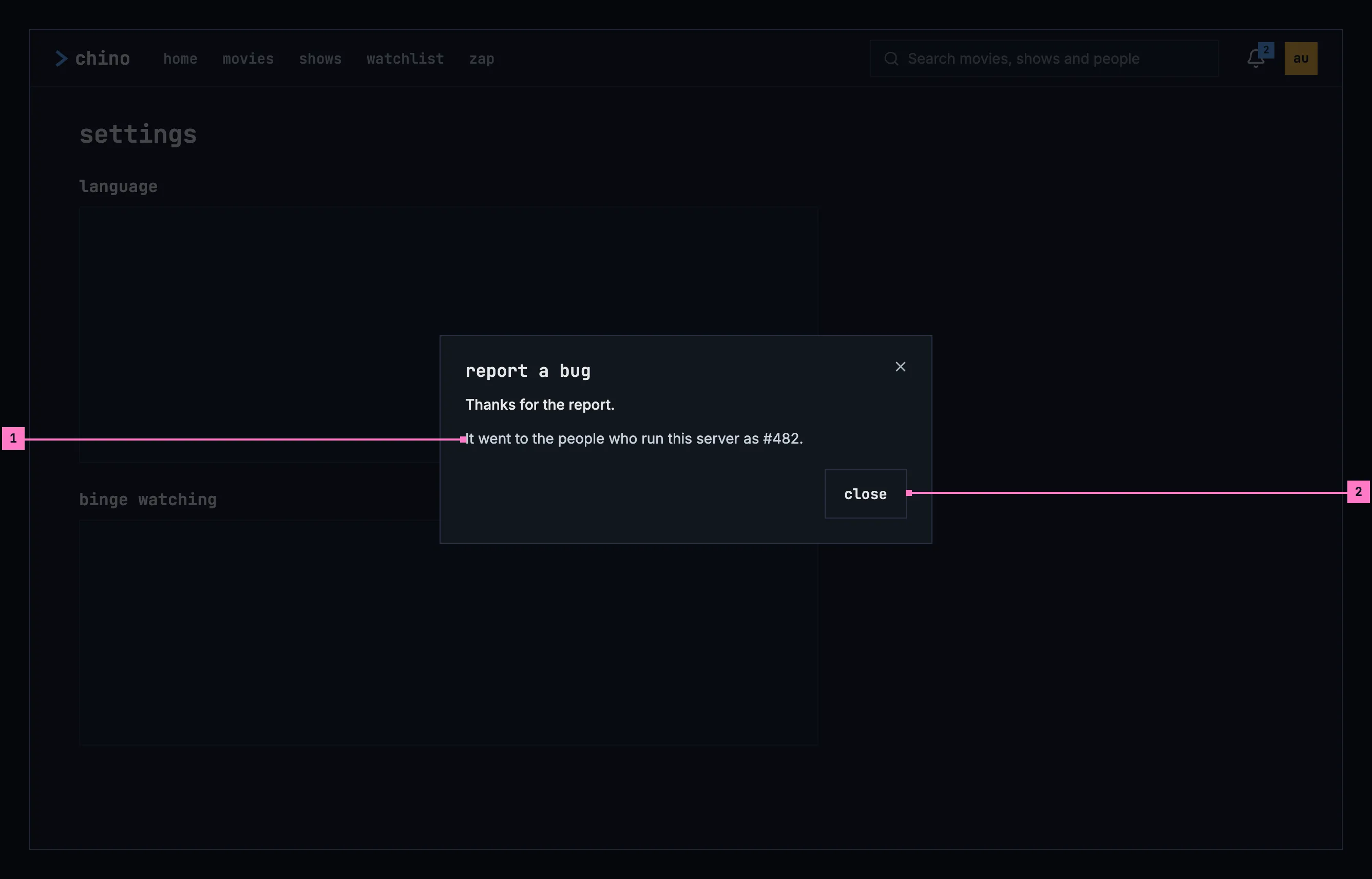
Figure 16.23: The report was sent, on a computer.
- The report's number, as the people who run the server file it. When they already have the same report, the sentence says “The people who run this server already have this one. Your details were added to #482.”
- close closes the dialog.
| State | What the screen shows |
|---|---|
| The subtitle languages load | A grey block in the field's shape |
| They couldn't load | Figure 16.21 |
| The watch history loads | Grey rows in the shape of the history |
| Nothing watched yet | “nothing watched yet”, and “A movie or an episode shows here once you finish it, or mark it as watched.” |
| The watch history couldn't load | “couldn't load your watch history”, the reason and try again |
| A question's action runs | Its danger button is busy, and the dialog stays until it is done |
| A report is being sent | send report is busy |
| The report was sent | Figure 16.23 |
| A report without words | The field's error: “Describe what happened to send the report.” |
| A report couldn't be sent | “Couldn't send the report.” and the reason in an error banner; the words stay |
| The server stopped taking reports | “Bug reporting is switched off on this server, so this report can't be sent.” |
| The account is deleted | Section 16.5.6: “account deleted” on the web, the toast “Account deleted” in the phone and TV apps |
| The server refused to delete it | Its reason in an error banner, and close |
| The server doesn't delete accounts | Figure 16.22 |
| Deleting failed | “Couldn't delete the account, so nothing was deleted.” and the reason, with delete account |
16.9 Words
Section titled “16.9 Words”| Where | Text |
|---|---|
| Settings | settings · account (TV) · language · binge watching · downloads · server · feedback · about |
| Language | Audio · Original · Subtitles · off · the two texts in section 16.4.1 |
| Binge watching | Auto-skip intros · Skips the intro and the recap on every episode after the first one you watch in a row. · Auto-play next episode · Starts the next episode when the credits roll. Off, the up next card waits until you play it. · Countdown · Seconds the player counts down before it skips the intro or the recap, or starts the next episode. · 3 s |
| Downloads | Download quality · Medium (720p) · about 932 MB an hour · Download over Wi-Fi only (chapter 13) |
| Server | Connected to media.example.com. · change server |
| Feedback | Reports go to the people who run this server, with details of the app and the device. Crashes and playback failures are reported on their own. · report a bug |
| About | Version · 0.1.0 |
| The subtitle languages couldn't load | couldn't load the subtitle languages · Can't reach the server. · try again |
| The account | account · switch account · sign out · delete account · watch history · 5 nov |
| An empty history | nothing watched yet · A movie or an episode shows here once you finish it, or mark it as watched. |
| The history couldn't load | couldn't load your watch history · try again |
| Report a bug | report a bug · What happened? · What were you doing, what did you expect, what happened instead? · Attach a screenshot of the page · Attach a screenshot of the screen (phone) · retake · The report goes to the people who run this server, with details of the app and the device. · details · cancel · send report · Describe what happened to send the report. |
| A report sent | Thanks for the report. · It went to the people who run this server as #482. · The people who run this server already have this one. Your details were added to #482. · close |
| A report not sent | Couldn't send the report. · Bug reporting is switched off on this server, so this report can't be sent. |
| Report a bug on a TV | What's going wrong? Pick the closest match. · playback won't start · video stutters or freezes · audio out of sync · subtitles wrong or missing · the app is slow · something else |
| The questions | sign out · remove account · change server · cancel · the sentences in section 16.5.5 · Casting on Living Room TV stops. |
| Delete account | delete account · This deletes the account alex@example.com on media.example.com, and with it: · your watch progress · your lists · your likes · your watch history · your sign-in: you can't sign in with this account again · This can't be undone. · close |
| Its answers | This server doesn't delete accounts from the apps. Ask the people who run it. · Couldn't delete the account, so nothing was deleted. · Account deleted · account deleted · Your account is deleted, with everything this server kept of you, and you're signed out. · sign in |